
Apeaksoft iPhone Eraser is a professional Windows tool that permanently and irrecoverably deletes all data from your iPhone, iPad, or iPod before selling, trading, or recycling it. Unlike a standard factory reset — which leaves data recoverable by forensic tools — Apeaksoft overwrites your data up to 3 times using military-grade algorithms, making recovery impossible.

Why You Need an iPhone Eraser in 2026
With iPhones holding more personal data than ever — banking apps, health records, passwords, photos, and messages — simply deleting files or doing a factory reset is dangerously insufficient before selling or handing off a device. In 2026, data privacy is critical:
- ⚠️ Factory reset alone does NOT guarantee data is unrecoverable
- 💸 iPhone resale market is booming — millions of used iPhones change hands every year
- 🔒 Identity theft via recovered phone data is a real threat
- ✅ Apeaksoft iPhone Eraser gives you certified, permanent data destruction
Key Features of Apeaksoft iPhone Eraser
- 🔐 Three Security Erasing Levels:
- Low Level — Overwrites data once at high speed. Fast and suitable for minor privacy needs.
- Middle Level — Overwrites data twice for stronger protection. Recommended for most users.
- High Level — Overwrites data three times. Military-grade security for maximum privacy — no recovery possible.
- 🗑️ Comprehensive Data Erasure: Permanently deletes photos, videos, messages, contacts, call logs, browsing history, app data, account info, and all settings — nothing left behind.
- 📱 Universal iOS Device Support: Compatible with iPhone 16, 15, 14, 13, 12, 11, XS, XR, X, iPad Pro, iPad Air, iPad mini, iPod touch, and all iOS versions including iOS 18.
- 🧹 Free Up Storage Space: Clears junk files, app caches, and temporary data to reclaim space on your device.
- 🔒 Locked Device Support: Works with locked iOS devices (device must trust the connected computer).
- ⚡ Easy One-Click Operation: Connect, choose your erase level, and click Start — no technical knowledge required.
- 💻 Windows & Mac Compatible: Available for both Windows PC and Mac.
How to Use Apeaksoft iPhone Eraser (Step-by-Step)
- Download and install Apeaksoft iPhone Eraser on your Windows PC or Mac (download link below)
- Connect your iPhone/iPad to your computer via USB cable
- Trust the computer on your iPhone when prompted (unlock device first if locked)
- The software will detect your device automatically
- Select an erasing level: Low, Middle, or High based on your security needs
- Type “delete” in the confirmation box to proceed
- Click “Start” — the app will permanently erase everything on your device
- Once done, your iPhone is clean and ready to sell or recycle safely

Apeaksoft iPhone Eraser vs. Other iPhone Data Erasers (2026)
| Tool | Erase Levels | iOS 18 Support | Windows | Price |
|---|---|---|---|---|
| Apeaksoft iPhone Eraser | 3 Levels | ✅ | ✅ | Free (Giveaway) |
| iMyFone Umate Pro | 3 Levels | ✅ | ✅ | Paid ($19.95+) |
| Stellar Eraser for iPhone | 1 Level | ✅ | ✅ | Paid ($29.99+) |
| Dr.Fone Data Eraser | Multiple | ✅ | ✅ | Paid ($39.95+) |
| Apple Factory Reset | 1 (basic) | ✅ | ❌ | Free (recoverable!) |
🎁 Get Apeaksoft iPhone Eraser FREE — 1-Year License Giveaway
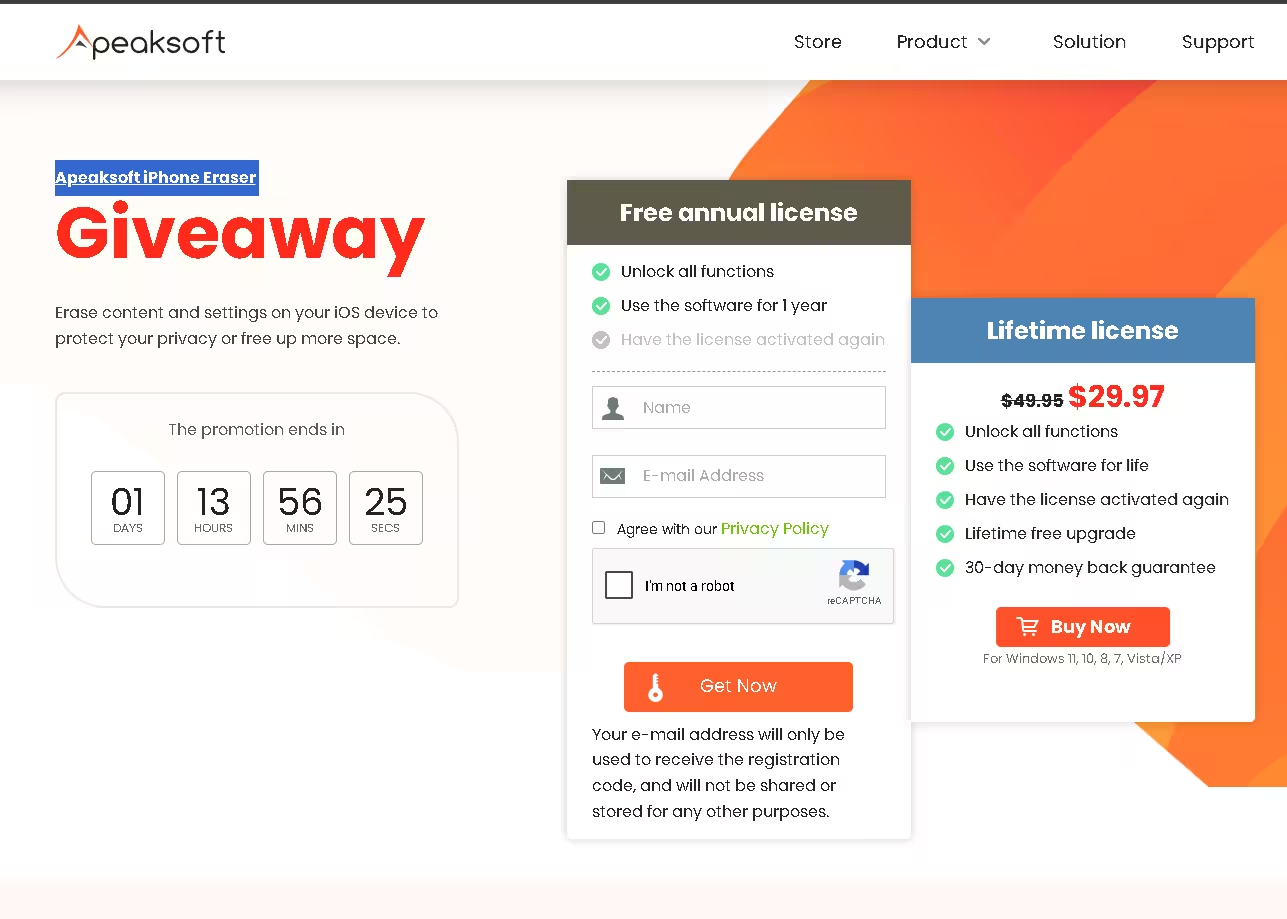
Apeaksoft is offering a free 1-year license via a limited-time giveaway. Follow the steps below to grab your free copy before the offer ends!
🔑 How to Get Your Free License — Step by Step
- Visit the official giveaway page: Apeaksoft iPhone Eraser Giveaway
- Enter your name and email address, agree to the privacy policy, and complete the reCAPTCHA
- Click the “Get Now” button
- Check your inbox for an email from registration@apeaksoft.com with your license code
- Download the software: Download Apeaksoft iPhone Eraser (.exe)
- Install and launch the app — click “Register” in the activation window
- Enter your email and the received license/registration code, then click “Register”
⚠️ Note: This giveaway is time-limited. Grab your free license while it lasts! The retail price is $14.95/month or $19.96 one-time.
Supported Devices & Compatibility
- iPhone: iPhone 16, 15, 14, 14 Plus, 13, 12, 11, XS Max, XS, XR, X, 8, 7, 6s, 6, SE, and earlier
- iPad: iPad Pro (all generations), iPad Air, iPad mini 6, iPad 9/10, iPad 2020/2019
- iPod: iPod touch (all generations)
- iOS: iOS 8 through iOS 18 (latest)
- PC OS: Windows 11, 10, 8.1, 8, 7, Vista (32-bit & 64-bit); macOS 10.9 and above
Frequently Asked Questions (FAQ)
Is Apeaksoft iPhone Eraser safe?
Yes. Apeaksoft is a reputable software developer with positive reviews on G2 and SourceForge. The software does not collect your data and works entirely offline after installation.
Will erasing my iPhone with this tool void the warranty?
No. Using Apeaksoft iPhone Eraser simply deletes data — it does not modify the iOS system, hardware, or warranty conditions.
Can deleted data be recovered after using High Level erase?
No. The High Level erasing overwrites storage three times with dummy data. Even professional data recovery software cannot recover data after this process.
Does it work with iOS 18?
Yes. Apeaksoft iPhone Eraser supports all iOS versions including the latest iOS 18 and iPhone 16 series.
Is the giveaway license permanent?
The giveaway provides a 1-year license. After expiry, you can renew at the official store. The retail price is $14.95/month or $19.96 for a one-time license.
Do I need iTunes installed?
Yes. iTunes (or Apple Devices app on Windows 11) must be installed on your PC for the software to detect your iPhone.
Final Verdict
If you are selling, gifting, or recycling your iPhone in 2026, Apeaksoft iPhone Eraser is a must-have tool. A standard factory reset simply is not enough to protect your personal data from being recovered. With three levels of military-grade data overwriting and support for all iPhones including the iPhone 16 and iOS 18, this tool provides complete peace of mind.
The current free 1-year license giveaway makes this a zero-risk opportunity — grab it before it expires!


Discover more from Techno360
Subscribe to get the latest posts sent to your email.
You must be logged in to post a comment.