
🎁 ASCOMP giveaway · Windows 11, 10, 8 & 7
Slow PC, full drive? Get Cleaning Suite Professional 4.021 free, for keeps
ASCOMP is giving away lifetime licences of Cleaning Suite Professional, normally $19.90. It bundles six cleaners in one window (startup manager, uninstaller, junk-file cleaner, registry cleaner, recycle-bin tools and RAM cleaner). Below: the giveaway link, the six activation steps with fresh screenshots, and what “30 days of updates” really means.
⚡ Quick Read
- What: ASCOMP Cleaning Suite Professional 4.021, an all-in-one Windows PC cleaner and optimiser.
- Value: $19.90 for a private licence.
- Licence: Professional Edition, private (home) use, unlimited validity, unlocked with your 10-digit ASCOMP customer ID.
- Updates & support: 30 days from registration. After that, version 4.021 keeps working; ASCOMP offers a paid extension.
- Download: csuiteW.exe, about 7.7 MB, from your ASCOMP customer menu.
- Deadline: No end date published. The offer was working when we tested it on 23 October 2026.
- Catch: Registering signs you up for ASCOMP’s weekly newsletter (you can unsubscribe).
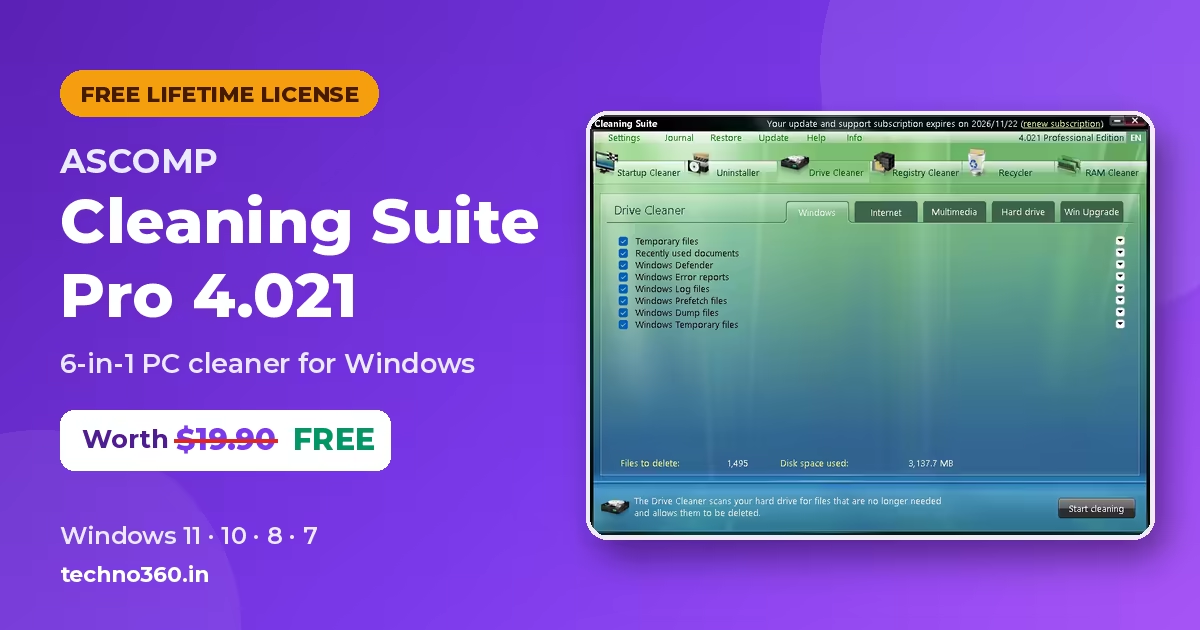
ASCOMP Cleaning Suite Pro free: what the giveaway includes
If Windows takes ages to boot and your C: drive is nearly full, the usual suspects are startup apps nobody needs, leftover programs and gigabytes of temporary files. Cleaning Suite Professional from German developer ASCOMP Software tackles all three from one window, and this giveaway gets you the paid Professional Edition at no cost.
The free Standard Edition of Cleaning Suite is for private use and may show an information window. The Professional Edition you get here has no nag screen and is the edition ASCOMP sells for $19.90.
| Software | ASCOMP Cleaning Suite Professional 4.021 |
|---|---|
| Developer | ASCOMP Software GmbH (Germany) |
| Regular price | $19.90 (private licence) |
| Operating system | Windows 11, 10, 8.1, 8 and 7 (32- and 64-bit); Windows Server 2012–2025 |
| Licence type | Professional Edition, private licence, unlimited validity |
| Updates and support | 30 days from registration |
| Download | csuiteW.exe, about 7.7 MB |
| Activation | 10-digit customer ID, sent by email and shown in your ASCOMP account |
| Giveaway end date | Not announced |
🎁 Get Cleaning Suite Pro free ⬇️ See the 6 claim steps
How to get Cleaning Suite Pro free (step by step)
The whole process takes about five minutes. Use an email address you can open, because the activation link arrives by email.
1. Register on the ASCOMP giveaway page
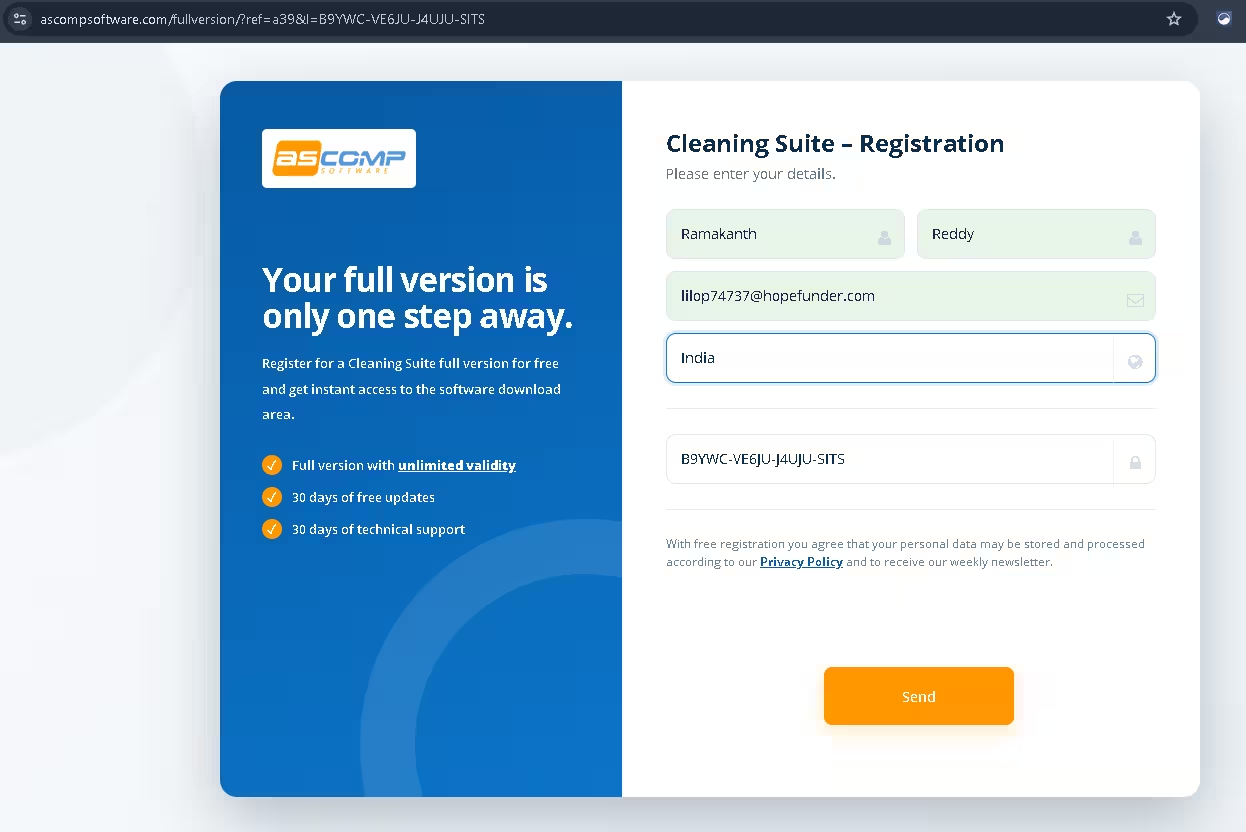
Open the Cleaning Suite giveaway registration page. Enter your first and last name, email address and country. The licence key field at the bottom is filled in automatically by the link. Click Send.
Licence key field empty? Paste this giveaway key: B9YWC-VE6JU-J4UJU-SITS
2. Confirm your email address
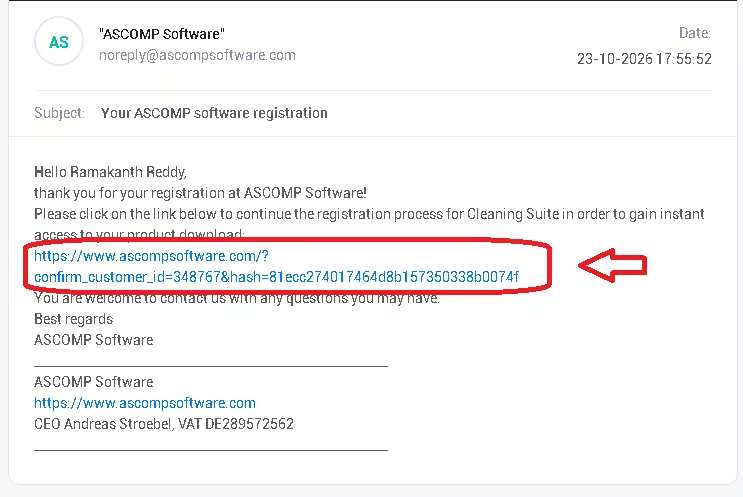
Within a few seconds you’ll get an email from noreply@ascompsoftware.com with the subject “Your ASCOMP software registration”. Click the link inside to finish the registration. If it doesn’t arrive, check your spam, junk or promotions folder.
3. Download the full version and copy your customer ID
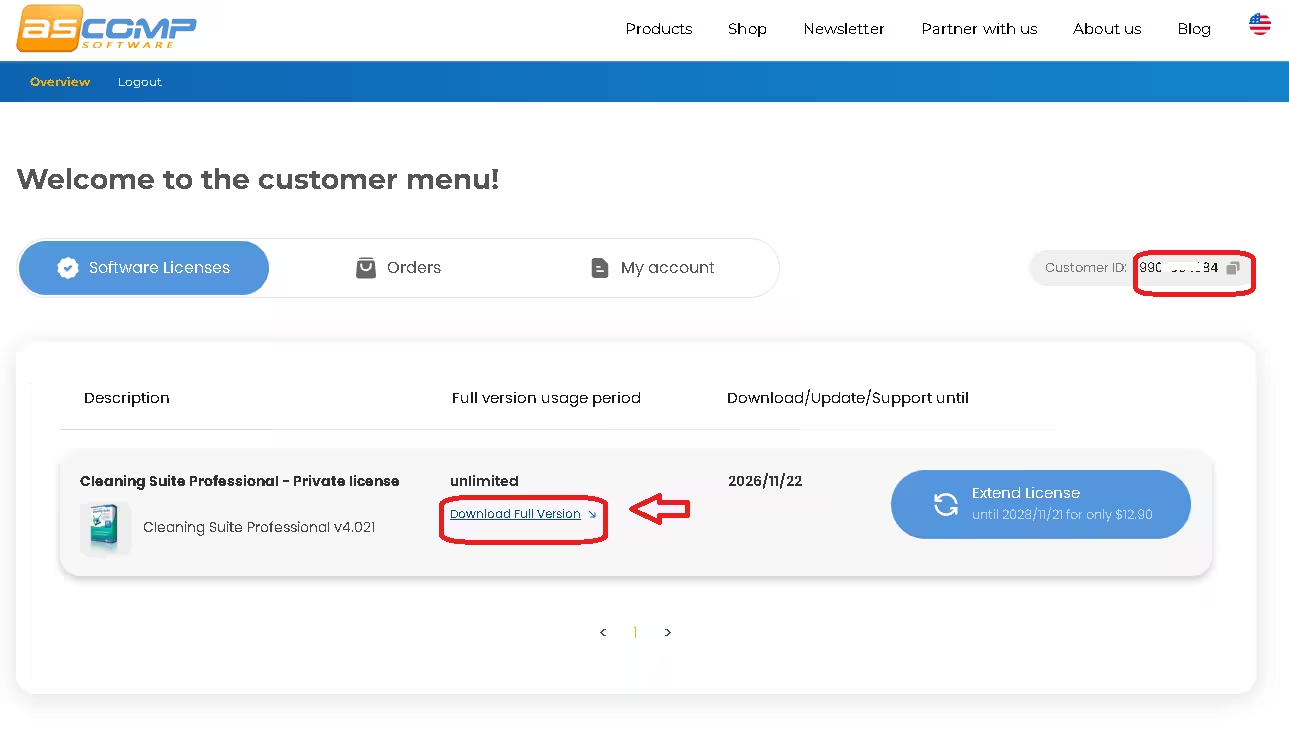
The link opens your ASCOMP customer menu. Under Software Licenses you’ll see Cleaning Suite Professional – Private license with an unlimited usage period. Click Download Full Version, and copy the 10-digit Customer ID shown at the top right (it is also emailed to you).
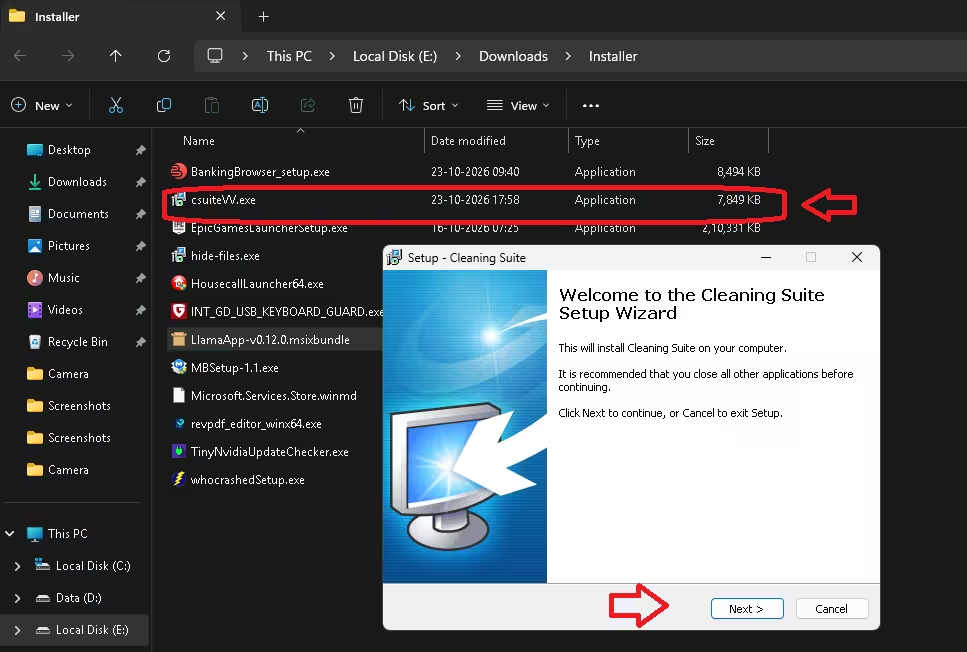
4. Install Cleaning Suite
Run the downloaded csuiteW.exe (about 7.7 MB) and follow the setup wizard. Close other programs first, as the installer recommends.
5. Unlock the Professional Edition
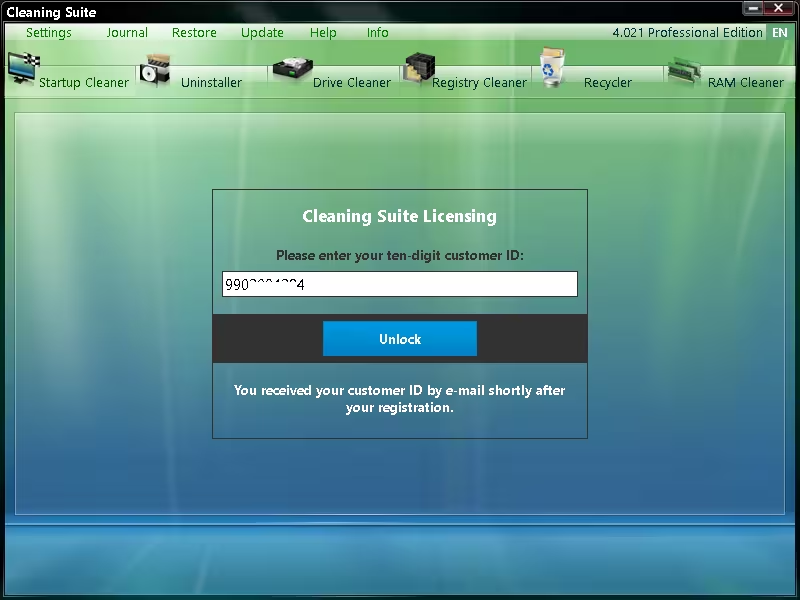
Launch Cleaning Suite. The Cleaning Suite Licensing window asks for your ten-digit customer ID. Paste it and click Unlock. The title bar then shows 4.021 Professional Edition.
6. Start cleaning
Pick one of the six tools from the top bar. A sensible first run is Startup Cleaner (faster boot), then Drive Cleaner (free disk space). The next section explains each tool.
Key features of Cleaning Suite Professional 4.021
All six tools sit in one ribbon, and each one shows a short description at the bottom of the window so you know what it will touch before you click.
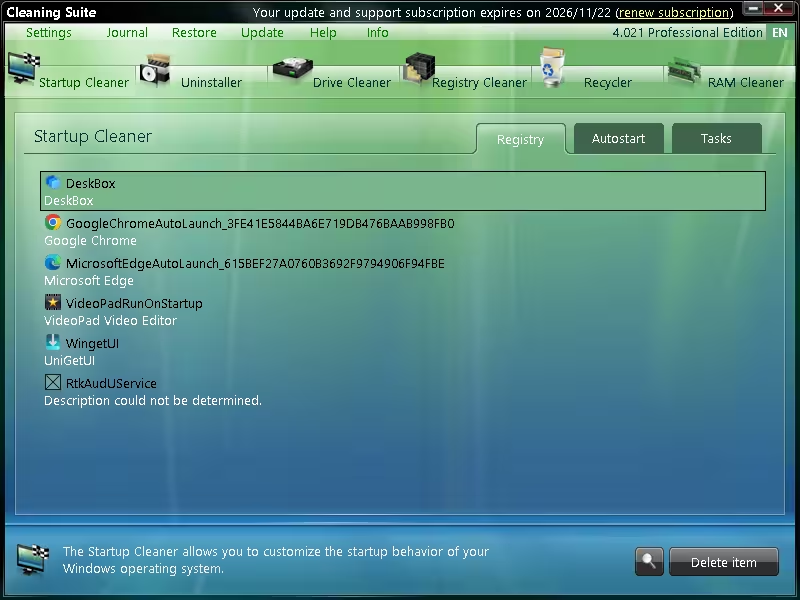
Startup Cleaner: faster Windows boot
Lists everything that starts with Windows across three tabs: Registry, Autostart folders and scheduled Tasks. The Tasks tab matters, because many apps now hide their auto-launch entries in Task Scheduler, where Task Manager’s Startup tab doesn’t show them.
Uninstaller: remove programs in bulk
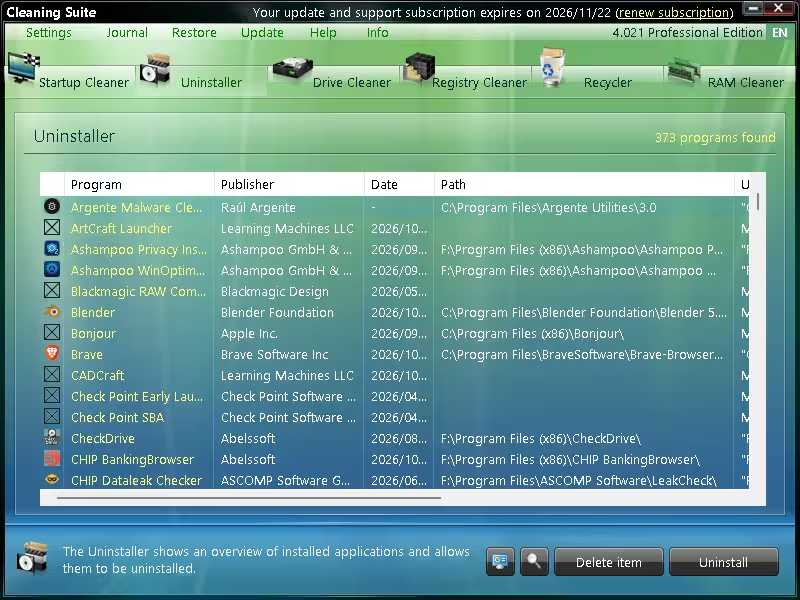
Shows every installed program with its publisher, install date and folder path, so it’s easy to spot old trials and bundled extras. On our test PC it found 373 programs.
Drive Cleaner: reclaim disk space
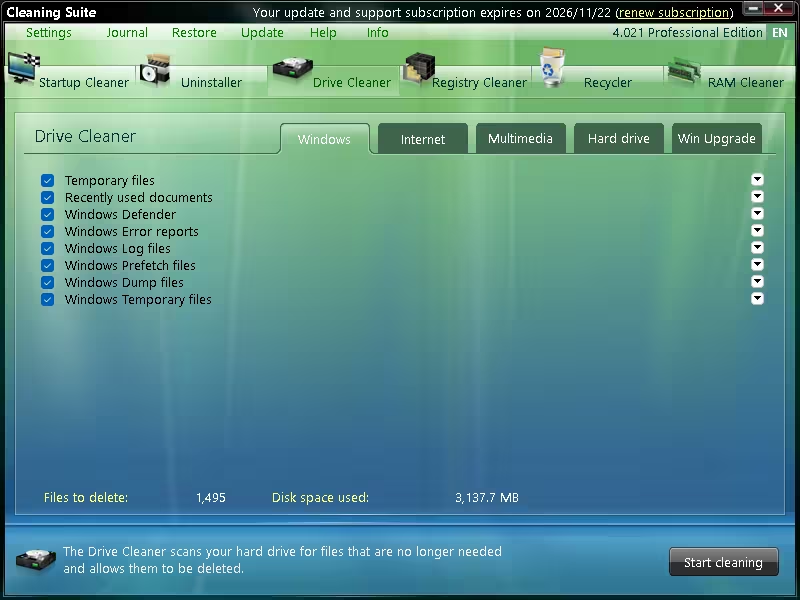
Scans five categories: Windows (temp files, error reports, logs, prefetch and dump files), Internet (browser history, cache and cookies for Chrome, Edge and Firefox), Multimedia, Hard drive and Win Upgrade leftovers. You can untick anything you want to keep before clicking Start cleaning. Our first scan found 1,495 files taking up about 3.1 GB.
Registry Cleaner, Recycler and RAM Cleaner
- Registry Cleaner: finds invalid and obsolete registry entries. ASCOMP says it works cautiously so the PC stays fully usable after cleaning.
- Recycler: extra controls for the Windows Recycle Bin.
- RAM Cleaner: frees up working memory held by running processes.
- Restore centre and journal: undo certain cleaning actions and review the full cleaning history.
Free Standard vs Professional Edition
| Standard | Professional | |
|---|---|---|
| Price | Free | $19.90 (free in this giveaway) |
| Use | Private only | Private licence in this giveaway |
| Information / promo window | May appear | None |
| All six cleaning tools | Yes | Yes |
Limitations to know before you install
- Updates end after 30 days. The licence never expires, but new versions after the first 30 days need a paid extension. In our account, ASCOMP offered two more years of updates for $12.90.
- Private use only. The giveaway licence is a private licence, so don’t use it on work PCs.
- Newsletter sign-up. Registering agrees to ASCOMP’s weekly newsletter.
- Registry cleaning is optional. Modern Windows rarely gets faster from registry cleaning. Use the Startup and Drive cleaners first, and create a restore point before big registry clean-ups.
- Dated look. The green Vista-style interface works fine but looks old next to newer cleaners.
Prefer not to install anything? Use Windows’ built-in cleaners
Windows 11 already has basic tools: Settings › System › Storage › Cleanup recommendations for temp files and old downloads, Storage Sense for automatic cleaning, and Task Manager › Startup apps for boot programs. Cleaning Suite goes further with browser data, scheduled-task autostarts and a bulk uninstaller in one place.
More PC cleaner and ASCOMP giveaways on Techno360
- Ashampoo WinOptimizer 28 free licence key
- Wise Care 365 Pro 8 free full version
- Advanced SystemCare Pro free licence key
- Wise Registry Cleaner Pro free
- IObit Uninstaller 16 Pro free licence
- ASCOMP BackUp Maker Pro free licence
- ASCOMP Secure Eraser Pro free licence
- ASCOMP Easy Slideshow Pro free licence
FAQs
Is the Cleaning Suite Pro giveaway really free?
Yes. You only register with your name, email and country. No payment details are asked for.
Is this the full Professional Edition or a trial?
It’s the full Professional Edition 4.021 with a private licence. After you unlock it with your customer ID, the title bar shows “Professional Edition”.
How long does the free licence last?
The licence has unlimited validity. Free updates and technical support last 30 days from registration; after that you can keep using the version you have.
Where do I find my customer ID?
In the top-right corner of your ASCOMP customer menu, and in the email ASCOMP sends after registration.
Does Cleaning Suite work on Windows 11?
Yes. ASCOMP lists Windows 11, 10, 8.1, 8 and 7 plus Windows Server, and our screenshots were taken on Windows 11.
The licence key field is empty or says invalid. What now?
Open the giveaway page through our button so the key fills in automatically, or paste B9YWC-VE6JU-J4UJU-SITS. If ASCOMP rejects it, the promotion has probably ended.
Can I use it on more than one PC or at work?
The giveaway is a private licence for home use. Check the terms in your ASCOMP account before installing it on other machines, and don’t use it commercially.
📊 Verdict
Cleaning Suite Professional won’t win design awards, but it puts a startup manager, bulk uninstaller and thorough junk cleaner in one small download, and this giveaway licence never expires. For a free, lifetime PC cleaner, it’s an easy grab.
👍 Good: six tools in one, scheduled-task autostart cleanup, restore centre, no nag screen, lifetime licence, under 8 MB.
👎 Watch out for: only 30 days of updates, private use only, newsletter sign-up and a dated interface. Grab it while it’s live, because ASCOMP hasn’t announced an end date.
Discover more from Techno360
Subscribe to get the latest posts sent to your email.

You must be logged in to post a comment.