
Last updated: August 25, 2026
Offer status: Official ASCOMP giveaway — 1-year Professional license, free. Confirmed active as of the update date above. Links below go directly to the official ASCOMP registration page; always verify the offer is still live before registering.
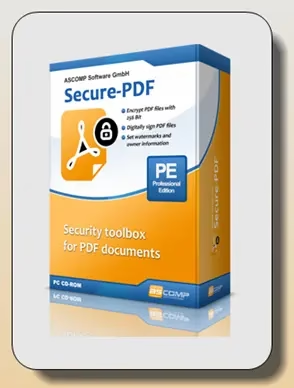
ASCOMP Secure-PDF Pro is a lightweight Windows utility built for one job: locking down PDF files. Instead of a full editor, it focuses on encryption, digital signing, and watermarking — and for a limited time, ASCOMP is giving away a full 1-year Professional license for free (regularly $19.90 for a private license / $39.90 for a company license).
What Is ASCOMP Secure-PDF Pro?
Secure-PDF Pro isn’t trying to replace Adobe Acrobat or a full PDF editor — it does one narrow thing well: protecting PDF documents you already have. If you regularly send contracts, invoices, reports, or other sensitive PDFs and want them password-protected, signed, or watermarked without paying for (or learning) a bloated suite, this is the kind of tool built for that single purpose.
It runs as a native Windows desktop app, works offline once activated, and doesn’t require you to upload files anywhere to process them.
Key Features
- AES encryption up to 256-bit – Password-protect your own or other people’s PDF files so only someone with the correct password can open them.
- Digital signing – Sign PDFs using a PKCS#12 certificate, so recipients can verify the document is authentic and hasn’t been altered since signing.
- Signature images – Alternatively, apply a visual signature image instead of a certificate-based one.
- Watermarking – Add text watermarks and owner information to a PDF.
- Permission controls – Restrict what a recipient can do with an encrypted document (viewing vs. editing/printing, depending on settings applied).
- Windows-native and lightweight – Small install footprint, no subscription-style cloud processing.

System Requirements
| Requirement | Details |
|---|---|
| OS | Windows 7, 8, 8.1, 10, 11; Windows Server 2012 and newer |
| Processor | Intel-compatible or Windows on ARM |
| RAM | 2 GB minimum (4 GB recommended) |
| Disk space | 50 MB |
(Source: ASCOMP’s official product page. Always double-check current specs on ascompsoftware.com before installing.)
How to Claim the Free 1-Year License
- Visit the official giveaway page. Use ASCOMP’s registration link (not a third-party mirror).
- Enter your first and last name, email address, and country, then click “Send.”
- Check your inbox for a confirmation email from ASCOMP Software. This usually arrives within a few seconds. Didn’t get it? Check your spam or junk folder before trying again.
- Click the confirmation link in that email — it takes you to your ASCOMP account page, where the full-version installer is available to download.
Already have an ASCOMP account? Just log in at ascompsoftware.com/login/ with your customer ID and password, then click “Download Full Version.”

- Run the downloaded Windows installer and complete setup as normal.
- Launch Secure-PDF Pro, enter your 10-digit customer ID when prompted, and the app unlocks the full version.
That’s it — you now have a working 1-year Professional license for free.
Important Notes Before You Register
- This is a 1-year subscription, not a lifetime license — it’s a time-limited giveaway, not the regular perpetual purchase.
- Only use ASCOMP’s own official pages to register. Don’t use “free key” listings from third-party sites — the license is tied to your registered email and customer ID.
- After the free year ends, standard pricing applies if you want to continue ($19.90 private / $39.90 company license, per ASCOMP’s normal pricing — confirm current pricing on their site, as it can change).
- Windows only — there’s no Mac or Linux version.
- The free giveaway period can end without notice. If the registration link above isn’t working when you read this, the promotion has likely closed.
Who Is This Useful For?
- Freelancers and small businesses who need to send password-protected contracts or invoices without an Acrobat subscription
- Anyone digitally signing PDFs occasionally and wanting a lightweight, dedicated tool for it
- Privacy-conscious users who want to encrypt sensitive documents before emailing them
- People who just need watermarking/owner-info stamping on PDFs they distribute
It’s not the right pick if you need full PDF editing (text/image editing, merging, OCR) — for that, you’d want a broader PDF suite.
Related Reading
FAQ
How long is the free license valid?
One year from activation, as a Professional edition license — not a lifetime license.
Is this an official giveaway?
Yes — it’s run directly through ASCOMP Software’s own registration page, not a third-party key reseller.
What happens after the 1-year period?
The software reverts to trial/limited functionality unless you purchase a standard license to continue.
Does it work offline after activation?
Yes, once activated with your customer ID, Secure-PDF Pro runs locally and doesn’t require an internet connection to encrypt, sign, or watermark files.
Can I use it commercially under this giveaway?
The giveaway provides the Professional edition; check ASCOMP’s license terms for commercial-use specifics, as private vs. company licensing may differ even within the same giveaway.
Before You Go
Always confirm the offer is still active on ASCOMP’s official page before registering — free giveaways like this typically run for a limited time. If you found this useful, subscribe for more free software giveaways as we find them.
Discover more from Techno360
Subscribe to get the latest posts sent to your email.

You must be logged in to post a comment.