

Tired of a laggy PC and hardware that quietly misbehaves? The Pro build of DriverMax 17 hunts down every stale driver on your machine and refreshes them in one sweep — and right now a DriverMax 17 Pro free license is yours for a whole year, without paying a rupee.
Jump to the claim steps →

- What you get: DriverMax 17 Pro (v17.11) with a genuine 366-day subscription — worth roughly $30/year.
- Who it’s for: Anyone on Windows 7 through Windows 11 who wants hands-off driver updates, backups and rollback.
- The catch: This promo is aimed at the DACH region (Germany, Austria, Switzerland). A free VPN set to a German server is all you need to qualify.
- Time to set up: About 5–7 minutes, start to finish.
- Cost: ₹0. No card, no trial trap.
Drivers are the quiet middlemen between your hardware and Windows. When they fall behind, you feel it — stutter in games, a webcam that refuses to wake up, audio that crackles, or the odd blue screen that nobody can explain. Chasing each fix by hand through Device Manager is a chore, and honestly most people never bother until something breaks.
That’s the gap DriverMax 17, built by Innovative Solutions, is designed to fill. It scans your system, matches every component against a library of more than 2.3 million drivers, and pulls the latest signed versions for you. The Pro tier removes the free version’s daily cap and ad nags, and thanks to a limited-time offer run through German publisher ComputerBild, you can pick up a DriverMax 17 Pro free license at no cost.

What the DriverMax 17 Pro free license actually gives you
Strip away the marketing and it comes down to a handful of jobs it does reliably:
- One-click scanning. It reads every device on your PC and flags what’s outdated, missing or unknown.
- Bulk updates. Instead of babysitting downloads one at a time, you tick a box and it grabs the whole batch. On my machine it queued 15 updates and finished without a single manual click.
- Backup and rollback. Before it touches anything, it can snapshot your current drivers and drop a system restore point, so a bad update is a two-minute undo rather than a reinstall.
- Scheduled checks. Set it and forget it — daily, weekly or monthly scans run in the background.
The interface still looks like it wandered in from an earlier era, and that’s fair criticism. But function beats fashion here, and for a set-it-and-leave-it updater that’s exactly the trade most people want.
Before you claim your DriverMax 17 Pro free license
Skimming past this part is where most people trip up, so give it thirty seconds.
The giveaway is region-locked to Germany, Austria and Switzerland. To be handed a license code, your connection needs to look like it’s coming from Germany — that’s the whole reason for the VPN. If you ever see a code that reads DMX-COUNTRY-NOT-ALLOWED in your email, your VPN either wasn’t running or wasn’t on a German server. Fix that and try again in a fresh incognito window.
One more thing that’s easy to miss: keep the VPN connected when you update drivers too, not just during sign-up. If DriverMax phones home and sees a non-German IP, it may flag the license as out of territory and pull your Pro status. Once your drivers are all current, you can switch the VPN off and get on with your day.
I used Windscribe because its free plan is generous, but you don’t have to. Proton VPN’s free tier and TunnelBear both work fine here and neither forces an account just to connect a German server.
How to claim your DriverMax 17 Pro free license
Turn on your VPN and open the offer page
Connect to any German server, then open the giveaway page — an incognito window keeps things clean: drivermax.de/1xduxskscobi. The page is in German, so let your browser translate it if that helps.
Fill in the short form
Pop in your first name, last name and a working email, tick the two consent boxes, clear the reCAPTCHA, and press Absenden (Submit). A green “thank you” note — Vielen Dank für Ihre Registrierung — confirms it went through.


Grab the code from your inbox
Within a minute or two, an email from Softwarezirkel (register@softwarezirkel.de) lands with your personal User ID and a registration code shaped like DMX-XXX-XXX-XXXX. That code doubles as your serial number, so keep the mail handy. Everyone receives their own unique key — you can’t share one across machines.

Download the installer from ComputerBild
Grab the setup file straight from the source — the ComputerBild download page. Sticking to the official page keeps you clear of the sketchy “pre-activated” copies floating around on file-sharing sites.
Install with the VPN still on
Run the installer, accept the licence agreement, and let it finish. Leave your German VPN connected through this step and the first launch.
Enter your code and set up the account
Open the app, choose to enter a registration code, paste in your key and hit OK. Finish by typing your email and setting a password twice. You’ll see a “Congratulations, your account is activated” message — that’s your cue that Pro is live.
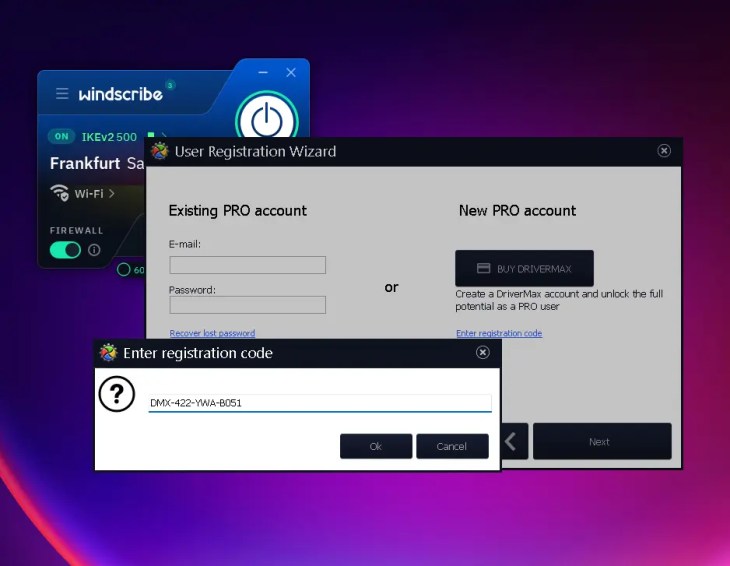
Confirming your DriverMax 17 Pro free license
Want to be sure it stuck? Head to Settings → My account. Mine reads “You are registered as a PRO user” with the subscription clocking in at 366 days remaining. That’s your proof the activation landed and your free year has started.

From there, drop into the Updates tab, run a scan, tick everything you want and hit Download and Install. On my laptop that cleared out fifteen outdated drivers in a single run — graphics, audio, SMBus, the built-in camera, the lot.

Is the DriverMax 17 Pro free license safe and worth it?
DriverMax has been around since 2007 and comes from an established Windows-utility developer, so this isn’t some fly-by-night tool. The one rule I’d stress: only ever download it from ComputerBild or the official DriverMax site. Cracked or “pre-activated” builds are exactly where malware likes to hide, and there’s no reason to risk it when the legitimate copy is free for a year.
If you’d rather skip the VPN dance entirely, there are solid alternatives worth a look. I’ve rounded up the best of them in our guide to the best free driver updaters for Windows 11 — a good place to compare your options before you commit.
✅ The Verdict
A DriverMax 17 Pro free license that runs a genuine year is a fair deal, and the process is far simpler than the region lock makes it sound. Spin up a free German VPN, register, activate, and you’re set. In my testing it did precisely what it claims — found stale drivers, updated them in bulk, and backed everything up first.
Bottom line: if you like the idea of drivers that quietly stay current without you thinking about them, this giveaway is well worth the seven minutes. Just remember to keep the VPN on during updates, and grab the installer only from the official source.
Frequently asked questions
Do I really need a VPN for the DriverMax 17 Pro free license?
Yes. The offer only serves license codes to visitors who appear to be in Germany, Austria or Switzerland. A free VPN set to a German server is enough to qualify, and it takes seconds to switch on.
How long does the DriverMax 17 Pro free license last?
A full 366 days from activation, based on the subscription I received during testing. After that it reverts to the free version unless you renew.
Why did my email show DMX-COUNTRY-NOT-ALLOWED?
That means the request didn’t register as coming from Germany. Make sure your VPN is connected to a German server, open the page again in a fresh incognito window, and resubmit the form.
Can I turn the VPN off after activating?
Keep it on until you’ve finished updating your drivers. Once your hardware is all current, you can disconnect and use your PC normally.
Is DriverMax 17 safe to install?
It’s a legitimate tool from Innovative Solutions, a long-running Windows-utility developer. Download it only from the official ComputerBild or DriverMax pages and avoid any “cracked” versions.
Discover more from Techno360
Subscribe to get the latest posts sent to your email.

You must be logged in to post a comment.