
![Franzis HDR Projects 10 Full Version Free Download – Giveaway [2026]](https://techno360.in/wp-content/uploads/2026/05/HDR-Projects-10-Giveaway-Box-Shot.avif "Franzis HDR Projects 10 Full Version Free Download – Giveaway [2026]")
🎁 Limited-Time Giveaway
Franzis HDR Projects 10 — Get the Full Version FREE
Pro-grade AI-powered HDR photo editor — yours free with this official Franzis giveaway
⏱️ Quick Read
| What it is: | AI-powered HDR photo editor | Platform: | Windows 10 / 11 (64-bit) |
| Regular Price: | $99 / €99 | Giveaway Value: | 100% FREE |
| Languages: | EN, DE, FR, ES, IT, JP | File Size: | 539 MB (ZIP) |
| License: | Lifetime (personal use) | Method: | Email registration + serial key |
If you have ever shot a sunset and ended up with a sky that looks washed out and shadows that swallowed up half the frame, you already know why HDR matters. High Dynamic Range photography blends multiple exposures (or pulls the most out of a single RAW file) so that bright skies, mid-tone subjects, and deep shadows all keep their detail in one beautifully balanced image.
The tricky part is that doing it well usually requires expensive software with steep learning curves. That is exactly where Franzis HDR Projects 10 comes in — and right now, you can grab the full version completely free through an official Franzis giveaway. No cracks. No shady installers. Just a legitimate license code emailed straight to your inbox.
In this guide we will walk you through every step of claiming your free copy, downloading the installer, and activating HDR Projects 10 on your Windows PC. The whole process takes under five minutes, so let’s get to it.
What is Franzis HDR Projects 10?
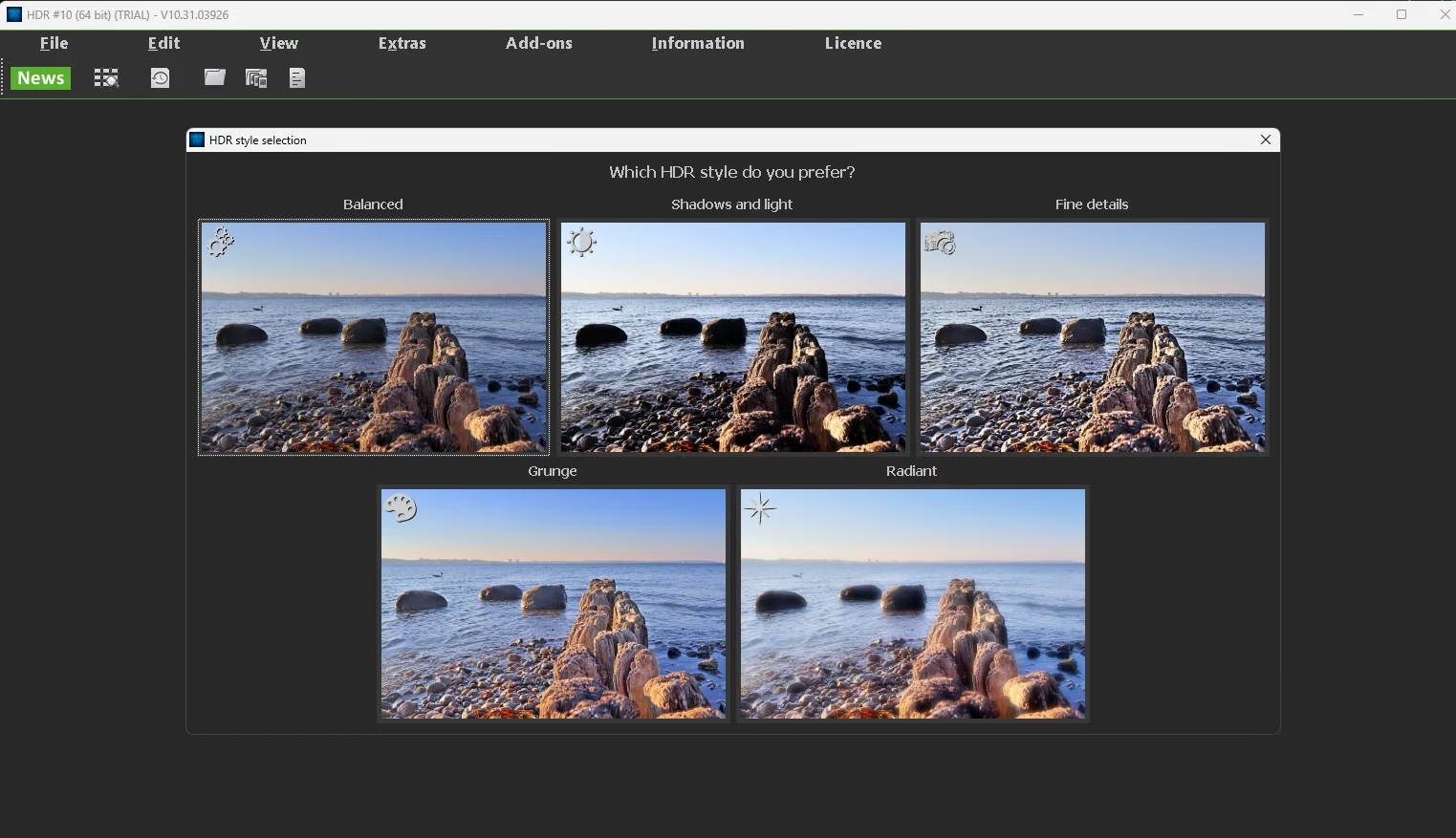
Franzis HDR Projects 10 is the latest generation of Franzis GmbH’s flagship HDR processing suite. The German developer has been refining its Projects family of photo software for over a decade, and version 10 introduces a fully AI-powered HDR engine that automatically analyses your photo and balances exposure, contrast, color, and tone with a single click.
Unlike basic HDR plugins built into smartphone cameras, HDR Projects 10 is a full desktop application built for serious enthusiasts and professionals. It accepts single-image HDR from a regular JPEG or RAW file, as well as classic multi-exposure bracket sequences, and merges them with intelligent ghost removal, deghosting, and tone mapping. You can output everything from photorealistic landscapes to grungy, surreal, painterly art-looks — all from the same source files.
Key Features at a Glance
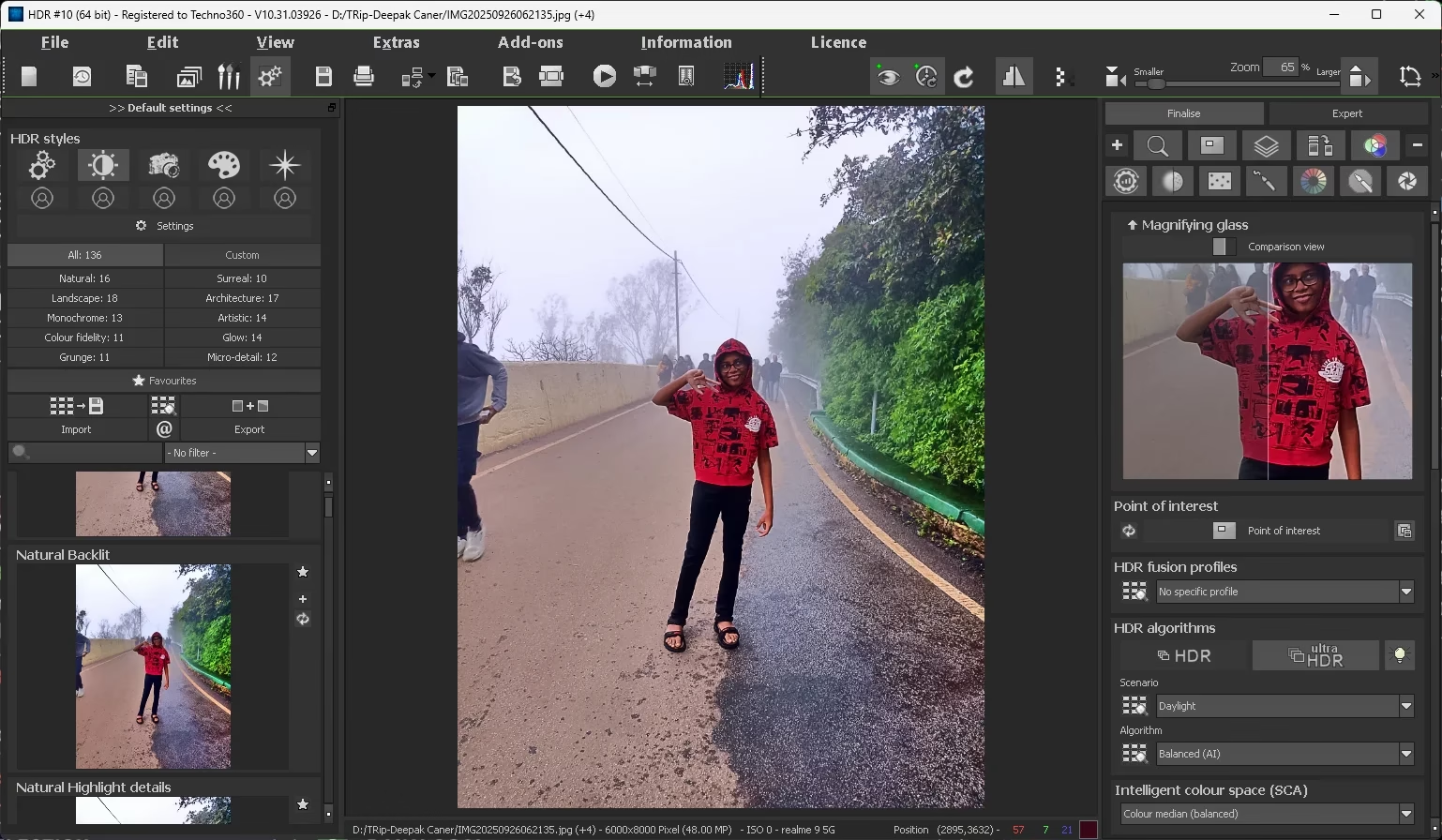
| 🤖AI-Powered HDR EngineThe new neural-network engine analyses your image and applies optimal HDR settings automatically — no presets to guess at. | 🎨136+ Built-In PresetsFrom Natural and Landscape to Surreal, Grunge, Architecture, and Monochrome — instantly try multiple looks with one click. |
| 📷Full RAW SupportNative RAW workflow for all major DSLR and mirrorless cameras with non-destructive editing throughout. | ⚡Batch ProcessingApply the same look to dozens of photos at once — perfect for travel, real estate, and event shooters. |
| 👻Ghost RemovalAutomatically detects and removes moving subjects between bracketed exposures (cars, people, swaying leaves). | 🌈Advanced Tone MappingMultiple HDR algorithms including Balanced (AI), Ultra HDR, and Intelligent Colour Space (SCA) for total control. |
| 🔍Magnifying Glass + CompareSide-by-side before/after preview with a real-time magnifier to inspect fine detail at any zoom level. | 🖼️Selective Editing BrushesMask, expert-mode brushes, and HDR painting tools let you tweak skies, faces, or shadows without affecting the rest. |
Screenshot Gallery
Step-by-Step: How to Get HDR Projects 10 Free
The whole process is split into six simple steps. Just follow them in order and you will have a fully activated copy of HDR Projects 10 in under five minutes.
Visit the Official Giveaway Page
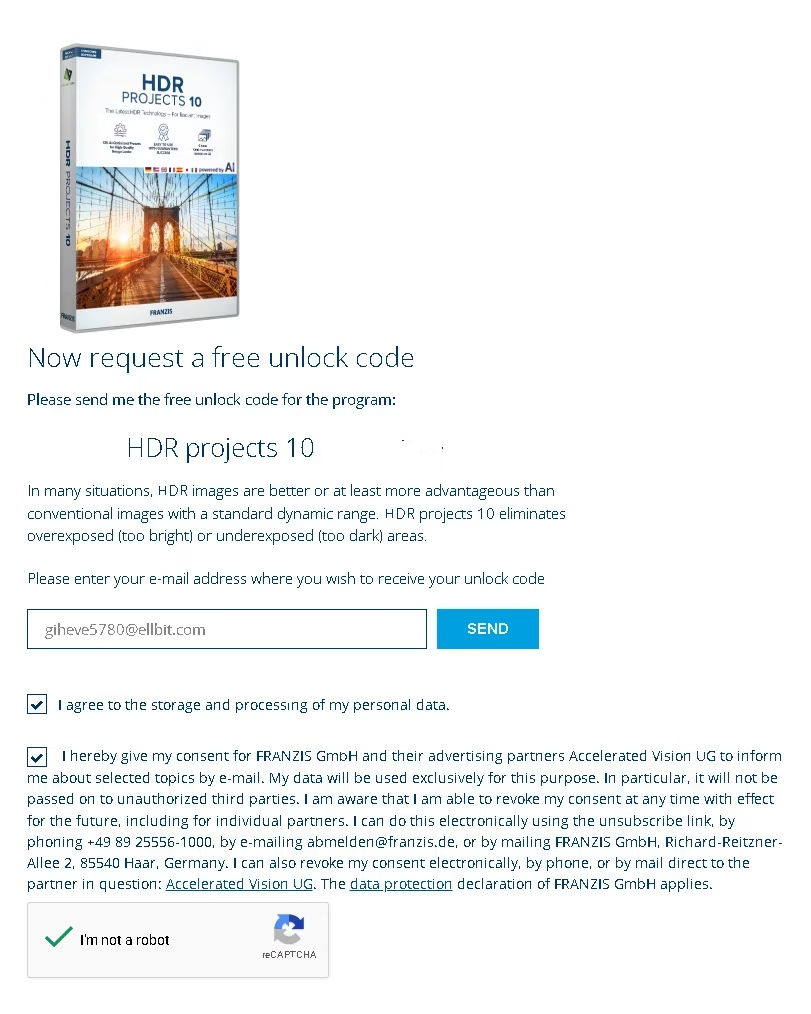
Head to the Franzis giveaway page below. Enter a valid email address, tick the two consent checkboxes, solve the reCAPTCHA, and click SEND.
Confirm Your Email
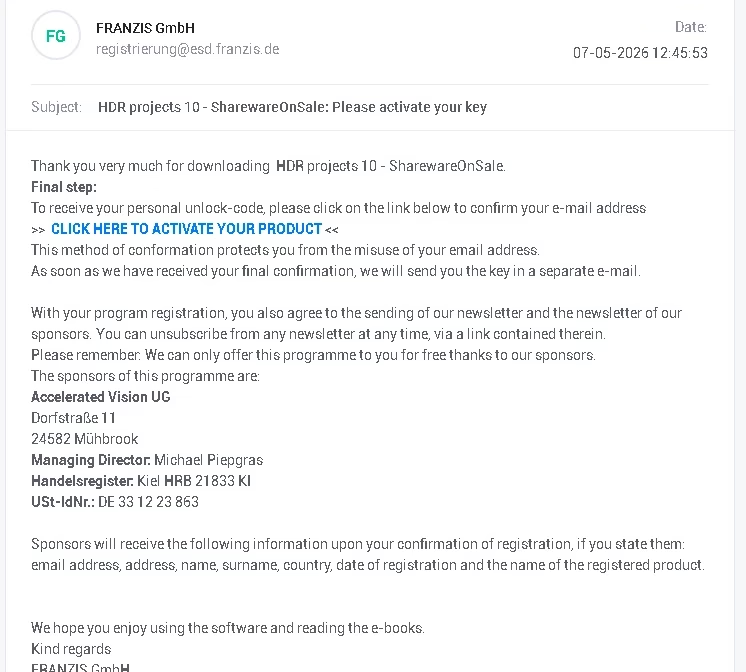
Within a minute or two you will receive an email from registrierung@esd.franzis.de with the subject “HDR projects 10 – SharewareOnSale: Please activate your key”. Open it and click “CLICK HERE TO ACTIVATE YOUR PRODUCT”. (If you don’t see it, check your Spam / Promotions folder.)
Grab Your User-ID and Registration-Key
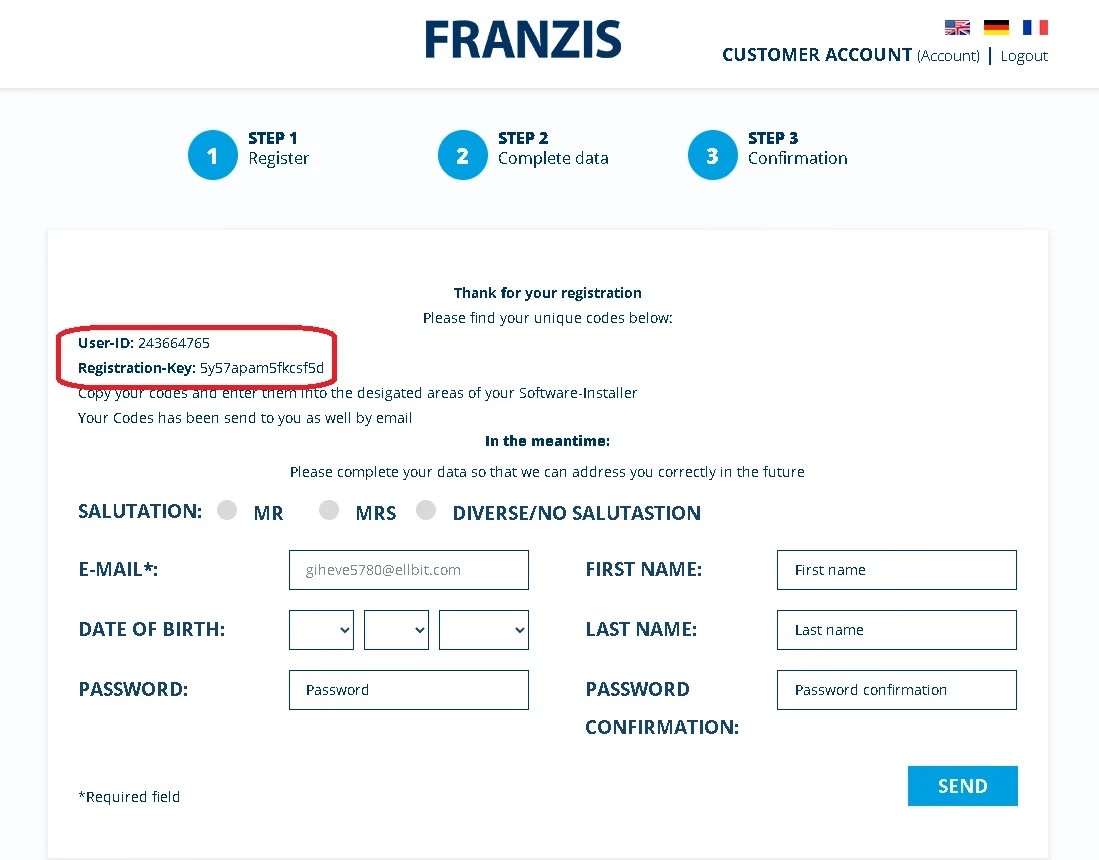
The activation link opens a Franzis customer-account page that shows your User-ID and Registration-Key (Serial Number). Copy both into a safe place — they are also sent to your email as a backup.
Download the Installer (ZIP, 539 MB)
Use the official direct-download link below to grab the multilingual installer ZIP. The download is hosted on Franzis’s own CDN and contains the Setup.exe along with the user manual, copyright info, and tutorial videos.
Extract and Install
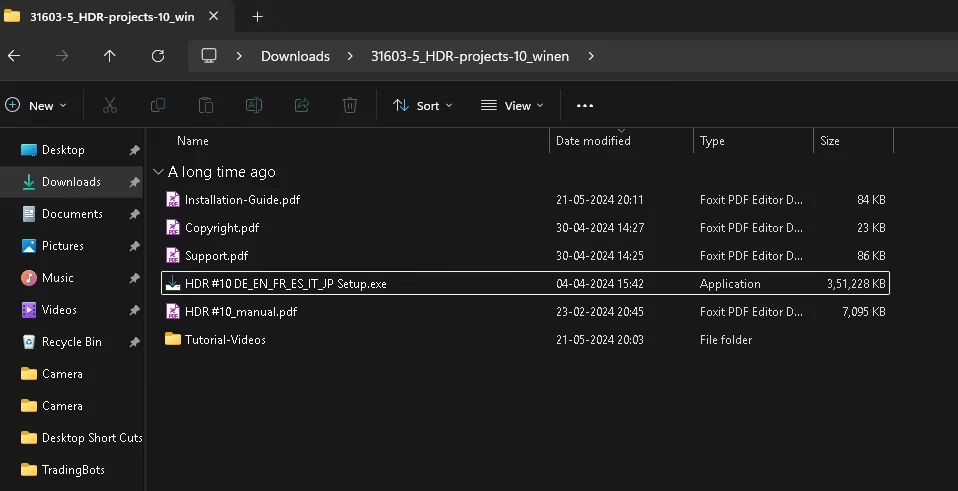
Right-click the downloaded 31603-5_HDR-projects-10_winen.zip and choose Extract All. Open the extracted folder and run HDR #10 DE_EN_FR_ES_IT_JP Setup.exe. Follow the wizard — accept the license, pick your install folder, and let it finish.
Activate the Software
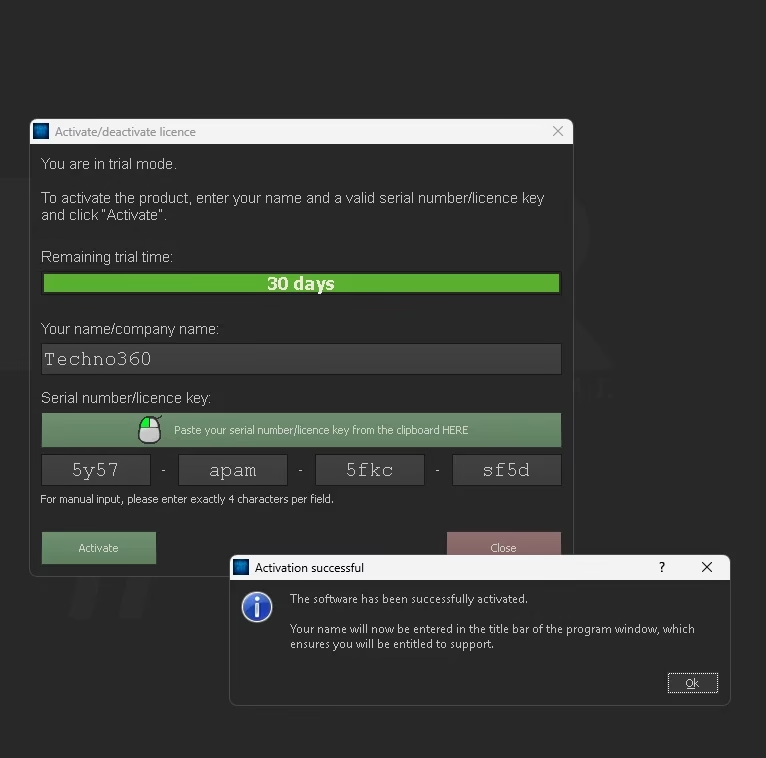
Launch HDR Projects 10. Go to Licence → Activate (or just click the trial banner). Enter your name, paste the 16-character serial key in 4-character chunks, and click Activate. You should see “The software has been successfully activated”. Done — you now own a fully registered copy! ✅
System Requirements
| Component | Minimum / Recommended |
|---|---|
| Operating System | Windows 10 / Windows 11 (64-bit) |
| Processor | Intel Core i5 / AMD Ryzen 5 or better |
| RAM | 4 GB minimum (8 GB recommended) |
| Free Disk Space | ~ 2 GB |
| Display Resolution | 1280 × 1024 or higher |
| Graphics | DirectX-compatible GPU with up-to-date drivers |
| Internet | Required for activation only |
Our Verdict
👍 Pros✅ Genuine, ad-free full-version license ✅ True AI-powered HDR engine ✅ 136+ presets across 8 style categories ✅ Single-image and bracketed HDR support ✅ Native RAW + batch processing ✅ One-time activation, no subscription | 👎 Cons❌ Windows-only (no macOS / Linux) ❌ Personal use license (no commercial) ❌ 539 MB download is on the heavier side ❌ Interface can feel dense for first-timers |
If you have ever wanted to elevate your landscape, travel, or real-estate photography, HDR Projects 10 is genuinely one of the most capable HDR processors on Windows — and getting it free through an official Franzis giveaway is a no-brainer. Even if you only use it once a month, having a registered, lifetime copy sitting on your PC is well worth the five minutes it takes to claim.
Frequently Asked Questions
Discover more from Techno360
Subscribe to get the latest posts sent to your email.
