
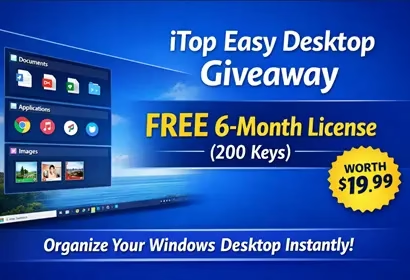
Keeping your desktop organized can be surprisingly difficult. Files, folders, screenshots, and shortcuts quickly pile up, turning your workspace into a cluttered mess. If you are looking for a simple solution to manage your desktop efficiently, iTop Easy Desktop is designed exactly for that purpose.
In this article, we’ll review the features of iTop Easy Desktop, explain how it helps improve productivity, and show you how to claim a free 6-month license giveaway.

What is iTop Easy Desktop?
iTop Easy Desktop is a lightweight desktop organization tool that helps users keep their workspace clean and structured. Instead of leaving icons scattered across the screen, the software allows you to group them into customizable boxes and categories.
This approach makes it easier to locate files quickly and maintain a distraction-free workspace.

Key Features of iTop Easy Desktop
1. Smart Desktop Organization
The software automatically groups icons into boxes based on file type or custom rules. For example:
Documents
Images
Applications
Folders
This instantly makes your desktop look cleaner and easier to navigate.
2. Customizable Desktop Boxes
You can create your own categories and drag files into them. Each box can be resized, renamed, and styled according to your preferences.
This is especially helpful for users who manage multiple projects or frequently used files.
3. Quick Search
The built-in search feature allows you to quickly find files directly from the desktop interface. Instead of opening File Explorer and digging through folders, you can locate files instantly.
4. One-Click Desktop Cleanup
With a single click, you can automatically organize all desktop icons. This feature is particularly useful if your desktop tends to get messy over time.
5. Lightweight and User-Friendly
Unlike heavy desktop customization tools, iTop Easy Desktop runs smoothly without consuming significant system resources.
It’s designed for both beginners and advanced users who want a simple but effective desktop management solution.
Why Use a Desktop Organizer?
A cluttered desktop can reduce productivity. When icons pile up, finding files becomes time-consuming and distracting.
A desktop organizer like iTop Easy Desktop helps by
Improving workflow efficiency
Reducing visual clutter
Making important files easier to access
Keeping your workspace professional and organized
iTop Easy Desktop Giveaway:
Download the software from the official link
👉 https://www.itopvpn.com/Install and launch iTop Easy Desktop.
Launch the app; on the app’s main interface, click “Signup” and create an account.
After logging in to your account, click the User (profile) icon, then select “Link Activation Code.”
Enter this giveaway key to activate: MTAAV-KLRLG-CB4ZN-AJJA1
Activate the software to unlock the 6-month premium version.
Giveaway Details
License Duration: 6 Months
Total Activations: 200
Expiration Date: April 10, 2026
Giveaway License Key
MTAAV-KLRLG-CB4ZN-AJJA1
iTop Easy Desktop vs Other Desktop Organizers
The market has a few desktop organizers available, but iTop Easy Desktop stands out for several reasons. Many competing tools are either too complex for casual users or require a paid subscription from the start. iTop Easy Desktop offers a free tier with robust features and the option to upgrade to premium for advanced capabilities.
Here is how it compares to common alternatives:
- Fences (Stardock): A popular Windows desktop organizer, but it is a paid-only tool starting at $9.99. iTop Easy Desktop provides a free version and currently a free 6-month premium giveaway.
- Nimi Places: Free but limited in features and no longer actively updated.
- iTop Easy Desktop: Free to use, actively developed, lightweight, and now offering a premium 6-month license at no cost.
For users who want a capable and modern desktop organizer without spending money, iTop Easy Desktop is currently the strongest choice.
System Requirements
Before downloading, here are the minimum system requirements for iTop Easy Desktop:
- Operating System: Windows 7, 8, 10, or 11 (64-bit recommended)
- RAM: 2 GB minimum
- Storage: 100 MB free disk space
- Internet: Required for account registration and license activation
The software is optimized to run in the background with minimal CPU usage, making it suitable even for older PCs.
Pros and Cons of iTop Easy Desktop
Pros
- Free to download and use
- Lightweight with low resource usage
- Easy to set up — no technical knowledge required
- Smart auto-grouping saves time
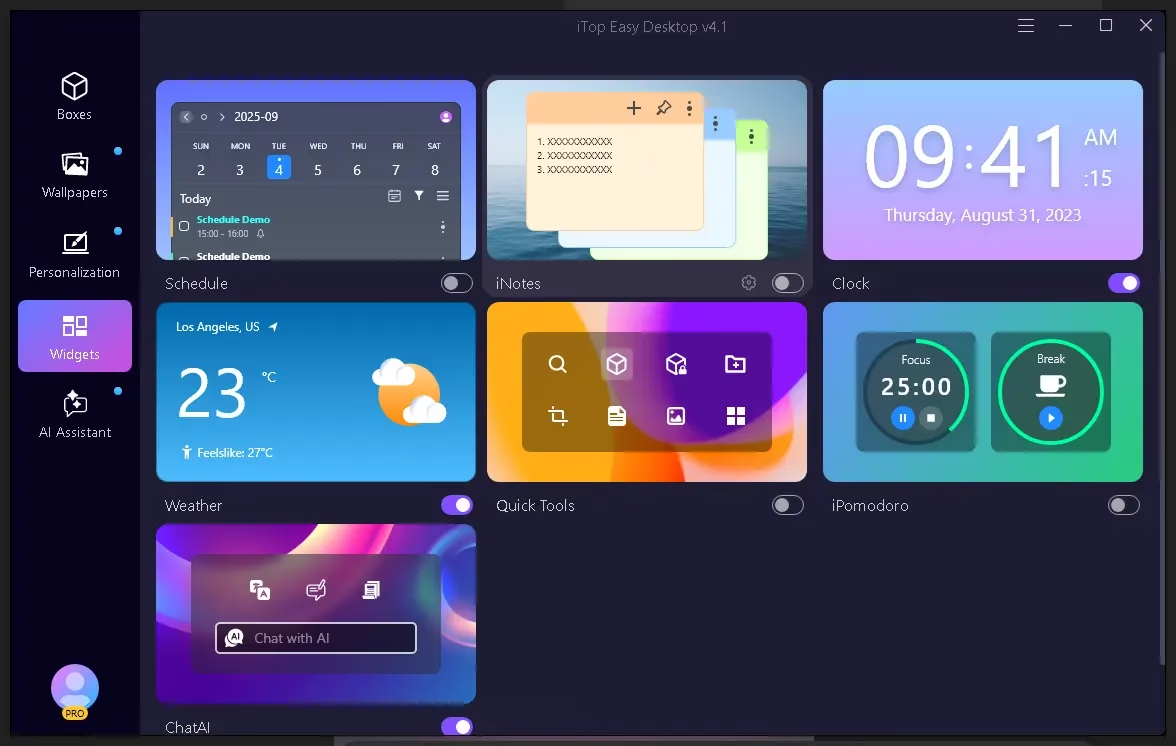
- Supports customizable desktop boxes and widgets
- Regular software updates from the iTop team
Cons
- Some advanced features are behind the premium tier
- Requires an account for license activation
- Currently available only for Windows
Frequently Asked Questions (FAQ)
Is iTop Easy Desktop free?
Yes, iTop Easy Desktop has a free version available for all Windows users. The premium plan unlocks additional features, and this giveaway gives you 6 months of premium access at no cost.
Is iTop Easy Desktop safe to use?
Yes, iTop Easy Desktop is a legitimate desktop organization tool developed by iTop Inc. It does not contain malware or adware.
How long is the giveaway valid?
The giveaway license key is valid until April 10, 2026, with a total of 200 activations available. Claim it early to secure your copy.
Final Thoughts
If your desktop is often cluttered with icons and folders, iTop Easy Desktop provides a simple way to keep everything organized. Its automatic grouping, customizable boxes, and quick search feature make it a practical productivity tool.
With this limited 6-month giveaway, it’s a fantastic opportunity to try the premium features at no cost. Also check out our other free software giveaways on Techno360.


Discover more from Techno360
Subscribe to get the latest posts sent to your email.
You must be logged in to post a comment.