
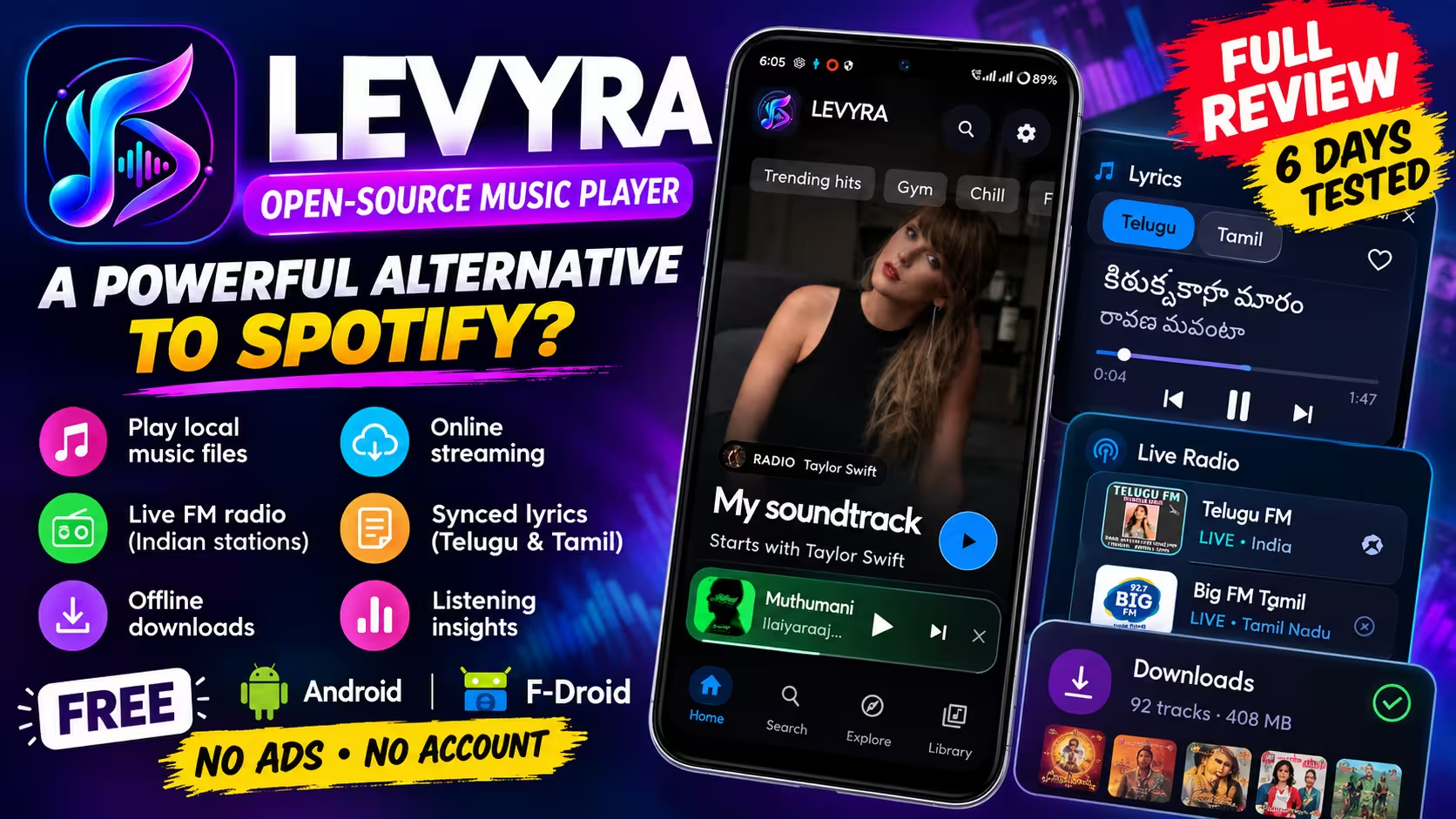
Levyra Review · 6 Days of Hands-On Testing
One free app for your MP3s, streaming, FM radio and synced lyrics. Does Levyra actually hold up?
I installed Levyra from F-Droid, spent six days testing it as an everyday music player, and played Telugu and Tamil songs, local files, regional radio and 92 offline tracks through it. Here’s what worked, what didn’t, and who should try it.
Price
Free
Licence
GPL-3.0
Account
Not needed
Needs
Android 8.0+
⚡ Quick Read
- What it is: an open-source Android music player that puts your local files and online music in one library, with live radio, synced lyrics and offline saving built in.
- Best part in my testing: Telugu and Tamil lyrics that stayed in time with the song.
- Weak spot: several Telugu and Tamil radio stations played nothing at all.
- Stability: no crashes across six days on a Realme phone.
- Worth knowing: streaming leans on YouTube Music, so what you can find depends on that service and your region.
Most music apps on Android pick a lane. Either they’re tidy players for the MP3s you’ve collected over the years, or they’re streaming apps that pretend your phone storage doesn’t exist. Levyra tries to do both, and then piles on radio, lyrics, listening stats and offline saving for good measure.
That’s a lot of promises for a free app with no ads and no sign-up. So instead of reading the feature list and nodding along, I spent six days putting it through everyday listening. This Levyra review is built on that time with the app. Where I mention something I didn’t test myself, I say so and point to the developer’s documentation, release notes or the F-Droid listing.
How I tested: I installed Levyra 2.5.9 from F-Droid and used it for six days on my Realme phone (RMX3741). On 2 October 2026 I updated to version 2.6.0 and took a first look at the refreshed interface.
How to read this review: hands-on findings come from six days on 2.5.9. Anything marked as 2.6.0 is a first look, not six days of use. Features added in releases I didn’t use day to day are described from the developer’s release notes and labelled that way.
Disclosure: Levyra’s developer reached out to Techno360 on his own and made clear this was not a paid placement request. Nobody saw this review before it went live.
What Is Levyra?
Levyra is a free music player for Android (with a separate Windows version) built by an independent developer who goes by LUC4N3X. The code is public on GitHub under the GPL-3.0 licence, and the Android app is written in Kotlin on top of Google’s AndroidX Media3/ExoPlayer playback engine.
The core idea is simple: songs stored on your phone and songs you find online should sit side by side in the same library, playlists and queue. You don’t flip between a “local” app and a “streaming” app. It all lives in one place.
| Developer | LUC4N3X (independent) |
| Platforms | Android 8.0 and newer, Windows |
| Licence | GNU GPL v3.0 |
| Where to get it | F-Droid, GitHub Releases, IzzyOnDroid (plus other mirrors the developer lists) |
| Ads / account | None and none (per the developer) |
| App languages | 37 |
| Versions tested | 2.5.9 (six days), 2.6.0 (first look) |
If you like the idea of apps that don’t come with a Google account attached, Levyra sits comfortably next to the picks in our guide to the best free open-source Android apps.
Installing Levyra and Getting Started
Setup took a couple of minutes. I searched for Levyra in F-Droid, installed it, picked a language and was listening shortly after. There’s no login screen, no email field and no “start your free trial” banner. That alone feels refreshing.
To pull in songs already on the phone, Levyra asks for permission to read audio files. Grant it, run a scan, and your collection shows up in the library.
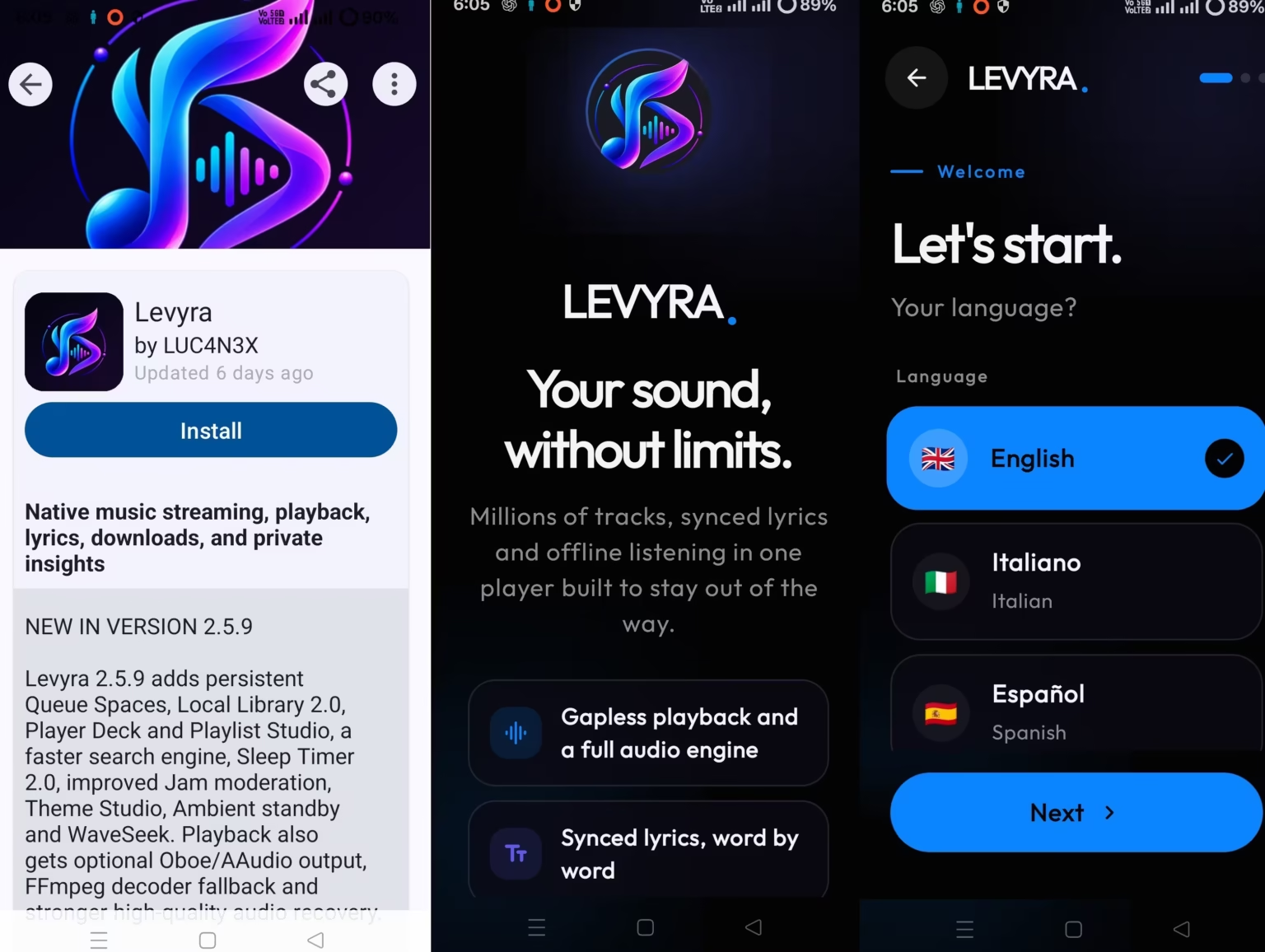
⚠️ Levyra on F-Droid vs GitHub: When I started testing, F-Droid was still serving 2.5.9 even though GitHub already had 2.5.12. F-Droid builds apps from source on its own schedule, so the version it offers won’t always match the developer’s latest GitHub release. If you want to know whether a newer build exists, compare both listings. Our roundup of alternative Android app stores covers tools like Obtainium that can track GitHub releases for you.
Finding Your Way Around
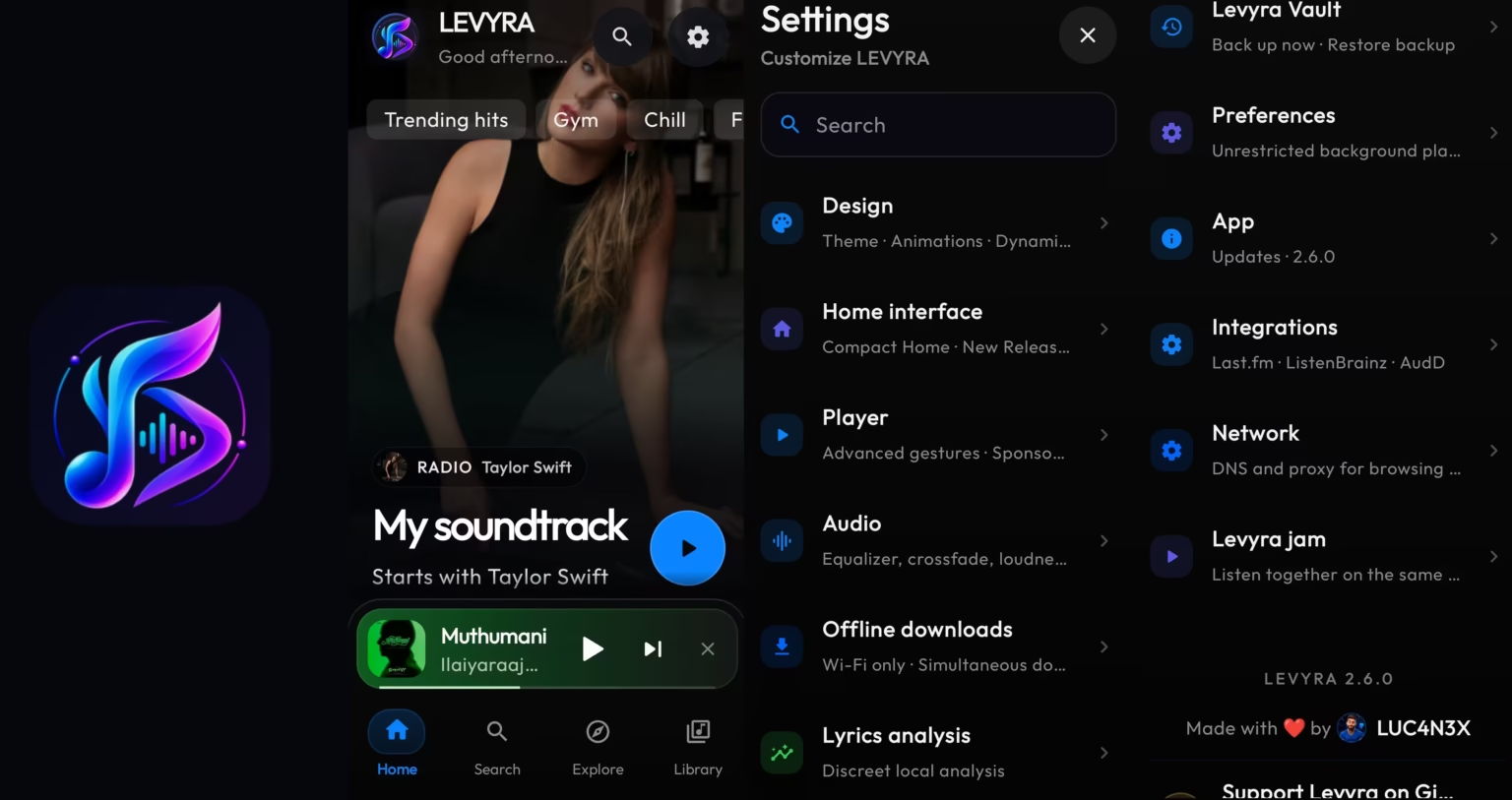
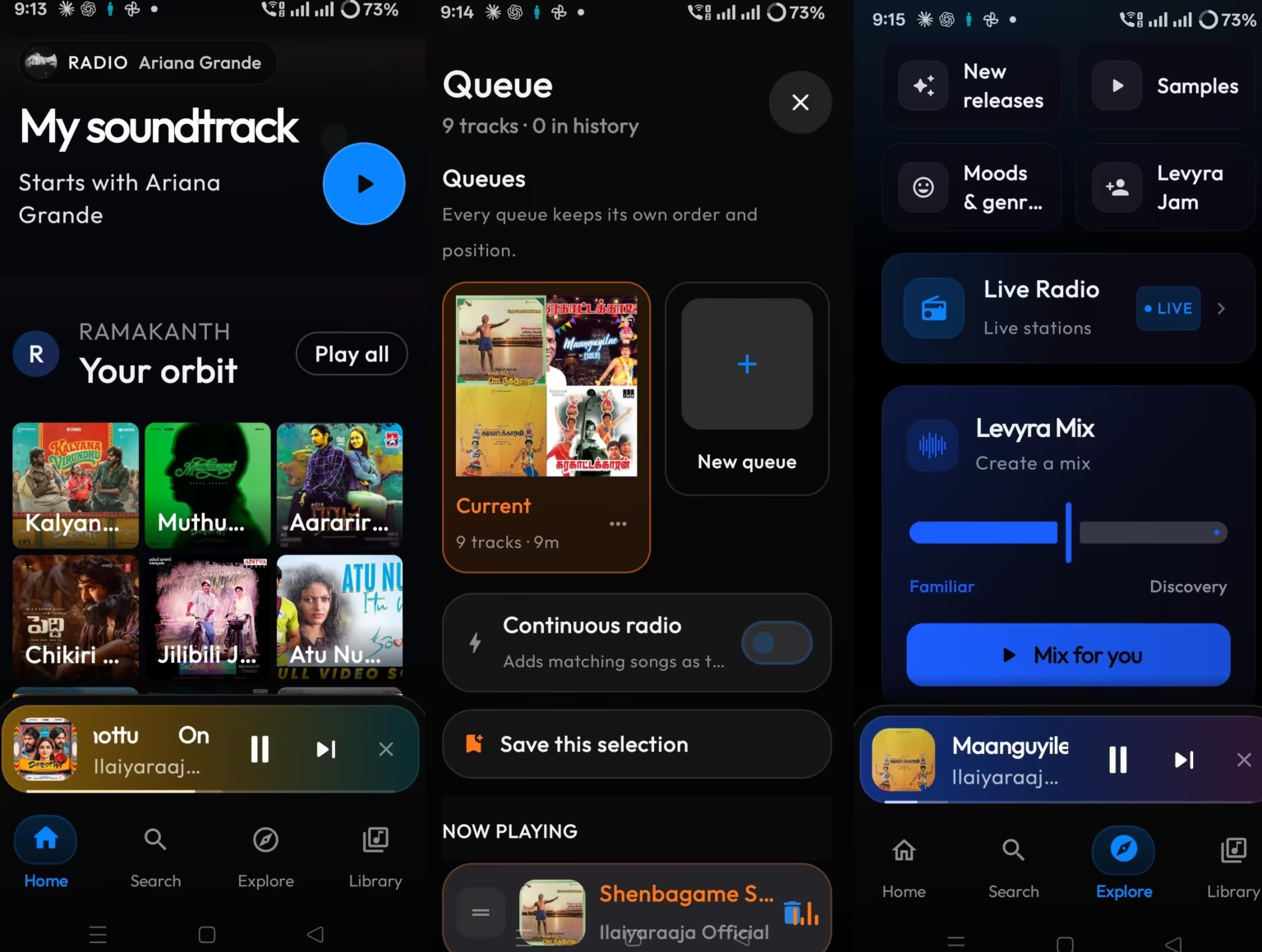
The app is split into four tabs: Home, Search, Explore and Library. Home serves up recommendations and recent listening, Search does what it says, Explore is where you browse moods, genres, charts and radio, and Library holds your files, favourites, playlists, downloads and history.
It looks polished, with big artwork and smooth animations. The flip side is depth. Levyra has a lot of settings, and the first day or two felt like opening drawers in a new kitchen. Nothing is hidden badly, but expect some poking around before it feels like yours.
Settings are grouped sensibly, with sections for Design (themes and animations), Player, Audio, Offline downloads, Integrations and Levyra Vault for backups. In 2.6.0 there’s a search box at the top too, which helps a lot given how much is in there.
Playback and Audio Controls
This is where a music app earns its keep, and Levyra did. Local files played without a hitch. Streamed songs started quickly, and over six days I didn’t run into buffering, mid-song drops or tracks that refused to load on my connection. That’s my experience on one phone and one network, not a guarantee for everyone, but it was consistent.
The audio panel goes well beyond a volume slider. You get an equalizer, crossfade, a streaming quality switch (Auto, High or Low), an output picker, and a readout of what’s actually playing. On my phone, the app reported the stream as MP4A at around 327 kbps and showed “DSP active”. Keep in mind that’s the app’s own stream information, not something I measured independently. I also didn’t do a controlled listening comparison between the Auto, High and Low settings, so I can’t say how much difference they make to your ears.
There’s also an option called High-quality alternative audio. According to the developer, when this is turned on Levyra tries to fetch a higher-bitrate copy of the same song from JioSaavn, checks that it really is the same recording, and falls back to the normal source if it can’t confirm a match. For Indian listeners that’s an interesting touch, given how much regional music JioSaavn carries.
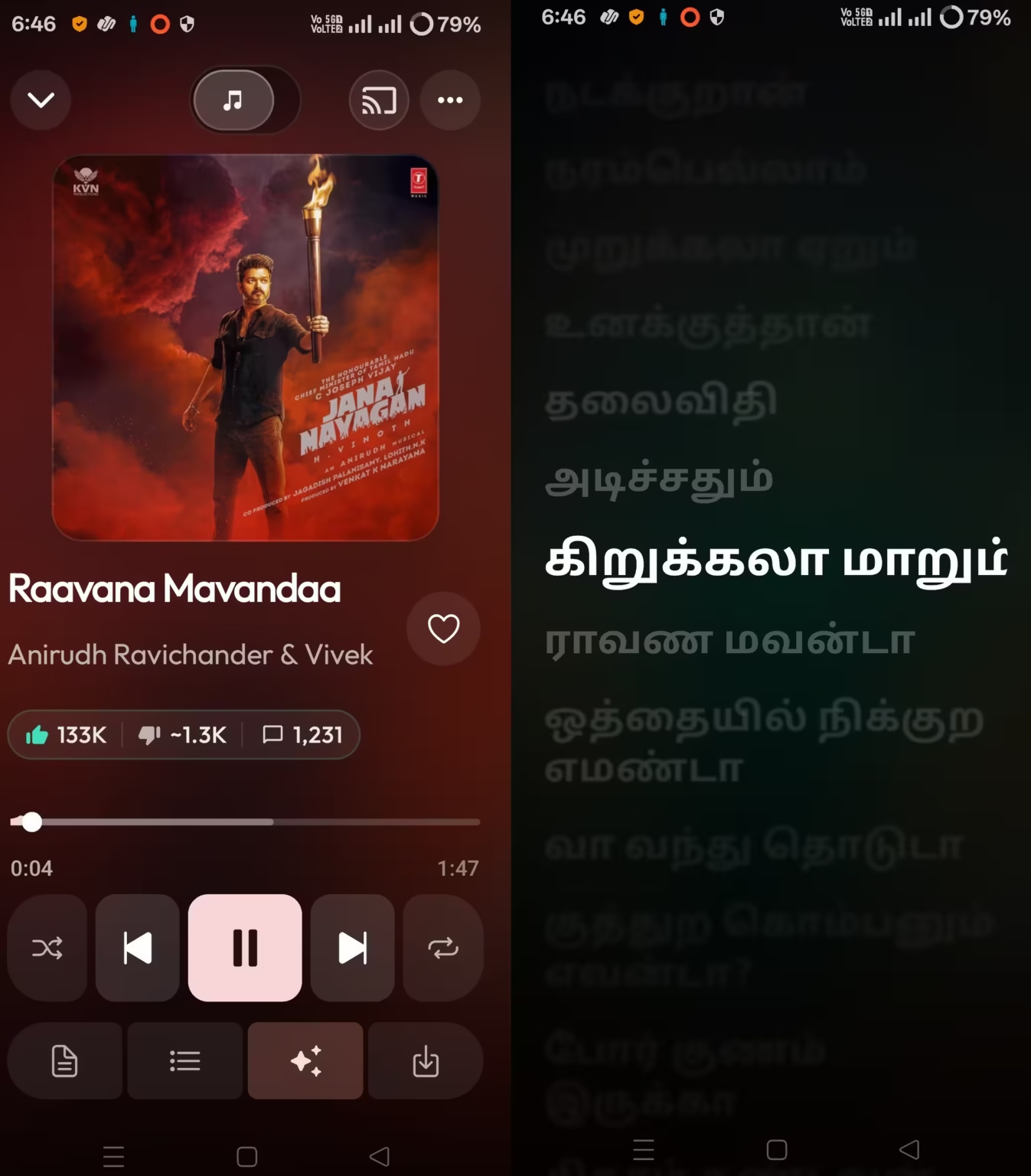
The now-playing screen also carries like and dislike counts and a comments count pulled from the original video, which is a little unusual for a music player but handy if you’re curious how a song landed.
Queues are more flexible than usual as well. You can keep several separate queues, and each one remembers its own order and position, so starting a new listening session doesn’t wipe out the one you had going. A “Continuous radio” switch keeps adding similar songs once your queue runs out.
Background playback
Music kept going with the screen locked and when I switched to other apps, including X. The one time it stopped was when a video started playing inside X. That’s Android handing sound to the newer video, which most players do too, but if you scroll a video-heavy feed while listening, you’ll be tapping play again now and then.
Synced Lyrics in Telugu and Tamil: The Standout
I didn’t expect this to be my favourite part, but it was. Plenty of apps show lyrics for English pop. Far fewer get Indian-language songs right.
I played a mix of Telugu and Tamil tracks, and the lyrics turned up reliably in the original script, highlighting line by line in step with the music. On “Karige Loga” from Aarya 2, for example, Levyra pulled a synced version from LRCLIB and even split it into labelled Verse and Chorus sections you can jump between.
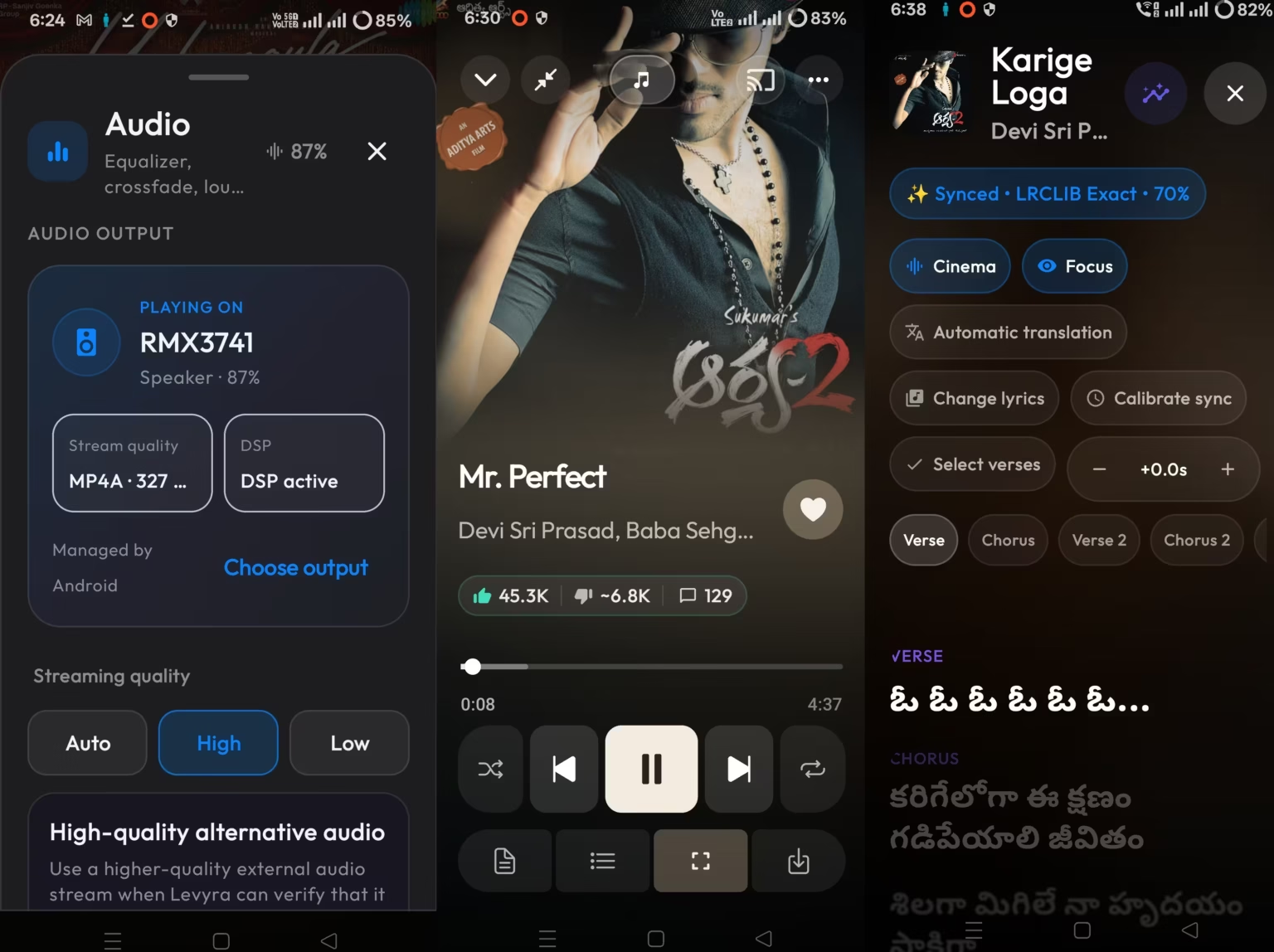
If the timing drifts, a small plus/minus control lets you nudge the lyrics forward or back, and there’s a “Calibrate sync” option for bigger corrections. You can also swap to a different lyrics source, switch between Cinema and Focus display styles, and turn on automatic translation. For anyone who likes singing along to film songs, this alone makes Levyra worth a try.
Live Radio: Hit and Miss
Levyra’s radio section lets you browse stations by country and language. I went straight for Telugu and Tamil stations. Some played fine. Others just sat there in silence, with no error and no audio.
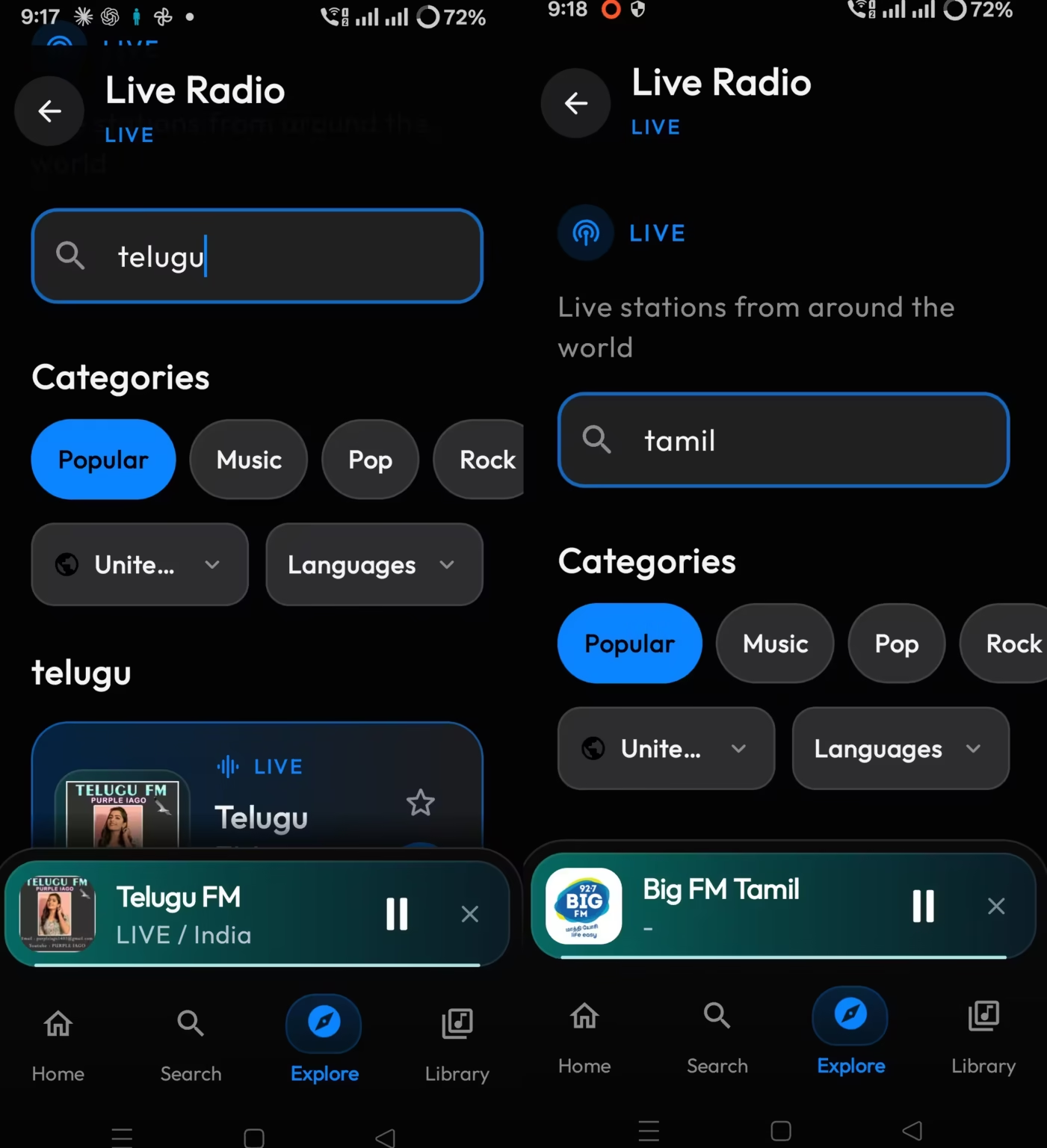
Radio stations come and go, and a dead stream is often the broadcaster’s problem rather than the app’s. Still, from a listener’s point of view, a station that’s listed but silent is frustrating. According to the release notes, the developer reworked radio station search and logos in version 2.5.11, which came out after the build I tested. I haven’t checked whether that changes things for Indian stations, so it may improve, but for now treat the regional radio list as “try a few” rather than “everything works”.
Offline Downloads: 92 Songs, 408 MB
To see how offline listening holds up with a real collection, I saved 92 tracks. They took up roughly 408 MB, which works out to around 4.4 MB a song. Every one I tried played back without an internet connection.
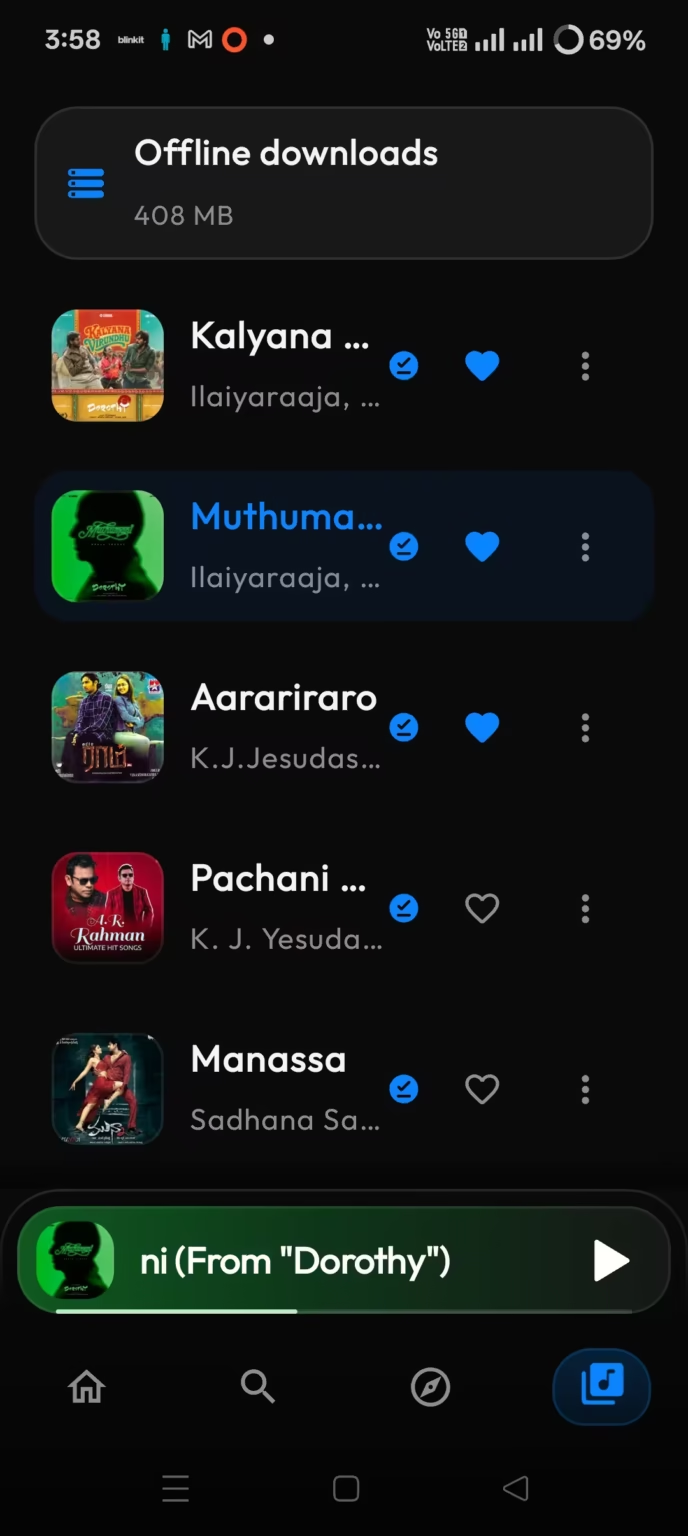
According to the F-Droid listing, saved tracks go into a regular Music/Levyra folder as tagged audio files rather than being locked inside the app. That means they sit right next to your existing collection, and any other player can see them too.
One fair warning: being able to save a song doesn’t mean you have the right to. Levyra’s own legal notice is clear that downloads are meant for music you’re allowed to keep, and that the app doesn’t grant any rights to third-party content. What you can lawfully keep, and for how long, depends on where the song comes from and the rules that apply to it.
Library and Private Listening Stats
The Library tab pulls everything together: local files, favourites, playlists, downloads and history. There’s also a stats dashboard showing how long you’ve listened, how many plays, your top artists and when you tend to listen. The developer says these numbers are worked out and kept on your phone rather than sent anywhere.
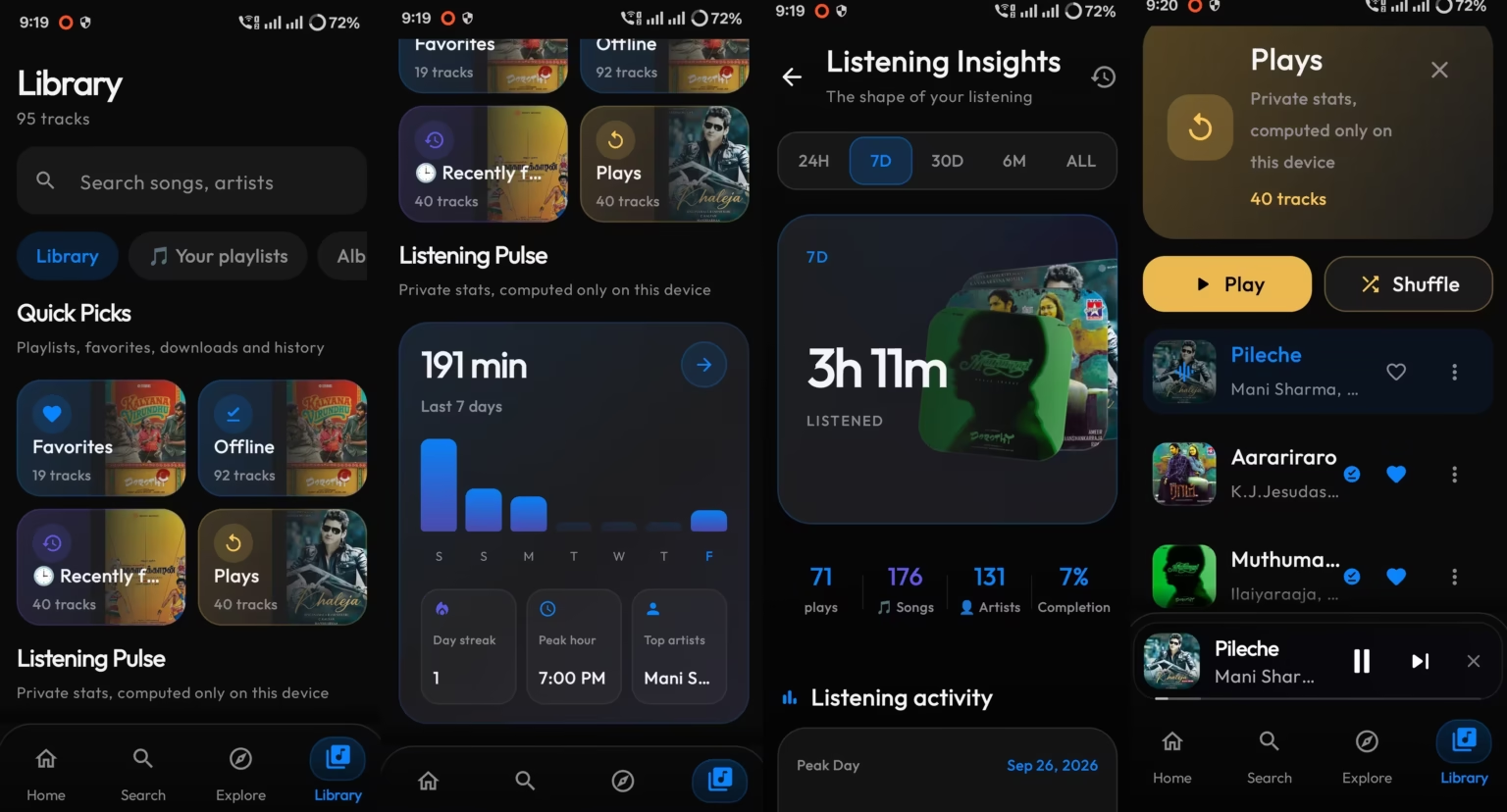
If you already keep a listening history elsewhere, Levyra can optionally send plays to Last.fm or ListenBrainz. It also supports AudD for song recognition. None of this is required, and I’d only bother if you already use those services.
Levyra Mix and the Little Extras I Liked
Levyra Mix ended up being the feature I used most after lyrics. Rather than building a playlist by hand, you tell it how much you want songs you already know versus fresh discoveries, and it puts a mix together. On a lazy evening, that’s exactly the amount of effort I want to spend. It was one of my favourite features in the version I tested. In the newer 2.6.0 release, the developer has expanded it with Mix Lab, which adds controls for shaping a mix by mood, genre, artist and length. I’ve only had a first look at that, so I’m describing it from the release notes.
I also liked the auto-dimming option, which lowers the screen brightness while music plays. It’s small, but it’s easier on the eyes at night and probably kinder to the battery too.
Privacy: What We Know and What We Don’t
Levyra’s privacy story is one of its selling points, so it’s worth being precise about it.
- What the developer says: no ads, no analytics, no telemetry and no account. Playlists, history and stats stay on the device.
- What the F-Droid listing adds: the app still talks to outside services to work, including YouTube and YouTube Music for streaming, LRCLIB and others for lyrics, and several sites for artwork. Those services see ordinary details like your IP address. F-Droid flags the app with its “Non-Free Network Services” label for this reason. That doesn’t mean Levyra collects your listening data. It means the app has to talk to outside services to stream, fetch lyrics and load artwork.
- What I didn’t do: a security audit. I can’t independently confirm the privacy claims, though the source code is public for anyone who wants to check.
In short, the developer says Levyra doesn’t collect analytics or telemetry, but the app isn’t an offline-only bubble. Its streaming, lyrics and artwork features talk to external services. That’s the same trade-off we discussed in our Kvaesitso launcher review. Open source buys you transparency, not automatic safety, so stick to official download sources.
Local Music vs Online Music: Where Each Stands
The easiest way to understand Levyra is to split it in two. Local playback was reliable throughout my testing. The rough edges showed up mainly in features that depend on outside content sources, particularly the regional music catalogue and live radio.
| Area | What I saw in six days |
|---|---|
| Local music library | Reliable. Scanned my files, played them without problems, and kept downloads and playlists organised. |
| Offline downloads | 92 tracks (about 408 MB) played back without a connection. |
| Streaming playback | Smooth on my network, with no buffering or failed tracks. |
| Regional catalogue | Popular film songs were easy to find. Less popular South Indian tracks had gaps. |
| Telugu and Tamil radio | Inconsistent. Some stations played, others stayed silent. |
The Catch for Indian Listeners
Because Levyra’s streaming side depends heavily on YouTube Music, its catalogue is only as good as what’s available there. For mainstream Telugu and Tamil film songs, I usually found what I wanted. Go deeper into older or less popular regional tracks and the gaps start to show. If you’re expecting the kind of curated South Indian library a dedicated Indian streaming app offers, you’ll be disappointed in places.
The developer’s documentation also warns that YouTube-based features can be patchy or unavailable in some countries and networks, and that outside services can change without notice. If YouTube changes something tomorrow, streaming could break until an update arrives. Your local files, of course, aren’t affected.
Levyra Review: My Honest Take After Six Days
Here’s how the week actually went. It never crashed. I didn’t hit a single bug that got in my way. Local and streamed music both played reliably, lyrics were better than I expected, and offline listening did its job. Radio was the one area that let me down, and the regional catalogue has holes.
Will I keep using it? Yes. I see Levyra as a Spotify alternative, not a drop-in replacement. It doesn’t have the polished editorial playlists, podcasts or guaranteed catalogue of a paid service. What it does have is one place for my own MP3s and online music, lyrics in the languages I actually listen to, and no ads or account nagging me. For managing my own collection and keeping songs offline, it’s earned a spot on my home screen.
If you only want something simple for local files, an old-school player like PowerAudio Pro is lighter to learn. Levyra is for people who want more and don’t mind exploring.
Pros and Cons
👍 What I liked
- Accurate synced lyrics for Telugu and Tamil songs
- Local files and streaming in one library
- Offline downloads saved as normal audio files
- Smooth streaming with no buffering in my tests
- Levyra Mix makes discovery effortless
- Free, open source, no ads, no account
- No crashes in six days
👎 What could be better
- Several Telugu and Tamil radio stations were silent
- Regional catalogue depends on YouTube Music and has gaps
- So many settings that it takes time to learn
- F-Droid version can lag behind GitHub releases
- Streaming could break if YouTube changes things
📊 The Verdict
Worth installing · Great for collectors and lyric lovers
Levyra is worth a try if you want your own music collection, online discovery, offline listening and synced Indian-language lyrics in one free app. In six days of testing, playback was reliable and I had no crashes. Regional radio was inconsistent, though, and the online catalogue has gaps, especially for less popular South Indian tracks.
I’ll keep using Levyra, mostly for offline music and discovery. But I wouldn’t cancel a dedicated streaming subscription because of it alone.
Try it if you keep your own music collection, love following Indian-language lyrics, or want an ad-free player without signing into anything. Skip it if you want a curated, guaranteed catalogue or a simple app you never have to configure.
Frequently Asked Questions
Is Levyra really free?
Yes. It’s free, open source under GPL-3.0, and the developer says it carries no ads and needs no account.
Where can I download Levyra safely?
Stick to F-Droid or the official GitHub Releases page. F-Droid builds the app from public source code; GitHub usually gets new versions first.
Does Levyra show lyrics for Telugu and Tamil songs?
In my testing, yes. Lyrics appeared in the original script and stayed in sync, with controls to fix timing or switch lyric sources when needed.
Can Levyra replace Spotify?
It’s a solid alternative, especially for local music and offline listening, but not a full replacement. Its streaming catalogue depends on YouTube Music, and it lacks the curated playlists and podcasts of a paid service.
Where does Levyra save downloaded songs?
According to its F-Droid listing, downloads are saved as tagged audio files in the public Music/Levyra folder on your phone.
Does Levyra work on Windows?
Yes, there’s a separate Windows desktop version with its own release cycle. This review covers only the Android app.
Sources: hands-on testing by Techno360 (Levyra 2.5.9 and 2.6.0); Levyra on F-Droid; official GitHub repository; developer’s legal notice.
Discover more from Techno360
Subscribe to get the latest posts sent to your email.

You must be logged in to post a comment.