
🚨 Tested & Updated for 2026
5 Best Alternative App Stores for Android — Ditch Google Play in 2026
Sick of being trapped inside Google’s walled garden? These hand-picked Play Store alternatives let you grab Android apps that are completely free, privacy-respecting, and 100% open-source — and you’d better install them before Google’s controversial September 2026 verification rules go live.
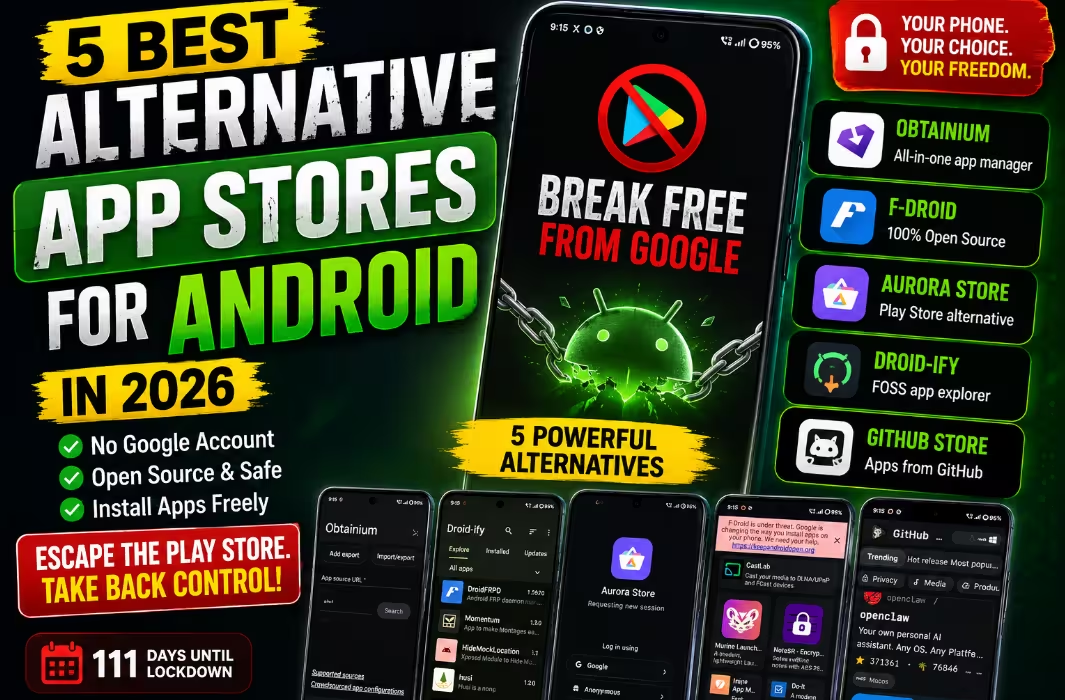
Here’s something most Android users forget: the Play Store has never been your only option. While iPhone owners are locked into Apple’s App Store with no escape, Android has always shipped with sideloading baked in — meaning you can install apps from any source you trust. It’s one of the platform’s biggest superpowers.
So why hasn’t everyone switched? Most people simply don’t know what’s out there. And the open-source Android scene has quietly produced some seriously brilliant Play Store rivals over the past decade — each one solving a different problem, from de-Googling your phone to installing apps straight from a developer’s GitHub repo.
But there’s a catch. Google’s new developer verification policy kicks in this September 2026, requiring every Android app developer worldwide to hand over a government ID and pay registration fees — even for apps distributed outside the Play Store. The rollout begins in Brazil, Indonesia, Singapore, and Thailand before expanding globally. Indie devs, hobbyists, and projects like F-Droid are scrambling.
The takeaway? Install these alternative app stores for Android now while the ecosystem is still wide open. Below, I’ve ranked the five best options based on catalog size, privacy, ease of use, and how well they hold up against Google’s tightening grip.
⚡ TL;DR — Quick Picks
- Aurora Store 👉 Best for grabbing regular Play Store apps without a Google account
- F-Droid 👉 Best for hardcore privacy fans who want only open-source software
- Droid-ify 👉 Best F-Droid replacement with a beautiful Material You interface
- Obtainium 👉 Best for tech-savvy users who track apps directly from GitHub & GitLab
- GitHub Store 👉 Best for discovering trending open-source apps with a real store vibe
- ✅ Every store on this list is completely free, doesn’t need a Google account, and respects your data.
1. Aurora Store — Browse Google Play Anonymously, No Account Needed
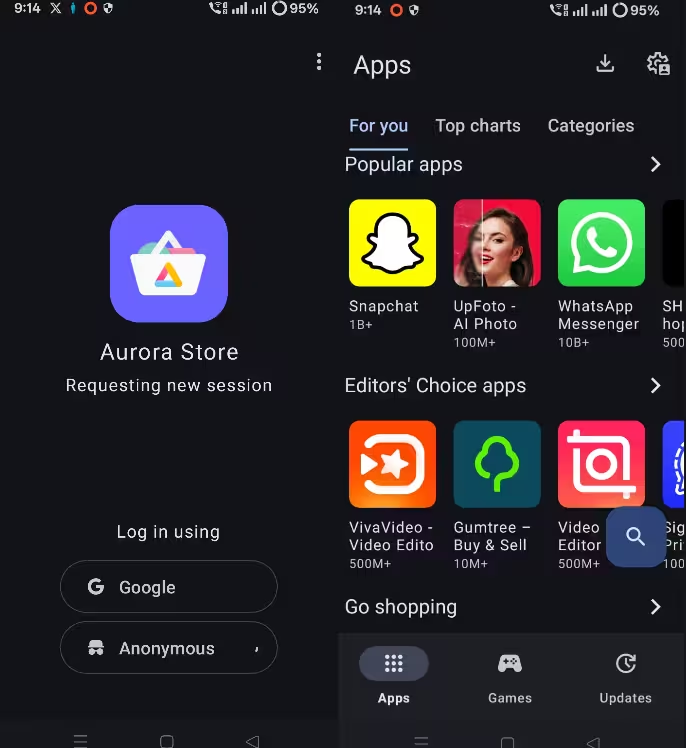
If you’ve ever wished you could browse the regular Play Store catalog without Google watching every move, Aurora Store is your answer. It’s not technically an app store with its own catalog — it’s a clever client that piggybacks on Google’s own servers and pulls the exact same APKs.
The result? You see the same apps, screenshots, ratings, and version updates as anyone on the Play Store — except you never have to sign into a Google account. For owners of Huawei phones or any device shipped without Google Mobile Services, Aurora Store is basically essential.
On first launch, you’ll see two login options: your personal Google account, or anonymous mode. Most people pick anonymous, which routes you through a pool of shared accounts maintained by the Aurora team. The trade-off is rare — occasionally a download might be rate-limited, but in everyday use it’s smooth.
Navigation feels instantly familiar. You get three tabs — Apps, Games, and Updates — with curated rows like “Popular Apps” and “Editors’ Choice.” The Updates tab even lets you filter out apps installed via F-Droid, which prevents signature conflicts that would otherwise block updates.
What makes Aurora Store special:
- Built-in Exodus Privacy reports — every app listing shows you exactly how many trackers are hiding inside.
- Plexus compatibility checker — find out instantly if an app will actually run on a phone without Google Services.
- Anonymous shared logins mean zero personal data ever touches your device.
- F-Droid filter in the Updates tab prevents accidental version conflicts.
✅ Pros
- Full Play Store catalog access
- No Google sign-in required
- Privacy tools built in
❌ Cons
- Anonymous logins occasionally throttle
- Apps themselves may still track you
2. F-Droid — The Original Open-Source App Store (Since 2010)
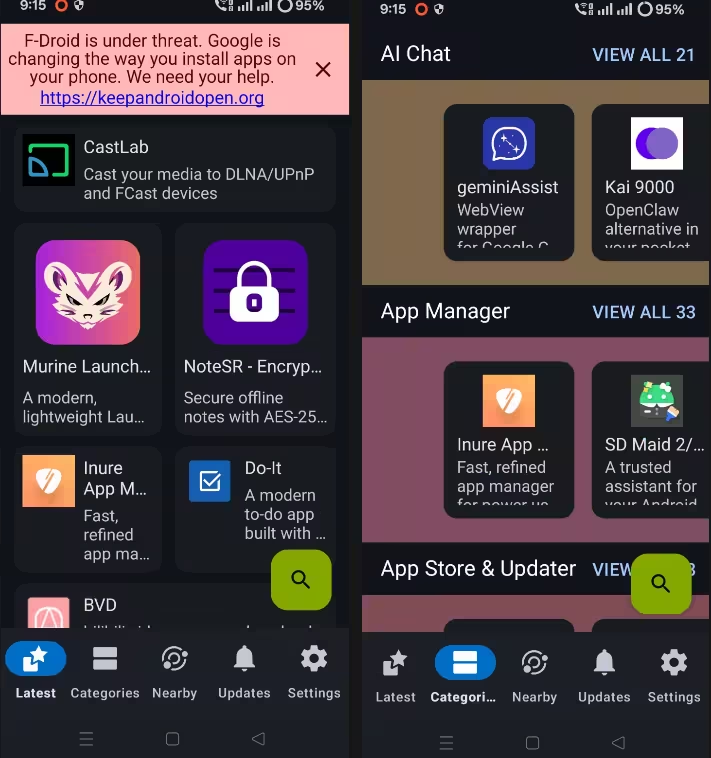
Born in 2010, F-Droid is the elder statesman of alternative Android app stores — and it’s never been more relevant. The entire catalog is built on one principle: every single app must be free, open-source, and verifiable from source code. Nothing else gets in.
You won’t find Instagram or WhatsApp here. What you will find is a thoughtfully curated library of thousands of apps that don’t spy on you, don’t show ads, and don’t try to upsell you a subscription every five minutes. F-Droid even goes the extra mile by labelling apps with “anti-features” tags — so you instantly see if something contains a tracker, advertising library, or proprietary dependency before you tap install.
The UI is no-frills but functional. Bottom tabs split the experience into Latest, Categories, Nearby, Updates, and Settings. Categories are well-organised — anything from password vaults to launchers, fitness apps, and developer tools.
What really sets F-Droid apart, though, are its power-user features that no other Android app store offers.
Hidden gems inside F-Droid:
- Offline app sharing via “Nearby” — beam apps to another F-Droid user over local Wi-Fi without ever touching the internet.
- Custom repositories — plug in IzzyOnDroid, Bitwarden, CalyxOS, or Cryptomator’s official repos with one tap.
- Tor integration via Orbot for truly anonymous downloading.
- IPFS gateway support + ability to host your own repo on an SD card or USB drive.
- Expert mode unlocks granular controls for hardcore tinkerers.
✅ Pros
- Zero ads, zero trackers guarantee
- Anti-features labels protect you
- Works offline via Nearby
❌ Cons
- No mainstream apps available
- Default interface feels old-school
3. Droid-ify — The F-Droid Glow-Up Nobody Asked For (But Everyone Loves)
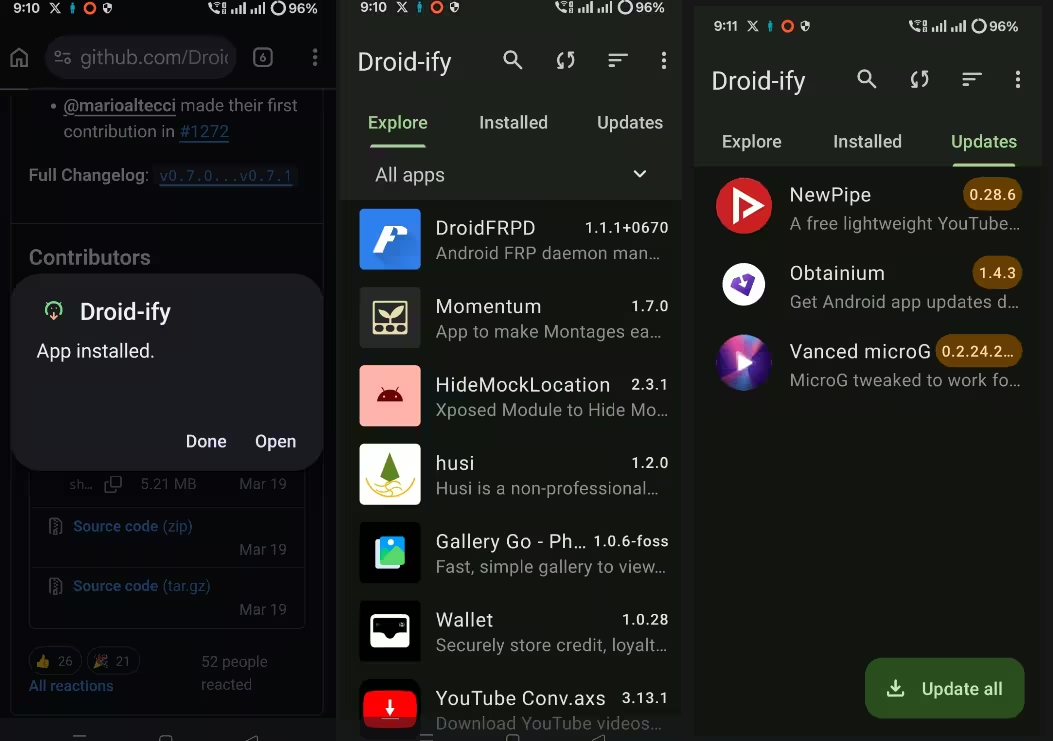
If you love what F-Droid stands for but the official app’s UI makes you wince, Droid-ify is the answer. Think of it as a fan-built front-end for the exact same F-Droid catalog — but rebuilt from the ground up with modern Material You design, snappier animations, and a far more intuitive layout.
You’re getting the same apps from the same official repository. The difference is in the experience. Tabs are pared down to three essentials: Explore, Installed, and Updates. Browsing categories like password managers, RSS readers, email clients, and launchers feels effortless.
Where Droid-ify really shines is repository management. Adding extra sources like IzzyOnDroid (which mirrors hundreds of GitHub-only apps), the official Bitwarden repo, Cryptomator, CalyxOS, or Collabora Office takes about 10 seconds each.
App listings themselves are detail-rich — screenshots, full descriptions, version history, permissions, and those crucial F-Droid anti-feature flags are all easy to scan at a glance. For security-minded users, Droid-ify even displays IzzyOnDroid’s build reproducibility logs, which prove an APK matches its source code exactly.
Why power users prefer Droid-ify:
- Lightning-fast repo syncing compared to the official client.
- One-tap repo additions — IzzyOnDroid, Bitwarden, CalyxOS & more.
- Automatic background updates with proxy support.
- Favorites & settings backup for quick phone migrations.
- Build reproducibility logs via IzzyOnDroid — confirm what’s inside every APK.
✅ Pros
- Beautiful Material You design
- Much faster than official F-Droid
- Effortless multi-repo support
❌ Cons
- Limited to F-Droid catalog
- No proprietary apps available
4. Obtainium — Skip the App Store Entirely, Pull Apps Straight From Developers
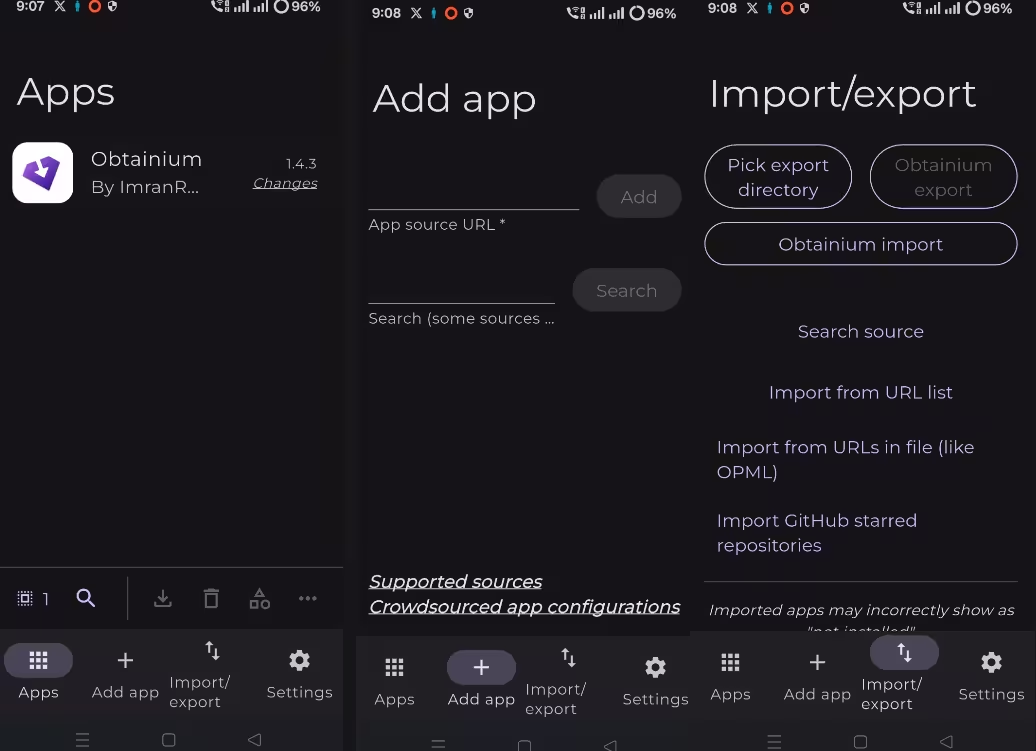
Here’s a wild concept: what if you could install Android apps directly from the same place developers actually publish them — and skip every middleman in between? That’s the entire pitch of Obtainium, and it’s surprisingly addictive once you get it set up.
There’s no catalog. No browsing. No “trending” section. Instead, you point Obtainium at a URL — a GitHub releases page, a GitLab repo, an F-Droid listing, or even the developer’s own download page — and it takes care of installing the APK plus checking for new versions automatically.
Adding apps is as simple as pasting a link. Want to follow NewPipe? Paste its GitHub URL. Bitwarden? Same deal. Obtainium handles the rest, including pushing you a notification the second an update drops.
The interface keeps things deliberately minimal: Apps, Add App, and Import/Export. That last tab is genuinely powerful — you can export your entire list as a backup, import URLs in bulk, parse an OPML file, or even automatically pull every Android repo you’ve starred on GitHub. There’s also a community-maintained list of pre-configured apps to get newcomers running fast.
Obtainium’s killer features:
- Source: anywhere — GitHub, GitLab, F-Droid, Codeberg, dev websites. If it has an APK, Obtainium can probably grab it.
- Import GitHub starred repos — turn your starred list into an instant app watchlist.
- OPML & URL-list imports for backup and bulk migration.
- Update check scheduling, Wi-Fi-only mode, charging-only mode.
- GitHub proxy + personal access tokens bypass API rate limits.
- Shizuku & Sui support for completely silent background installs.
- APK signature verification to confirm authenticity before installing.
✅ Pros
- Bypasses every app store entirely
- Auto-updates from GitHub releases
- Robust import/export options
❌ Cons
- Learning curve for non-techy users
- Zero discovery features
5. GitHub Store — Discover Trending Open-Source Apps With a Real Store Feel
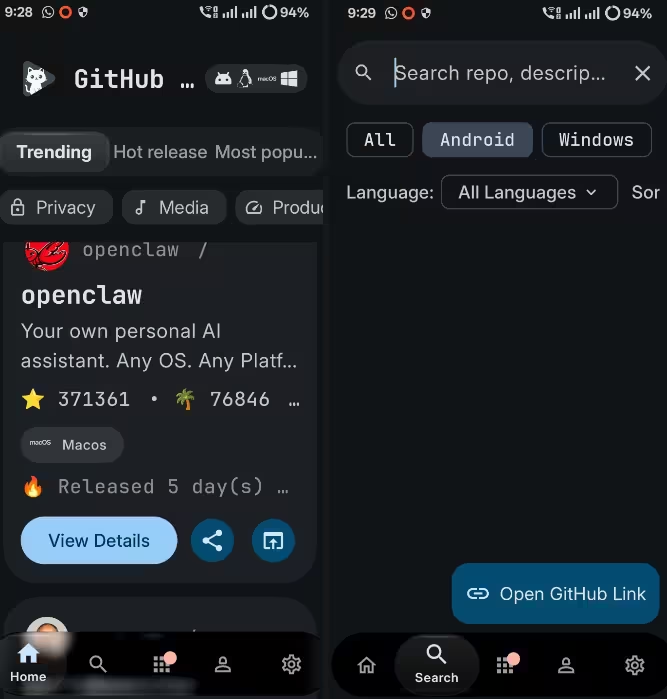
Of every alternative app store on this list, GitHub Store is the new kid — and arguably the most exciting. Its mission is dead simple: turn the chaos of GitHub’s Android ecosystem into an app store that actually feels like one.
Here’s the cool backstory — the entire project was built by a 17-year-old solo developer based in Uzbekistan, and within months it had earned serious respect across the Android open-source community. That’s the kind of indie energy that makes Android worth fighting for.
Open it up and you’re greeted with a home screen that looks suspiciously like a polished commercial app store — sections for Trending, Now Playing, Hot Releases, and Most Popular. Filters let you slice by platform (Android, Windows, macOS, Linux) or category (privacy, multimedia, productivity, system tools).
Each app card shows you the GitHub star count, programming language, release date, and a one-tap install button. There’s also a dedicated section that tracks every app you’ve installed via GitHub Store so you get notified the moment a new release goes live.
Logging in with a GitHub account is optional but adds perks — access to your starred repos, sync of favorites, and a much higher API request limit (which translates to a snappier browsing experience).
What makes GitHub Store stand out:
- Real app store browsing — Trending feeds, categories, search filters.
- Multiple themes + HTTP/SOCKS proxy support.
- Shizuku integration for silent installation.
- Custom auto-update intervals (3h, 6h, 12h, 24h).
- Preview/beta release support for bleeding-edge users.
- Cross-platform — same UI on Android, Windows, macOS, and Linux.
✅ Pros
- Polished, store-style discovery
- Cross-platform (PC + mobile)
- Active development
❌ Cons
- Limited to GitHub-hosted apps
- Still maturing as a project
Alternative App Stores for Android Compared (At a Glance)
Still can’t decide? Here’s a side-by-side breakdown of how the five best alternative app stores for Android stack up across the things that actually matter:
| App Store | Catalog Type | Google Account? | Best Use Case | Difficulty |
|---|---|---|---|---|
| 🥇 Aurora Store | Play Store mirror | ❌ Not required | Regular apps, no Google | Easy |
| 🥈 F-Droid | Open-source only | ❌ Not required | Privacy & FOSS apps | Easy |
| 🥉 Droid-ify | Open-source (F-Droid) | ❌ Not required | Modern F-Droid replacement | Easy |
| 🏅 Obtainium | Direct from developer | ❌ Not required | GitHub-tracked apps | Advanced |
| 🏅 GitHub Store | GitHub releases | Optional | Discovering OSS apps | Medium |
Final Verdict — Which Android App Store Wins?
🏆 Our Top Recommendation
👉 If you can only install one: Go with Aurora Store. It gives you the full Play Store catalog with zero Google account hassle — perfect for 90% of people.
👉 If privacy is everything: Pair Droid-ify (cleaner UI) with F-Droid’s catalog. You’ll only ever see open-source, ad-free, tracker-free apps.
👉 If you live on GitHub: Obtainium is unbeatable. Point it at any repo and forget about updates forever.
👉 If you love discovering new apps: GitHub Store turns FOSS browsing into an actual fun experience.
💡 The dream setup? Run Aurora Store + Droid-ify + Obtainium side by side. That covers regular Play Store apps, the entire open-source ecosystem, and direct-from-developer installs — all without Google ever seeing your activity.
How to Install Alternative App Stores Safely
Installing any of these Play Store alternatives is straightforward, but follow this quick checklist to stay safe:
- Download only from official sources — use the links in this guide. Sketchy APK aggregator sites are how malware spreads.
- Enable “Install unknown apps” permission for your browser or file manager when prompted (Settings → Apps → Special access → Install unknown apps).
- Keep Google Play Protect on — it adds a free extra layer of malware scanning even for sideloaded apps.
- Verify APK signatures where possible. Obtainium does this automatically; F-Droid rebuilds every app from source.
- Don’t disable system security warnings just to install something. If your phone flags an APK, investigate before continuing.
Will Android Still Be Open in 2027?
That’s the trillion-dollar question hanging over every alternative app store on this list. Android’s openness is what made it the most popular mobile OS on Earth — and Google’s September 2026 verification rules feel like the first serious crack in that foundation.
The good news? Projects like F-Droid aren’t going down quietly. Communities are organizing, custom ROMs like GrapheneOS and CalyxOS remain a refuge for power users, and tools like Obtainium are explicitly designed to stay one step ahead of Google’s gatekeeping.
The best thing you can do right now is actually use these alternative app stores. Adoption is leverage. The more people who run F-Droid, Aurora Store, and Obtainium daily, the harder it becomes for Google to shut the door.
Your turn: Which of these alternative app stores for Android do you already use — or are you a Play Store loyalist? Drop your setup in the comments below 👇 and if this guide saved you some time, share it with someone who’d appreciate a more open Android.
Frequently Asked Questions (FAQ)
What is the best alternative app store for Android in 2026?
For most people, Aurora Store is the best alternative app store for Android because it gives you the full Google Play Store catalog without requiring a Google account. If you specifically want open-source apps only, F-Droid (or its modern client Droid-ify) is the top pick. Power users typically combine Aurora Store, Droid-ify, and Obtainium for maximum coverage.
Are alternative app stores safe to use on Android?
Reputable alternative app stores like F-Droid, Aurora Store, Droid-ify, Obtainium, and GitHub Store are safe when downloaded from their official websites. F-Droid rebuilds every app from source code, Obtainium verifies APK signatures, and all five are open-source themselves so the code can be audited. Always keep Google Play Protect enabled as a safety net.
Will alternative app stores stop working after September 2026?
The app stores themselves will continue working, but apps from developers who haven’t completed Google’s identity verification may be blocked from installation on certified Android devices. The change first rolls out in Brazil, Indonesia, Singapore, and Thailand before going global. Open-source advocates are actively challenging the policy through the Keep Android Open campaign.
Do I need to root my Android phone to use these app stores?
No. Every alternative app store covered in this guide — Aurora Store, F-Droid, Droid-ify, Obtainium, and GitHub Store — runs perfectly on stock, non-rooted Android. You only need to grant the “Install unknown apps” permission to your browser or file manager during the initial setup.
What’s the difference between F-Droid and Droid-ify?
F-Droid and Droid-ify share the exact same app catalog because Droid-ify is a third-party client that connects to the official F-Droid repository. The only real difference is the user interface — Droid-ify offers a modern Material You design, faster syncing, and easier repository management. If you like F-Droid’s catalog but find its app dated, switch to Droid-ify immediately.
Can I use Aurora Store without a Google account?
Yes. Aurora Store’s headline feature is anonymous mode, which uses shared Google accounts maintained by the Aurora team. You get full access to the Play Store catalog without ever creating, signing into, or linking a Google account. Occasionally, a download might be temporarily rate-limited, but in everyday use it works smoothly.
Is Obtainium better than F-Droid?
Obtainium and F-Droid solve different problems. F-Droid is excellent for browsing and discovering open-source apps inside a curated catalog. Obtainium is better when you already know which apps you want and prefer to install them directly from a developer’s GitHub or GitLab page, with automatic update notifications. Most power users actually run both side by side.
Which alternative app store has the biggest catalog?
Aurora Store has the largest selection because it mirrors the entire Google Play Store — millions of apps. F-Droid features thousands of curated open-source apps. Obtainium technically has an unlimited “catalog” because you can add any APK source URL to track, but it has no discovery features.
Can I install apps from these stores in India?
Yes, all five alternative app stores work in India and globally. India is not part of the initial September 2026 verification rollout (which targets Brazil, Indonesia, Singapore, and Thailand first), so for now Indian Android users have full access to Aurora Store, F-Droid, Droid-ify, Obtainium, and GitHub Store with no restrictions.


Discover more from Techno360
Subscribe to get the latest posts sent to your email.
You must be logged in to post a comment.