
🎁 MINITOOL GIVEAWAY · OCTOBER 2026 · 6-MONTH PRO KEY
Back up, clone and rescue your Windows PC — with every Pro feature unlocked for free
MiniTool has a fresh ShadowMaker Pro giveaway running: download the official installer, paste the free license key below, and you get system-disk cloning, full/differential backup schemes, event-triggered backups and Universal Restore for six months. No credit card, no sign-up.
Windows 11/10/8.1/8/7
Version 4.8.1
6-month Pro license
⏳ Limited activations
⚡ Quick Read
- What: MiniTool ShadowMaker Pro 4.8.1 — an image backup, file sync, disk clone and recovery suite for Windows. The Pro Ultimate licence normally costs $79.
- Giveaway: a 6-month Pro registration key, published below, that works with MiniTool’s official giveaway installer.
- Best bits: system/disk/partition/file backup, HDD-to-SSD system disk cloning, full & differential schemes, event-triggered backups, Universal Restore and WinPE rescue media.
- Catch: it’s a 6-month subscription, not lifetime; personal use on one PC; the shared key has limited activations, so register today.
- Time needed: about 5 minutes. Jump to the claim steps ↓
A hard drive failure, a bad Windows update or a ransomware attack can wipe out years of photos and documents in seconds. A proper data backup tool is the cheapest insurance you can buy — and right now, one of the best ones is free. MiniTool is giving away MiniTool ShadowMaker Pro licence keys, unlocking the full Pro feature set on Windows 11 and 10 for six months.
What Is MiniTool ShadowMaker Pro?
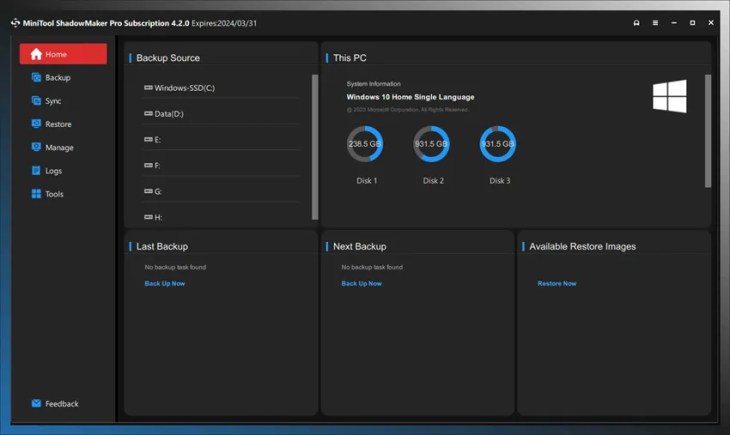
MiniTool ShadowMaker is a Windows backup and recovery program from MiniTool Software Limited, the company behind MiniTool Partition Wizard. It creates image backups of your system, partitions or entire disks, backs up individual files and folders, syncs folders, and clones drives — all from one clean interface.
Its standout feature is the WinPE bootable media builder. If Windows refuses to boot, you can start the PC from a ShadowMaker rescue USB and restore everything without reinstalling Windows. For anyone who has rebuilt a PC from scratch after a crash, that alone is worth the download.
What’s New in MiniTool ShadowMaker 4.8 (2025–2026)
The giveaway installer is a small (about 12 MB) online installer that fetches the current build — version 4.8.1, updated in May 2026. Recent releases have focused on polish and reliability:
| Version | Released | Highlights |
|---|---|---|
| 4.8.1 | May 2026 | Current build; maintenance update on top of 4.8 |
| 4.8 | Aug 2025 | Create and rename folders when choosing a backup destination; bootable media on USB hard drives; High-DPI fix for Media Builder; network-drive crash in WinPE fixed |
| 4.6 | Nov 2024 | Custom task names for backup and sync; Windows-style disk usage colours on the Home page; random script-error pop-ups fixed |
Key Features of MiniTool ShadowMaker Pro
1. Every kind of backup
- System backup — image the partitions Windows needs to boot, ready for one-click restore.
- Disk & partition backup — capture a whole drive or a single partition into a compressed image file.
- File & folder backup — back up just your Documents, Pictures or project folders.
- Backup schemes — incremental, plus full and differential in Pro, with automatic cleanup of old versions to save space.
2. Scheduled and event-triggered backups
Run backups daily, weekly or monthly — or, with Pro, automatically when you log on or off. Set it once and ShadowMaker keeps your backups current without you thinking about it.
3. Disk cloning and SSD upgrades
Clone Disk copies an entire drive to another one. With Pro, that includes your Windows system disk — the easiest way to move to a faster SSD without reinstalling Windows or your apps.
4. Disaster recovery tools
- Media Builder — create a WinPE rescue USB or ISO to recover an unbootable PC.
- Universal Restore (Pro) — restore a system image to different hardware and fix boot problems afterwards.
- Backup from the rescue media (Pro) — image a PC even when Windows can’t start.
- Password protection & encryption — keep your backup images private.
5. File sync and remote management
Sync keeps an exact copy of folders on another drive or a network share, and Pro’s remote management lets you control ShadowMaker on another computer on your network.
MiniTool ShadowMaker Free vs Pro (Giveaway)
Here’s what the free licence key actually unlocks over the regular free edition:
| Feature | Free | Pro (giveaway) |
|---|---|---|
| File, folder, partition, disk & system backup | ✔ Yes | ✔ Yes |
| Scheduled backups (daily/weekly/monthly) | ✔ Yes | ✔ Yes |
| Incremental backup scheme | ✔ Yes | ✔ Yes |
| Full & differential backup schemes | ✘ No | ✔ Yes |
| Event-triggered backup (log on / log off) | ✘ No | ✔ Yes |
| File sync | ✔ Yes | ✔ Yes |
| Clone a non-system disk | ✔ Yes | ✔ Yes |
| Clone the Windows system disk (HDD → SSD) | ✘ No | ✔ Yes |
| Media Builder (WinPE rescue USB) | ✔ Yes | ✔ Yes |
| Backup from the bootable media | ✘ No | ✔ Yes |
| Universal Restore | ✘ No | ✔ Yes |
| Remote computer management | ✘ No | ✔ Yes |
Sources: MiniTool’s edition comparison page and PCWorld’s ShadowMaker Pro review.
Giveaway Terms at a Glance
| Software | MiniTool ShadowMaker Pro 4.8.1 (giveaway build) |
| Normal price | Pro Monthly $12.99/month · Pro Annual from $3/month · Pro Ultimate $79 lifetime |
| Giveaway licence | 6-month Pro subscription, free upgrades during the term |
| Licence key | 280961-5BA718-73E11B-5738EB (shared key, limited activations) |
| PCs / use | 1 PC, personal and home use; no free technical support |
| Download | MiniTool_ShadowMaker_Giveaway.exe — official online installer, about 12 MB |
| System | Windows 11, 10, 8.1, 8 and 7 (all editions); 1 GHz CPU, 2 GB RAM (64-bit), 1.5 GB free space |
| Account needed? | No — no email or sign-up required |
How to Get MiniTool ShadowMaker Pro for Free (October 2026)
It takes about five minutes. Follow these steps in order:
Step 1: Download the official giveaway installer
Click the button below to download MiniTool_ShadowMaker_Giveaway.exe directly from MiniTool’s own CDN.
⬇ Download MiniTool ShadowMaker Pro (Official)
Step 2: Install MiniTool ShadowMaker
Run the installer. It downloads and installs the latest version automatically, which takes about two minutes on a normal connection.
Step 3: Copy the free licence key
🔑 MiniTool ShadowMaker Pro License Key
280961-5BA718-73E11B-5738EB
6-month Pro subscription · 1 PC · personal/home use · copy it without spaces
Step 4: Register ShadowMaker Pro
Open MiniTool ShadowMaker and click the key icon in the top-right corner of the main window, paste the licence key, and click Register. Once the registration succeeds, every Pro feature is unlocked for six months.

⚠️ Key not working? Paste it without spaces, and use the giveaway installer above rather than an older ShadowMaker build. The key is shared and has a limited number of activations — if it says the key is invalid or used up, the quota has run out. Bookmark our Free Stuff page for the next MiniTool giveaway.
Set Up Your First Backup in 3 Minutes
- Click Backup in the left menu. ShadowMaker pre-selects your Windows system partitions as the Source.
- Click Destination and pick an external drive or network share — never the same disk you’re backing up.
- Click Options > Schedule Settings to run it weekly, and pick a Backup Scheme to auto-delete old versions.
- Click Back up Now.
- Finally, go to Tools > Media Builder and make a rescue USB, so you can restore even if Windows won’t boot.
Pros and Cons
👍 Pros
- Clean, beginner-friendly interface
- System, disk, partition and file backup in one tool
- System disk cloning makes SSD upgrades painless
- WinPE rescue media and Universal Restore for disaster recovery
- Small official installer, no account or email needed
👎 Cons
- Only six months of Pro — not a lifetime licence
- Shared key with limited activations
- Windows only; servers need the Business edition
- No free technical support for giveaway users
📊 Techno360 Verdict: grab it before the activations run out
ShadowMaker Free is already a solid backup tool, but the Pro key unlocks the parts you actually need on a bad day: cloning your Windows drive to a new SSD, restoring an image to different hardware, and backing up from a rescue USB when Windows won’t start. Six months is long enough to migrate to a new drive, build a rescue USB and get a proper backup routine going — all for $0.
- Best for: home users upgrading to an SSD or setting up their first full-system backup
- Skip if: you need a lifetime licence or server support
- Rating: Must-grab giveaway
Frequently Asked Questions
Is MiniTool ShadowMaker Pro really free?
Yes, for six months. MiniTool’s October 2026 giveaway gives you a ShadowMaker Pro registration key at no cost. You only need the official giveaway installer and the key published in this article; no credit card or account is required.
How long does the free MiniTool ShadowMaker Pro license last?
The giveaway key is a 6-month Pro subscription for one PC. It is not a lifetime licence, and it is meant for personal, home use.
What happens after the 6 months end?
The Pro features lock again. You can keep using MiniTool ShadowMaker Free, which still covers scheduled image and file backups, or buy a Pro licence. Restoring your existing backups should be possible with the free edition, so keep your images safe.
Why is my MiniTool ShadowMaker key not working?
Copy the key exactly, without spaces, and paste it into the key-icon registration window of the giveaway build. The shared key has a limited number of activations, so if it is rejected the giveaway quota may already be used up — in that case, watch our Free Stuff section for the next MiniTool offer.
Does MiniTool ShadowMaker Pro work on Windows 11?
Yes. MiniTool lists support for Windows 11, 10, 8.1, 8 and 7, all editions. Windows Server needs the separate Business edition.
Can MiniTool ShadowMaker clone an HDD to an SSD?
Yes. The Clone Disk tool copies a whole drive to another disk. Cloning the system disk you boot Windows from is a Pro feature, which this giveaway unlocks; non-system disks can also be cloned in the free edition.
What is the difference between MiniTool ShadowMaker Free and Pro?
The free edition handles file, system, partition and disk backups, scheduled backups, the incremental scheme, file sync, non-system disk cloning and bootable media. Pro adds system disk cloning, full and differential backup schemes, event-triggered backups, backups from the bootable media, Universal Restore and remote management.
Can I restore my PC if Windows won’t boot?
Yes. Use Tools > Media Builder to create a WinPE rescue USB while your PC is working. If Windows later fails to start, boot from that USB and restore your system image from ShadowMaker’s recovery environment.
More Free Backup Software & Giveaways
Building a complete backup kit? Compare this offer with AOMEI Backupper Pro 8.4 (free 1-year licence) and Ashampoo Backup Pro 26, or try Abelssoft EasyBackup 2026 for simple one-click backups. Keep an eye on drive health with Hard Disk Sentinel, and sync folders with Synchredible Pro.
Still on an older Windows build? Read our Windows 11 24H2 end-of-support guide — and back up first. More tools live in our Backup section, and new free licences land every week in the Techno360 Free Stuff hub.
Know someone who has never backed up their PC? Share this giveaway with them while the key still works.


Discover more from Techno360
Subscribe to get the latest posts sent to your email.