

NEAT Projects 3 Free Full Version — Remove People, Cars & Passers-By From Your Photos
Franzis is handing out full-version licences for its clever object-removal editor. No crack or modified installer — you activate the official Franzis build with a serial key mailed straight to your inbox. Here’s how to claim it in about five minutes.
You lined up the perfect shot of a cathedral, a lake promenade or a busy square — and then a stranger strolled straight into frame. It happens to everyone. NEAT Projects 3 from German publisher Franzis solves this in a way that feels almost like a magic trick: it studies a burst of photos, spots what moved between frames, and quietly deletes it. What’s left is a clean, empty scene, as if the crowd was never there.
The catch used to be the price tag — the commercial version is normally sold for around $99 and ships as a 30-day trial. Right now, though, an official Franzis promotion (tied to a ComputerBild campaign) hands you the full version at no cost, and per the giveaway terms it’s a lifetime licence for personal use. I registered, downloaded and activated a copy on my own Windows 11 machine before writing this, so every step and link below is what I actually saw.

Quick Read — What You’re Getting
| What it is | Automatic object-removal & photo optimiser (v3.32, 64-bit) |
| Publisher | Franzis Verlag GmbH (Germany) |
| Platform | Windows 10 / 11 (64-bit) |
| Regular price | ~$99 / €99 — free right now |
| Licence | Lifetime full version (personal, non-commercial use) |
| Languages | English, German, French |
| Download size | ~102 MB (ZIP installer) |
| How to claim | Email registration → confirmation link → User-ID + registration key |
- OS: Windows 10 / 11, 64-bit
- Email: required to receive the giveaway key
- Download: ~102 MB ZIP from Franzis
- Licence: personal, non-commercial (per giveaway terms)
- Activation: needs the Franzis registration key
- Tip: claim the key now — giveaway pages can close without notice
What NEAT Projects 3 actually does
The idea is simple but the engineering behind it isn’t. Instead of cloning pixels the way a retouch brush does, NEAT Projects works from a series of shots taken of the same scene. Anything that stays put across the frames (a building, a bench, the sky) is treated as “the scene.” Anything that shifts — a walker, a cyclist, a moving car — is flagged as an intruder and blended out using the pixels from the other frames. Because it borrows from real image data, the result usually holds up without the smeared, obviously-edited look.
You can feed it up to 200 images in a single series, in RAW, JPEG, TIFF or PNG. If your first result looks off, there are six different motion algorithms to swap between, plus per-image weighting so you can push or pull the influence of individual shots. It’s the kind of control that turns a “close enough” export into a genuinely clean one.
What NEAT Projects 3 can remove
- Tourists and pedestrians wandering through the shot
- Passing cyclists
- Moving cars and traffic
- Any other subject that changes position between exposures
- Temporary movement in an otherwise still scene
The important limitation: it works best when the camera stays relatively fixed and the unwanted subjects move between shots. It is not a single-photo, Generative-Fill-style eraser — if you only have one frame, this isn’t the tool for the job.
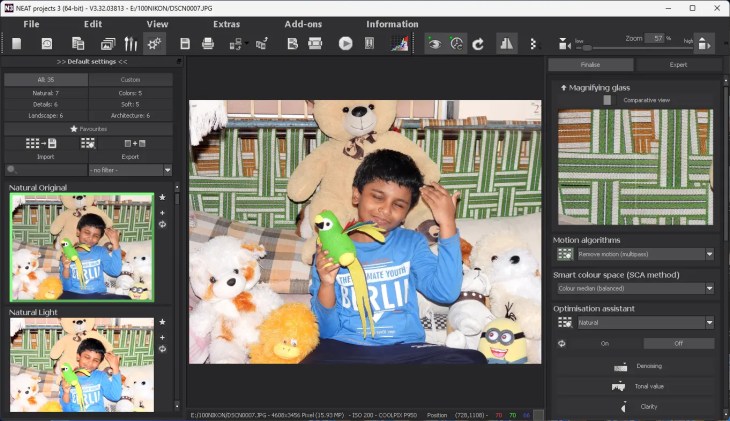
It isn’t a one-trick tool, either. Once the scene is clean, you get a full editing suite on top:
- 35 ready-made presets built from a stack of up to 90 stackable filters — noise reduction, grain, colour dynamics, tonal work and more.
- A Selective Drawing brush with edge detection, so you can lighten, darken, sharpen or boost colour in just one part of the frame.
- A RAW workflow for white balance, exposure and distortion tweaks before you even start.
- A repair brush for the little blemishes the automatic pass misses.
- Over 70 crop templates and a side-by-side comparison view with a magnifier.
How to get NEAT Projects 3 free — step by step
The whole process splits into two halves: request your key, then download and activate. Do the registration first — the key lands in your inbox while the installer downloads.
Part 1 — Request your free licence key
- Open the official giveaway page: reg.franzis.de → NEAT Projects 3 (Computerbild).
- Type in your email address, tick the box to accept the data terms, clear the “I’m not a robot” captcha, then hit Send.
- Within a few minutes you’ll get an email from Franzis (registrierung@post.franzis.de). Open it and click the confirmation link inside.
- That link opens a Franzis page showing your User-ID and Registration-Key (serial number). The same details are emailed to you — keep them safe.


Get the Free NEAT Projects 3 Licence →
Part 2 — Download, install and activate
- Grab the Windows installer from Franzis: NEAT-projects-3_winde.zip (~102 MB).
- Extract the ZIP and run the .exe installer. It supports German, English and French — pick English on first launch.
- Follow the on-screen prompts to finish installing, then open the app.
- On first run an activation window appears. Paste in your serial number and click Activate now.
- You’ll see an “Activation successful” message — click OK to finish. In my testing, this giveaway activation unlocked the full version rather than leaving the software in its initial 30-day trial state.

How to remove people and cars from photos with NEAT Projects 3
Once you’re in, the fastest way to see what it can do:
- Go to File → Import Image Sequence and select at least three photos of the same scene (Ctrl-click to multi-select), then click Open.
- Give it a moment — a cleaned result appears automatically.
- Not happy? Open the Motion Algorithms drop-down on the right and cycle through the options until the intruders vanish cleanly.
- Pick a preset on the left — Natural Light, Natural Shadows or Colorful Colors are good starting points — to polish the look.
- Save via File → Save result image.
Pro tip from experience: the tool corrects minor handshake, but you’ll get noticeably cleaner results if you shoot from a tripod with steady exposure. And the more frames you capture, the more raw material it has to rebuild the empty scene — in my testing, a burst of 8–10 shots generally gave the software more to work with than the bare minimum of three.
Is it safe and legit?
Yes. The giveaway is hosted through Franzis’ own registration system, and both the installer and the activation use Franzis’ services — this isn’t a cracked or repackaged copy. I downloaded the installer from a Franzis domain (transfer.franzis.de) and activated it with the registration details Franzis supplied through the promotion. Franzis is a long-established German software publisher, so the process is exactly what you’d expect from a legitimate vendor campaign. Giveaway pages can be pulled without warning, though, so if you want it, claim it sooner rather than later.
The Verdict
For photographers who regularly shoot travel, architecture or busy public spaces, the giveaway makes NEAT Projects 3 particularly easy to recommend. The automatic object removal does most of the heavy lifting, and the built-in filters mean you rarely need a second app to finish the job.
It’s not a general-purpose Photoshop replacement, and the personal-use licence rules out client work. But as a specialist that does one hard thing very well — plus a solid photo toolkit on top — it earns its spot. Claim it while the giveaway is live.
Related Franzis freebies worth grabbing
Franzis runs these promos often, and we keep the live ones listed on our Free Stuff giveaways hub. A few that pair nicely with NEAT Projects 3:
- NEAT Projects (earlier edition) — free license — the previous release of this same object-removal tool.
- DENOISE Projects 3 Pro — free download — the noise-reduction companion from the same “Projects 3” family.
- Franzis HDR Projects 10 — free giveaway — AI-driven HDR editing, another genuine lifetime licence.
Frequently Asked Questions
Is NEAT Projects 3 really free?
Yes. Franzis, via a ComputerBild campaign, is giving away the full version with a lifetime licence. You register with an email address, confirm it, and receive a genuine serial key — there’s no trial timer and no payment involved.
Can NEAT Projects 3 remove people from a single photo?
Not in the same way as a conventional AI object-removal tool. NEAT Projects 3 is built around image sequences: you photograph the same scene several times, and the software uses the differences between frames to remove moving subjects such as pedestrians, cyclists and cars. With only one photo, it can’t do this.
Does NEAT Projects 3 work on Mac?
The giveaway build covered in this guide is the 64-bit Windows version. Run it on Windows 10 or 11.
Is the giveaway licence for commercial use?
No. The free giveaway licence covers personal, non-commercial use on your own PC, and it doesn’t include free version upgrades or priority support. For paid client work you’d need to buy a commercial licence from Franzis.
What file formats does NEAT Projects 3 support?
It loads photo series in RAW, JPEG, TIFF and PNG, and can process up to 200 images in a single sequence.
Which operating systems does it run on?
This giveaway build is for Windows (10 and 11, 64-bit). The installer supports German, English and French.
How large is the download?
The installer ZIP from Franzis is roughly 102 MB. Extract it and run the .exe to install.
How do I activate the full version?
Launch the app, and on the activation window enter the serial number Franzis emailed you, then click “Activate now.” You’ll see an “Activation successful” message — click OK and the full version unlocks with no expiry.


Discover more from Techno360
Subscribe to get the latest posts sent to your email.