
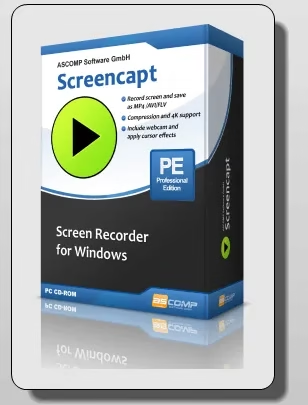
Record tutorials, webinars, meetings and gameplay with your webcam and voice on top. ASCOMP’s Screencapt Professional v3.006 normally costs $24.90 — one giveaway key unlocks it for nothing.
- What: ASCOMP Screencapt Professional v3.006 — screen recorder with webcam overlay, audio and on-screen drawing
- Normal price: $24.90 — free with the giveaway key below
- License: Full version, no expiry · up to 2 PCs · updates & support for up to 6 months
- Works on: Windows 11, 10, 8.1, 8, 7 (Intel & Windows on ARM)
- Deadline: Giveaway scheduled to end October 1, 2026
- Time needed: About 3 minutes — name, email, country, done
Screencapt is a lightweight screen recorder for Windows from German developer ASCOMP Software. It records your whole screen, a region or a single window, mixes in your microphone and system sound, and can drop a webcam bubble on top — everything you need for YouTube tutorials, course videos, meeting recordings and game clips.
The free Standard Edition stamps a watermark on every video and is limited to personal use. The Professional Edition removes the watermark and allows business use — and right now you can get a Screencapt Pro free license using an official giveaway key. Here’s how to claim it, what changed in version 3, and whether it deserves a place on your PC.
How to Get Screencapt Pro Free License (Step by Step)
The key is redeemed on ASCOMP’s own registration page, so the license lands in an official ASCOMP customer account — no third-party installers.
5I9QI-EYENZ-FWEQH-ONSALE
- Open the registration page: go to the ASCOMP full version giveaway page. The license key field should already show
5I9QI-EYENZ-FWEQH-ONSALE— if it’s empty, paste the key in. - Fill in your details: enter your first name, last name and email address, pick your country (India is in the list), and click Send. Use a real inbox — the license data is emailed to you.
- Confirm your email: open the message from ASCOMP Software and click the confirmation link. Check Spam/Promotions if it hasn’t arrived within a few minutes.
- Log in to your ASCOMP account: the email includes your Customer ID and password. The link takes you to the account page where the Screencapt Professional installer is waiting.
- Download & unlock: click Download Full Version, run the installer, and if it asks, type the ten-digit Customer ID from your account page and hit Unlock. Finish setup — you’re on Pro.

- Version covered: Screencapt Professional v3.006 — the license doesn’t expire.
- Downloads, updates and tech support: up to 6 months. No free upgrade to a future major version.
- Install on up to two PCs.
- Key must be redeemed before October 1, 2026. Download and back up the installer right away.
What Is ASCOMP Screencapt?
Screencapt is a no-fuss screen recorder for people who want a clean video without learning a full editing suite. You pick an area, pick your audio sources, switch the webcam on or off, and press record. When you stop, the file is saved to your output folder — ready to upload to YouTube, send to a colleague, or drop into a video editor.
ASCOMP rebuilt the app in version 3.0 with native 64-bit support, then added high-DPI support in 3.001. The current v3.006 (released August 2026) fixes microphone volume control, so it’s a mature, stable build to lock in.

Screencapt Pro Key Features
🖥️ Flexible recording areas
Capture the entire screen, a manually selected region, or one specific window. Window mode is ideal for software demos because notifications and other apps stay out of the shot.
🎙️ Microphone + system audio, separately controlled
Record your voice-over and PC sound together. Since v3.0 you can choose the exact audio devices and set volume levels for each, so a loud game won’t drown out your commentary. See more audio recording tools.
📷 Webcam overlay
Add a live webcam window to the recording. Drag it to any position and resize it by pulling its edges — perfect for reaction videos, lessons and product walkthroughs.
✏️ Draw and annotate while recording
Highlight areas, draw arrows and add notes live, with anti-aliased strokes (added in v3.0) so lines look smooth instead of jagged.
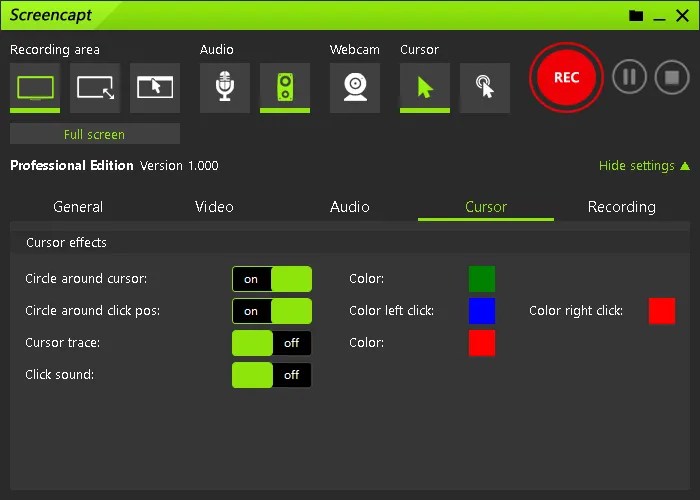
🖱️ Cursor effects
Hide the pointer completely, or add click and highlight effects so viewers never lose track of what you’re clicking.
⏰ Scheduled recording
Set a start time and let Screencapt record a live webinar, stream or online class while you’re away — new in version 3.
🎬 120 FPS with H.264 compression
Record at up to 120 frames per second for smooth gameplay and fast scrolling. The H.264 codec keeps files small, and adjustable compression lets you trade size for quality. Save as MP4, AVI or FLV.
Screencapt Free vs Screencapt Pro
| Feature | Standard (Free) | Professional (Giveaway) |
|---|---|---|
| Watermark on videos | ❌ Yes | ✅ None |
| Business / commercial use | ❌ Personal only | ✅ Allowed |
| Screen, region & window capture | ✅ | ✅ |
| Webcam, audio, drawing, 120 FPS | ✅ | ✅ |
| Price | $0 |
In short: the recording features are the same — the Pro license is what makes your videos look professional (no watermark) and lets you use them for client or company work.
System Requirements
- OS: Windows 11, 10, 8.1, 8, 7 · Windows Server 2016 / 2019 / 2022 / 2025
- Processor: Intel-compatible or Windows on ARM
- RAM: 2 GB minimum (4 GB recommended)
- Disk space: about 50 MB
- Version: 3.006 (August 2026)
Who Should Grab This?
- YouTubers & course creators making tutorials with a face-cam and voice-over
- Teachers and students recording online classes — schedule it and walk away
- Office teams & IT support documenting processes or bug reproductions
- Gamers who want quick 120 FPS clips without a heavy capture suite
Who should skip it: if you need a built-in timeline editor, zoom-and-pan effects or direct streaming to Twitch/YouTube, Screencapt isn’t that. Pair it with a free editor like VSDC Video Editor Pro for cutting and titles.
More Free Screen Recorders & ASCOMP Giveaways
- SurFlex Screen Recorder free license key — Windows & Mac recorder
- Coolmuster Screen Recorder giveaway — free 1-year license
- ZD Soft Screen Recorder v12 free license — lightweight game and desktop capture
- Ashampoo Snap 17 free license — screenshots, video capture and OCR
- ZD Screen Marker Pro free license — draw on screen during presentations
- ASCOMP Text-R Pro free and BackUp Maker Pro free license — more ASCOMP freebies
For every live deal, browse the Techno360 Free Stuff hub.
✅ Techno360 Verdict: Easy Yes
Screencapt Pro does the everyday recording jobs well — region or window capture, webcam overlay, separate mic and system audio, live drawing and 120 FPS output — without a learning curve. The giveaway removes the watermark, which is the only real reason to pay. For a free, permanent license, it’s an easy install.
- No watermark, business use allowed
- Webcam overlay + live annotations
- Scheduled recording
- Runs on older PCs and Windows on ARM
- No built-in video editor
- No live streaming
- Updates limited to 6 months
Score: 8/10 for tutorials, lessons and meeting recordings · Claim it free →
FAQ
Is Screencapt Pro really free?
Yes, for a limited time. Entering the giveaway key 5I9QI-EYENZ-FWEQH-ONSALE on ASCOMP’s official registration page unlocks the Screencapt Professional v3.006 full version, which normally costs $24.90. The offer is scheduled to end on October 1, 2026.
How long does the Screencapt Pro giveaway license last?
The license itself doesn’t expire. Free updates, downloads from your ASCOMP account and technical support are limited to up to 6 months under the giveaway terms — you keep v3.006 permanently but won’t get future major upgrades free.
What is the difference between Screencapt Free and Screencapt Pro?
The free Standard Edition is for personal use and evaluation and adds a watermark to recordings. The Professional Edition removes the watermark and permits business use.
Which Windows versions does Screencapt support?
Windows 11, 10, 8.1, 8 and 7, plus Windows Server 2016, 2019, 2022 and 2025. It supports Intel-compatible PCs and Windows on ARM, needs 2 GB RAM (4 GB recommended) and about 50 MB of disk space.
What video formats and frame rates does Screencapt support?
Screencapt records at up to 120 FPS and uses the H.264 codec with adjustable compression. You can save recordings as MP4, AVI or FLV.
Can Screencapt schedule a recording automatically?
Yes. Scheduled recording was added in Screencapt 3.0, together with native 64-bit support, audio device selection and separate volume levels.
Discover more from Techno360
Subscribe to get the latest posts sent to your email.
