
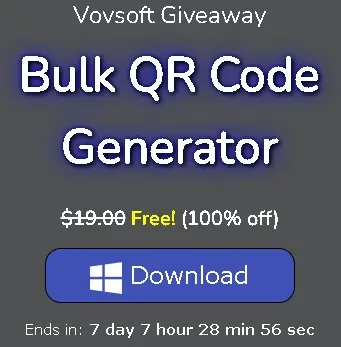
Offer Status: 🟢 ACTIVE—Expires 10 Oct, 12:30 IST
Platform: Windows 11 / 10 / 8 / 7
Official Partner: Vovsoft
Disclaimer: This is an official promotional giveaway by Vovsoft. We do not host cracked or pirated software. The license key is for personal, non-commercial use only.
Vovsoft Bulk QR Code Generator is a lightweight Windows desktop tool that lets you create hundreds — or even thousands — of QR codes in one go, without needing an internet connection. The full version normally costs $19, but Vovsoft is currently running a limited-time giveaway where you can grab a lifetime license completely free. The offer ends on July 12, 2026, so grab it while you can.
Why We Are Featuring This Tool
There are plenty of free online QR code generators, but most of them only let you create one code at a time — which is frustrating when you need to generate codes for an entire product catalogue or a list of employee IDs. Vovsoft’s Bulk QR Code Generator solves this by letting you import a plain text file and batch-generate all your codes in seconds.
It works completely offline, which is a plus if you handle sensitive business data. You can also customise each code’s size, shape, colour, and output format (PNG, JPEG, GIF, BMP), making it useful for everything from product labels to event badges. If you deal with barcodes or QR codes regularly for your business, this is the kind of tool worth having on your PC.

Vovsoft Bulk QR Code Generator — Main Window (Windows 11)
What is a QR Code?
Quick Response (QR) codes are 2D matrix barcodes that store information — like a website URL, contact details, product ID, or plain text — in a scannable format. Unlike a standard barcode that only holds a handful of characters, a QR code can store several hundred characters of data.
They are widely used in marketing materials, product packaging, restaurant menus, digital business cards, and event ticketing. Most smartphones can scan them natively through the camera app, making QR codes one of the most practical ways to bridge the gap between physical and digital content.
Pros & Cons of Vovsoft Bulk QR Code Generator
| What We Liked | What Could Be Better |
|---|---|
| Generate thousands of QR codes in one batch | No built-in QR code scanner or reader |
| Works completely offline — no data leaves your PC | Output customisation options are basic compared to premium tools |
| Supports PNG, JPEG, GIF, and BMP output formats | Interface is simple but a bit dated-looking |
| Customise size, shape, and colour of each code | No Mac or Linux version |
| Import text files for bulk processing | Free trial is limited; full features need a paid/giveaway license |
| Lightweight — runs well on older hardware |
About Vovsoft Bulk QR Code Generator
This desktop application for Windows makes it easy to generate large numbers of QR codes without any fuss. Here is what you can do with it:
- Import a plain-text file (.txt) with one entry per line — each line becomes a separate QR code
- Manually enter data into the input list if you only have a handful of entries
- Adjust image dimensions (width & height in pixels) and select your preferred output format
- Choose from multiple QR code shapes and colour schemes
- Save individual codes or export all of them to a folder in one click
This kind of batch automation is a real time-saver if you are running a small business, managing inventory, or printing QR codes for a large event. Instead of generating each QR code one by one, you can have everything done in under a minute.
How to Use Vovsoft Bulk QR Code Generator
Here is a quick step-by-step walkthrough of how the tool works:
- Download and install the software (desktop installer or portable zip — see links below)
- Open the app and either type your entries manually or click File > Import to load a text file
- Choose the image size (width & height in pixels)
- Select your output format: PNG, JPEG, GIF, or BMP
- Click “Save single image…” for one code, or “Save all to folder…” for the entire batch

How to use Vovsoft Bulk QR Code Generator — step-by-step workflow
How to Claim Your Free License (Step-by-Step)
Follow these steps carefully to activate your free license before the promotion expires on October 10, 2026.
[New Giveaway]:
Simply download the giveaway version installer from here: Giveaway_Bulk_QR_Code_Generator.exe.
Launch the installer, follow the on-screen prompts to finish the installation, and then you can start using the full version—the installer has already been activated, so you won’t need the activation code.
Note: The giveaway installer is offered for version 2.6, and the giveaway ends on 10 October at 12:30 IST
[Previous Giveaway-Expired]
Download the installer: Get the setup file from the official Vovsoft desktop installer or grab the portable ZIP edition if you prefer not to install anything.Install and launch the application on your Windows PC.Click “Enter License Key” when prompted (you will see this option in the app’s main interface or under Help > Register).Copy and paste the license key from the box below, then click Register or Activate.
Official Giveaway License Key:
H8WM6-HYQXR-3G7M4
Note: This key must be activated before July 12, 2026. It is for personal, non-commercial use only.
You can also visit the official Vovsoft giveaway page to get the key directly from the source.
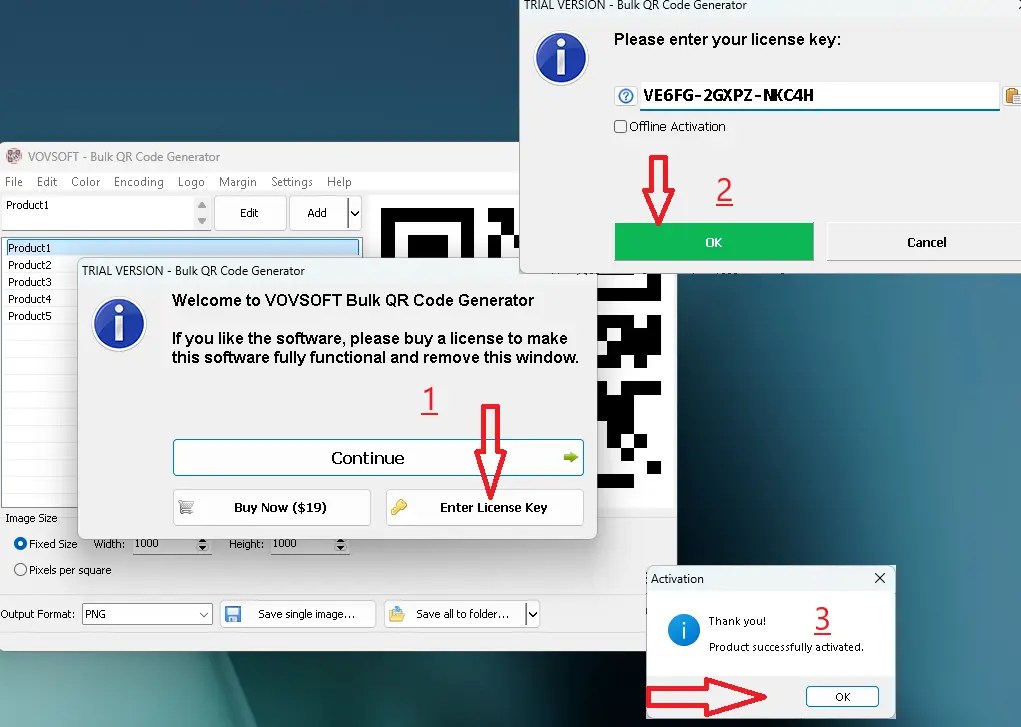
Vovsoft Bulk QR Code Generator — License activation screen
Vovsoft Bulk QR Code Generator vs. Free Alternatives
There are a few free tools that can create QR codes, but none of them match the batch capabilities of this software. Here is how it compares:
| Feature | Vovsoft Bulk QR Code Generator | QR Code Monkey (Online) | ZXing (Open Source) |
|---|---|---|---|
| Batch / Bulk Generation | Yes — unlimited | No — one at a time | Limited via command line |
| Works Offline | Yes | No — requires internet | Yes |
| Custom Size & Colour | Yes | Yes (limited on free plan) | Requires manual config |
| Output Formats | PNG, JPEG, GIF, BMP | PNG, SVG | PNG |
| Import from Text File | Yes | No | Yes (via CLI) |
| Ease of Use | Beginner-friendly GUI | Web-based, easy | Requires technical knowledge |
| Cost | Free (this giveaway) | Free with limits | Free / Open Source |
Bottom line: If you need to generate QR codes one at a time and are comfortable using a browser, free online tools work fine. But if you regularly need to produce batches of 50, 500, or 5,000 codes, Vovsoft’s desktop tool saves a huge amount of time. Grabbing this free license during the giveaway is a no-brainer.
Download Vovsoft Bulk QR Code Generator for Free

Official Vovsoft Giveaway Page — Bulk QR Code Generator free download
Click the button below to go to the official giveaway page and download the installer directly from Vovsoft’s servers:
Go to the Vovsoft Bulk QR Code Generator Giveaway Page →
Direct download links:
Discover more from Techno360
Subscribe to get the latest posts sent to your email.

You must be logged in to post a comment.