
🎁 Giveaway · Windows · Ends Nov 15, 2026
Photos to Video v2.6 — free lifetime license
Vovsoft is giving away its $19 slideshow maker for one week. Turn a folder of photos into an MP4, MKV, WEBM or GIF with background music — up to 4K resolution.
Was $19.00Now FREELifetime license
⚡ Quick Read
- Software: Vovsoft Photos to Video v2.6
- Regular price: $19.00 — free during the giveaway
- Giveaway period: November 8 – November 15, 2026
- License: Lifetime, no free updates, not for resale
- Works on: Windows 11, 10, 8/8.1 and 7 (64-bit)
- License key: DJMXL-VH3Q5-JHEZT

What Is Vovsoft Photos to Video?
Vovsoft Photos to Video is a lightweight Windows program that turns a set of still images into a video slideshow. You add your photos, optionally pick a music track, set how long each image stays on screen, and click Convert. There’s no timeline, no transitions to configure and no learning curve — it does one job and does it quickly.
That makes it handy for quick jobs: a birthday or wedding slideshow, a product showcase for social media, a video built from screenshots for a YouTube tutorial, or an animated GIF from a series of frames. Under the hood it uses FFmpeg for merging and conversion, so the output plays everywhere.
We covered a one-year license for this app back in 2024. This time the offer is better: the 2026 giveaway comes with a lifetime license.
Key Features
- Photos to video with music — images play in the order you load them, with an optional WAV or MP3 soundtrack.
- Drag-and-drop ordering — reorder images with the mouse or the arrow buttons below the file list.
- Per-image duration in milliseconds — the default 1000 ms equals one image per second (1.00 FPS); lower it for faster sequences.
- Resolutions from SD to 4K — 640×480, 1280×720, 1920×1080, 2560×1440, 2048×1080, 3840×2160, or a custom size.
- Two encoders — use the built-in encoder or switch to OpenH264 for better quality.
- Add a whole folder at once — no need to pick images one by one.

Supported Formats
- Image input: BMP, JPEG, GIF, PNG, TIFF
- Audio input: WAV, MP3
- Video output: MP4, WEBM, MKV, FLV, MOV (QuickTime), AVI, MPEG, WMV
- Animation output: animated GIF

How to Get Vovsoft Photos to Video for Free
- Visit the official Vovsoft Photos to Video giveaway page.
- Click Download, or grab the installer directly from the Vovsoft download page.
- Install and launch the program. A welcome window appears — click Enter License Key.
- Paste the license key below and click OK.
- You’ll see “Thank you! Product successfully activated.” Click OK and the trial notice is gone.
Giveaway License Key
DJMXL-VH3Q5-JHEZT

How to Make a Video from Photos
- Click Add Files or Add Folder to load your images.
- Reorder them with drag-and-drop or the arrow buttons.
- Click the folder icon next to Audio to add background music (optional).
- Set the Image Duration in milliseconds.
- Choose a Video Output Format and Video Output Resolution.
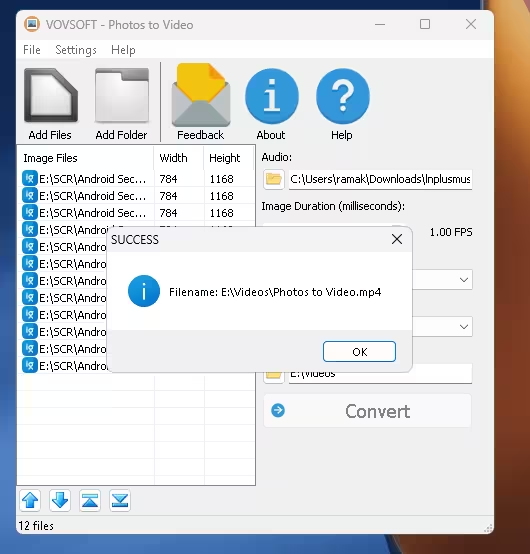
- Pick a Destination Directory and click Convert. A “SUCCESS” message shows the saved file name when it’s done.
Giveaway Terms
⚠️ Read before you install
- Lifetime license.
- No free updates — if you update the giveaway version, it may become unregistered.
- You must download and install it before the offer ends on November 15, 2026.
- The license may not be resold.
System Requirements
- OS: Windows 11, Windows 10, Windows 8/8.1, Windows 7 (64-bit)
- Install size: about 69 MB in our test install
- Full version price: $19.00 (the giveaway saves you the full amount)
📊 Our Verdict
Photos to Video won’t replace a full video editor — there are no transitions, text overlays or Ken Burns effects. But if you just need a clean slideshow with music, or want to turn screenshots into a quick tutorial clip, it’s fast, light and outputs up to 4K in all the common formats.
👍 Pros: dead-simple workflow, 8 video formats plus GIF, 4K and custom resolutions, millisecond-level timing.
👎 Cons: no transitions or effects, one fixed duration for all images, no updates on the giveaway license.
Frequently Asked Questions
Is the Vovsoft Photos to Video giveaway license really free?
Yes. Vovsoft lists the $19 full edition at 100% off from November 8 to November 15, 2026. Just install the program and enter the key DJMXL-VH3Q5-JHEZT.
Is this a lifetime license?
Yes, Vovsoft’s giveaway terms list it as a lifetime license. It doesn’t include free updates, so stick with the version you install — updating may unregister it.
Can I add music to my slideshow?
Yes. You can add a WAV or MP3 file as background music using the Audio field in the main window.
Can it export 4K video?
Yes. The resolution list goes up to 3840×2160 (4K), and you can also enter a custom resolution.
Does it work on 32-bit Windows?
Vovsoft lists Windows 11, 10, 8/8.1 and 7 in 64-bit only, so a 32-bit system isn’t supported.
Discover more from Techno360
Subscribe to get the latest posts sent to your email.

You must be logged in to post a comment.