
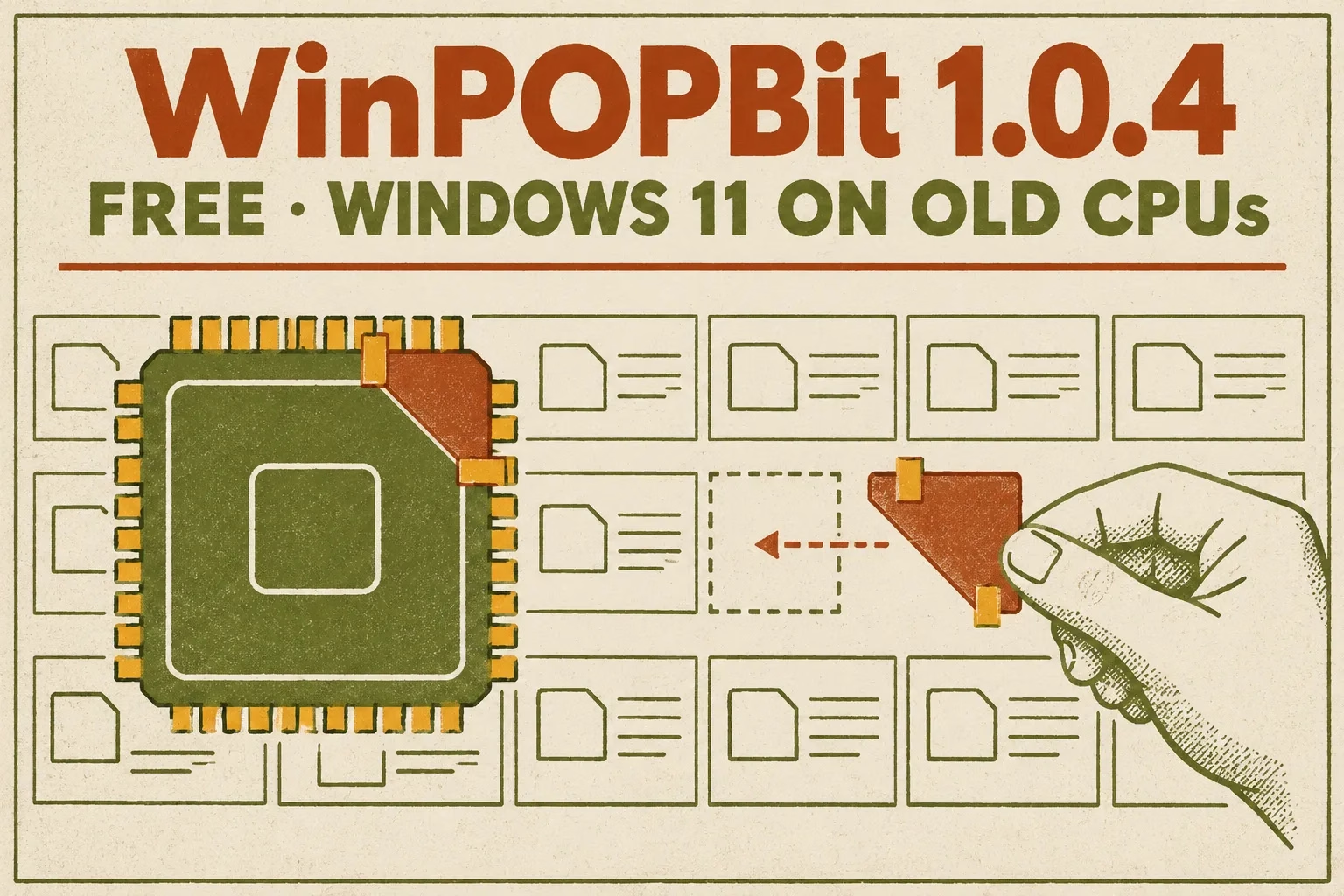
💻 Windows 11 26H2 on a 15-year-old AMD PC? This free patcher makes it boot
Since Windows 11 24H2, Microsoft’s kernel refuses to start on processors without the SSE4.2 instruction set, and no Rufus or registry trick gets around that. WinPOPBit patches Windows itself so it boots on AMD Phenom and Athlon II era chips. It works, but you give up Secure Boot and monthly security updates. Here’s what it does, who it’s for, and what it costs you.
Free & Open Source (MIT)Windows 11 26H2Phenom / Athlon II era CPUsExperimental
📊 Quick Read
- What it is: A free, open-source tool (formerly POP4.2) that builds a patched Windows 11 install ISO. Latest version 1.0.4, released 4 November 2026.
- Works on: Old CPUs that have POPCNT but lack SSE4.2, such as AMD Phenom, Athlon II and VIA Nano. A separate patch targets 32-bit Windows 10 on pre-NX chips like the Pentium 4.
- Doesn’t work on: Intel Core 2 Duo and Core 2 Quad, which lack POPCNT.
- The catch: Secure Boot and driver integrity checks must be off, monthly cumulative updates fail to install, and only clean installs work. See the full list.
- Our take: A brilliant hack for hobbyists and spare PCs. Not something to put on a family or banking PC.
What Is WinPOPBit?
WinPOPBit is a free patcher from a developer who goes by Smu1zel on GitHub. The project describes itself as experimental: it modifies Windows so it can run on hardware Microsoft no longer supports. It is released under the MIT licence, and the source code is public.
It started life as POP4.2, a Python script for one specific problem. In October 2026 it was renamed WinPOPBit and became a ready-to-run program. Version 1.0 arrived on 25 October, and the current release, 1.0.4, followed on 4 November 2026, according to Comss.ru’s coverage of the project.
The important thing to understand: WinPOPBit is not an app you install on your old PC. You run it on any Windows 8 or newer computer, point it at an official Windows 11 ISO, and it produces a modified ISO. You then install Windows from that ISO on the old machine.
Why Old PCs Can’t Run Windows 11 24H2 and Later
Older Windows 11 workarounds, such as the Rufus option that removes the TPM, Secure Boot and RAM checks, only skip the setup screen that says “This PC can’t run Windows 11”. Starting with version 24H2, Microsoft went further. The Windows kernel itself now needs two processor instructions, POPCNT and SSE4.2. On a CPU without them, Windows simply won’t boot, whatever you did during setup.
That locked out a whole generation of capable machines, especially AMD’s K10 family (Phenom, Phenom II and Athlon II) from around 2008 to 2011. These chips have POPCNT but not SSE4.2. Many of them sit in desktops that still run perfectly well with an SSD and 8 GB of RAM.
WinPOPBit edits the CPU requirement check inside the Windows 11 kernel so it no longer insists on SSE4.2. It also patches the boot loader (winload) and a setup component. Rufus can’t do this because it changes setup behaviour, not the Windows kernel.
Key Features
- Patched ISO builder. One command turns an official Windows 11 ISO into a patched one that boots in both UEFI and legacy BIOS mode.
- Standalone EXE. Since the rename, releases ship as
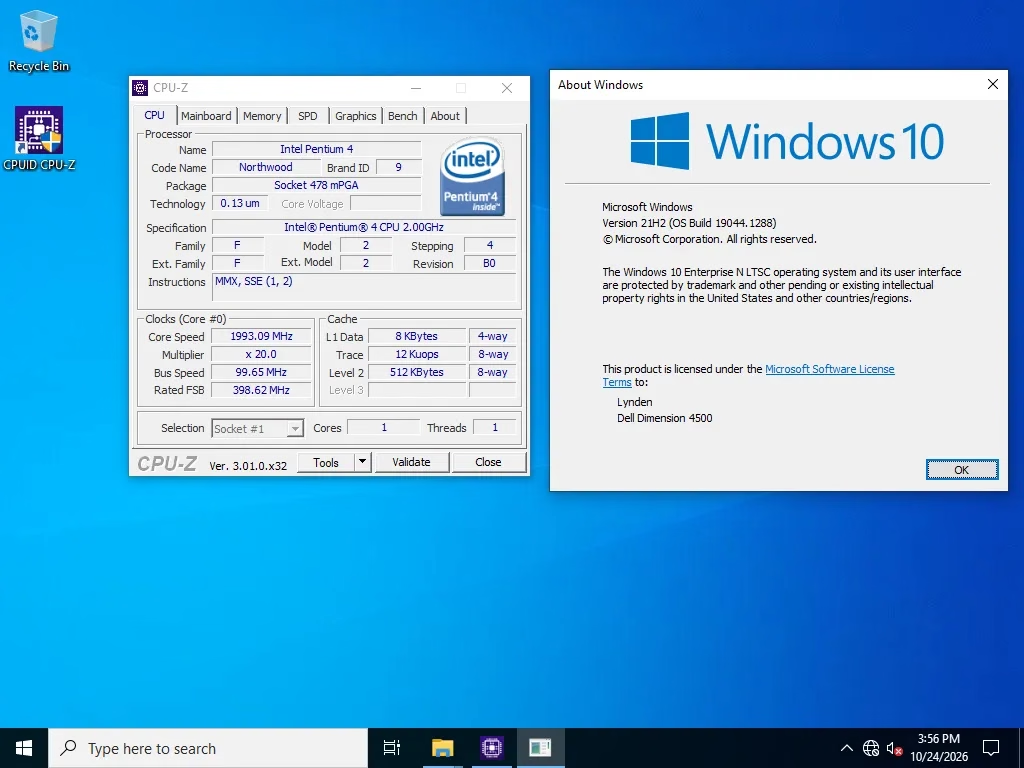
winpopbit.exe. You no longer need Python, though you can still run it from source. - Windows 10 NX patch. Windows 10 needs the NX (no-execute) CPU feature. WinPOPBit can remove that requirement from the 32-bit Windows 10 kernel, loader and HAL. The developer says it runs on machines from the early 2000s and shows a Pentium 4 Northwood (2002) working.
- Older chipset fixes. Recent releases improve support for NVIDIA nForce boards. Version 1.0.4 lifts the HPET blacklist by default, and 1.0.3 added a workaround for boards without HPET.
- Automatic tooling. It downloads Microsoft’s
oscdimg.exe(from the Windows ADK) if it isn’t already on your PC, and it asks for administrator rights on its own. - Bundled guide. Each release includes an HTML installation guide.
Which Processors Does It Support?
| CPU type | Windows 11 with WinPOPBit? |
|---|---|
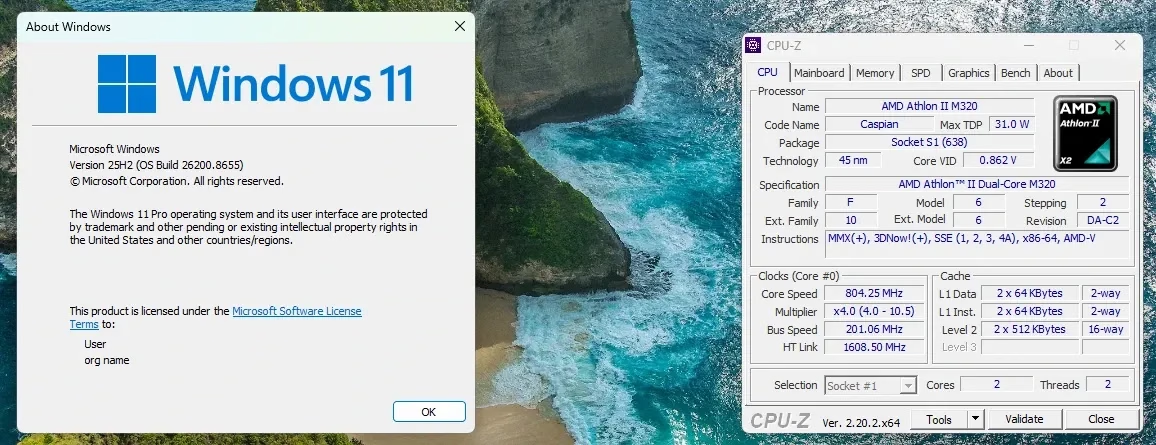
| AMD Phenom, Phenom II, Athlon II (K10) | Yes. This is the main target. The developer shows an Athlon II M320 working. |
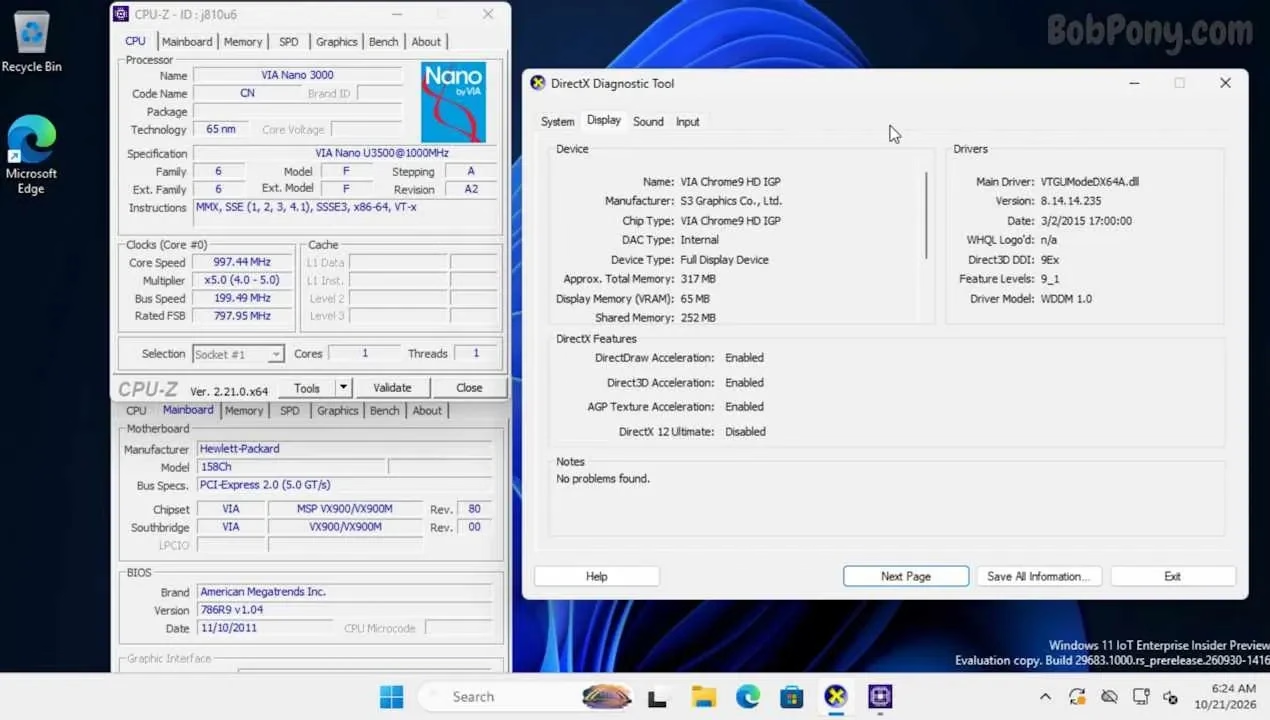
| VIA Nano U3xxx | Yes, with a separate configuration file (badblobs_via_u3xxx.xml). The developer shows a Nano U3500 working. |
| CPUs without SSE4.1 (most K10 chips) | Yes, but you must supply two files from Windows 11 23H2 (see the steps below). |
| Intel Core 2 Duo / Core 2 Quad | No. These chips lack POPCNT, which WinPOPBit cannot work around. |
| Pentium 4 and similar pre-NX chips | Not Windows 11. The NX patch is for 32-bit Windows 10 only. |
Not sure what your CPU supports? Microsoft’s free Coreinfo tool lists every instruction set your processor has. Look for POPCNT (must be present) and SSE4.2 (if it’s present, you don’t need WinPOPBit at all).
⚠️ What you give up
- No monthly security updates. Cumulative updates fail on a patched system with error 0x80070302 because they replace the files WinPOPBit modified. The developer recommends setting Windows Update to notify only.
- Secure Boot must be off on UEFI systems, or the PC won’t start.
- Integrity checks are disabled. Windows no longer verifies the signatures of boot files and drivers, which removes a real layer of protection against rootkits.
- Clean install only. An in-place upgrade from Windows 11 23H2 rolls back with error 0xC1900101-0x20017, so back up your files first.
- Insider builds aren’t supported. The developer says build 28000 (26H1) doesn’t boot when patched, although one README screenshot shows an Insider build running, so results vary by build.
- Rough edges on old hardware. Some NVIDIA nForce chipsets hang on boot, and AGP graphics cards need separate drivers.
How to Use WinPOPBit (Step by Step)
These steps follow the developer’s README and the test Comss.ru ran in a virtual machine. You need a working Windows PC to build the ISO, a USB drive of 16 GB or more, and the old PC you want to install on.
- Back up the old PC. Installation is a clean install that erases the drive.
- Check the CPU with Coreinfo as described above. You need POPCNT. If SSE4.2 is missing, WinPOPBit is the right tool.
- Download an official Windows 11 ISO. Get it from Microsoft’s website or with Oofhours Media Tool. Don’t use Insider builds.
- Download WinPOPBit from the project’s GitHub Releases page and extract the ZIP to a folder such as
C:\WinPOPBit. Microsoft Defender may flag the unsigned EXE as a threat ending in!ml, which is a machine-learning guess, not a confirmed detection. - Add two DLLs if your CPU lacks SSE4.1 (most Phenom and Athlon II chips do). Copy the 64-bit
WindowsCodecs.dllplus both the 64-bit and 32-bitmsxml6.dllfrom a Windows 11 23H2 installation into WinPOPBit’sblobsfolder, and rename the 32-bit one tomsxml6_wow64.dll. The developer warns that skipping these makes Setup crash or leaves a broken install. - Find the edition index. Mount the ISO, then run
dism /Get-WimInfo /WimFile:D:\sources\install.wim(useinstall.esdif that’s the file present, and your own drive letter). Note the index number of the edition you want, for example Windows 11 Pro. - Build the patched ISO. Open Command Prompt in the WinPOPBit folder and run the command below, replacing the file names and index. In Comss.ru’s test, the build took about 9 minutes.
Build command (copy and paste, then edit the names and index)
winpopbit.exe build -i Win11_26H2_English_x64.iso -o Win11_Patched.iso –clean –index 6
- Write the ISO to USB with Rufus. If the old PC has no TPM 2.0, tick Rufus’s option to remove the TPM, Secure Boot and RAM requirements.
- Turn off Secure Boot in the old PC’s firmware settings (UEFI systems only), then boot from the USB drive.
- Use the classic installer if setup stops you. In Comss.ru’s test, the new Windows 11 setup still blocked the install on the SSE4.2 check. Clicking the Previous version of setup link on the first screen opened the classic installer, which completed normally.
- Set updates to notify only after installation. On Windows 11 Pro, go to Group Policy > Computer Configuration > Administrative Templates > Windows Components > Windows Update and set Configure Automatic Updates to notify. On Home, pause updates in Settings.
🛠️ Troubleshooting: error 0xc0000428 on first boot
This error means Windows refused to load a modified file because integrity checks are still on. Comss.ru hit it in both of their test installs. Boot from the USB drive again, press Shift + F10 to open a Command Prompt, and run:
Legacy BIOS (MBR): bcdedit /set {default} nointegritychecks yes
UEFI (GPT): first mount the EFI partition with mountvol S: /s, then run bcdedit /store S:\EFI\Microsoft\Boot\BCD /set {default} nointegritychecks yes. If the PC still won’t start, make sure Secure Boot is really off.
Does It Actually Work?
Here we need to be clear about what has and hasn’t been proven.
What the developer shows: The README includes three screenshots from real machines. The first, at the top of this article, shows Windows 11 Pro 25H2 (build 26200.8655) on an AMD Athlon II M320 laptop chip, which CPU-Z lists with SSE up to SSE3 and SSE4A but no SSE4.1 or SSE4.2. The other two are below. The developer credits a tester, Bob Pony, with trying it on his hardware.
What third parties report: Comss.ru built a patched image from an official Windows 11 26H2 ISO and installed it in a VMware virtual machine with SSE4.1 and SSE4.2 hidden and POPCNT left on, which mimics an AMD K10 chip. They ended up with Windows 11 Pro 26H2, build 26300.9457, after working through the 0xc0000428 error above. They also confirmed the downsides: cumulative update KB5132061 failed at 41% with error 0x80070302, and an in-place upgrade from 23H2 rolled back. They could not get the Windows 10 NX patch to boot in their VM.
What that doesn’t prove: As Comss.ru points out, a virtual machine still runs instructions on the host’s modern CPU. Their test shows the Windows check is bypassed, not that every part of Windows 11 behaves well on a real Phenom. Some Windows components or apps may still use newer instructions and crash. We haven’t tested WinPOPBit on real hardware either, so treat any install as an experiment.
Is WinPOPBit Safe?
The tool itself looks legitimate. The full source code is on GitHub under the MIT licence, the project has an active issue tracker, and it has been covered by Windows Report, Pureinfotech, MuyComputer and Comss.ru. The Defender !ml warning is a common false positive for unsigned tools that modify system files, but download only from the official GitHub page and scan the file yourself.
The bigger question is the safety of the result. A patched Windows 11 install runs without Secure Boot, without driver signature checks and without monthly security patches. That’s fine for an offline retro PC, a lab machine or a media box. It’s a poor choice for a computer used for online banking, work email or by family members who won’t know the risks.
Who Should Try It and Who Should Skip It
👍 Try it if you
- Have a spare Phenom or Athlon II PC and enjoy tinkering
- Need Windows 11 for a single offline app or for testing
- Are comfortable with BIOS settings, bcdedit and clean installs
👎 Skip it if you
- Use the PC for banking, shopping or work
- Want a “set and forget” PC that patches itself
- Have an Intel Core 2 PC (it won’t work)
For an old PC that you use online every day, a lightweight Linux distribution such as Linux Mint is still the safer way to keep it going, because it gets regular security updates on this hardware.
More Windows Tools on Techno360
- Rufus: the free bootable USB creator for Windows 11
- Oofhours Media Tool: download official Windows 10 and 11 ISOs
- Winhance: the free app that hands Windows 11 back to you
- TweakHub review: free open-source Windows 11 tweaker
- How to activate Windows 11 for free: 6 legal ways
Article details: Covers WinPOPBit 1.0.4 (4 November 2026) · Based on the developer’s GitHub documentation and Comss.ru’s virtual machine test · Not tested by Techno360 on real hardware · Checked 17 November 2026.
✅ Techno360 Verdict
WinPOPBit does something no setup trick can: it gets Windows 11 26H2 past the kernel’s SSE4.2 requirement, opening the door for AMD Phenom and Athlon II era PCs. It’s free, open source and well documented, and the developer is upfront that it’s experimental.
The price is steep, though: no Secure Boot, no integrity checks and no monthly security updates. Use it on a hobby or spare machine, not on the PC you bank with.
Pros
- Free and open source (MIT)
- Gets past a limit no Rufus or registry trick can
- Builds one ISO that boots in UEFI and legacy BIOS
- Standalone EXE, no Python needed
- Bonus NX patch for 32-bit Windows 10
Cons
- Monthly cumulative updates fail
- Secure Boot and integrity checks must be off
- Clean install only, command-line setup
- No help for Intel Core 2 PCs
- Unsigned EXE may trigger a Defender warning
⬇️ Download WinPOPBit View on GitHub
Frequently Asked Questions
Is WinPOPBit free?
Yes. WinPOPBit is free and open source under the MIT licence. You still need your own Windows 11 licence to activate the installed system.
Will WinPOPBit work on my Core 2 Duo PC?
No. Intel Core 2 processors lack the POPCNT instruction, and WinPOPBit only removes the SSE4.2 requirement. It’s aimed at CPUs that have POPCNT but not SSE4.2, such as AMD Phenom and Athlon II.
Will a patched Windows 11 get updates?
Not the monthly security updates. Cumulative updates fail with error 0x80070302 because they overwrite the patched files. The developer advises setting Windows Update to notify only. To move to a newer Windows build, you’d need to patch a newer ISO and do a fresh install.
Can I upgrade my existing Windows 10 or 11 install?
No. In-place upgrades from Windows 11 23H2 roll back with error 0xC1900101-0x20017. You need a clean install, so back up your files first.
Why does Microsoft Defender flag WinPOPBit?
The EXE is unsigned and modifies Windows system files, which triggers a machine-learning detection ending in !ml. That’s a likely false positive, not a confirmed threat. Download only from the official GitHub page and scan it before running.
How is this different from Rufus or Flyoobe?
Rufus and Flyoobe skip Windows Setup’s hardware checks, such as TPM 2.0, Secure Boot and the supported CPU list. They can’t help when the Windows 11 kernel itself refuses to boot on a CPU without SSE4.2. WinPOPBit patches the kernel, which is why it needs Secure Boot and integrity checks turned off.
Discover more from Techno360
Subscribe to get the latest posts sent to your email.

You must be logged in to post a comment.