
🎁 ASCOMP giveaway · Updated 30 October 2026 · Windows 11 & 10
Is your SSD dying? Find out free with PC Internals Professional 2.106
ASCOMP is back with a fresh giveaway that gets you a PC Internals Pro free license: the Professional Edition, normally $24.90. It shows your SSD’s remaining lifespan, S.M.A.R.T. status and temperature, plus full CPU, RAM, GPU and Windows details, and the Pro edition can watch your drives in the background and warn you before they fail. Below: the new giveaway link, five claim steps with fresh screenshots, and what it found on our own laptop.
⚡ Quick Read
- What: ASCOMP PC Internals Professional 2.106, a Windows hardware-info and SSD/HDD health monitor.
- Value: $24.90 for the Professional Edition.
- Licence: Professional Edition, private licence (one person, up to two PCs), unlimited validity, unlocked with your 10-digit ASCOMP customer ID.
- Updates & support: 30 days from registration. After that, version 2.106 keeps working; ASCOMP offers a paid extension.
- Giveaway key: 2754A-5D9IY-TFCZH-ONSALE (filled in automatically by our link).
- Deadline: No end date published. The offer was working when we tested it on 30 October 2026.
- Catch: Registering signs you up for ASCOMP’s weekly newsletter (you can unsubscribe).
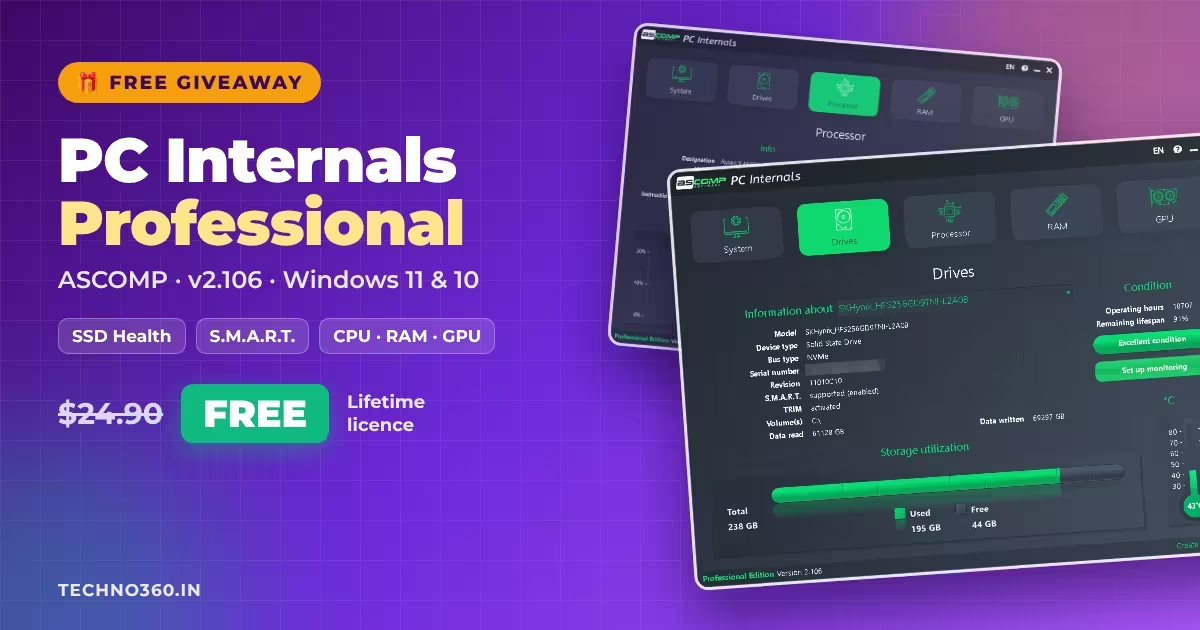
PC Internals Pro free license: what the giveaway includes
SSDs rarely fail with a warning noise the way old hard drives did. They just stop. PC Internals from German developer ASCOMP Software reads the health data your drive already records (operating hours, remaining lifespan, total data written, temperature and S.M.A.R.T. status) and shows it in one plain screen, next to a full breakdown of your CPU, RAM, graphics cards and Windows installation.
The free Standard Edition only shows you the numbers when you open it. The Professional Edition you get in this giveaway adds background drive monitoring: you set limits for operating hours, critical S.M.A.R.T. values or remaining lifespan, and PC Internals alerts you by Windows notification or email when a drive crosses them.
| Software | ASCOMP PC Internals Professional 2.106 |
|---|---|
| Developer | ASCOMP Software GmbH (Germany) |
| Regular price | $24.90 (Professional Edition) |
| Operating system | Windows 11 and 10 (32- and 64-bit); Windows Server |
| Licence type | Professional Edition, private licence (up to two PCs), unlimited validity |
| Updates and support | 30 days from registration |
| Giveaway key | 2754A-5D9IY-TFCZH-ONSALE |
| Tested | 30 October 2026, Windows 11 Home 26H2 (Lenovo Legion 5 laptop) |
🎁 Get PC Internals Pro free ⬇️ See the 5 claim steps
How to get PC Internals Pro free (step by step)
The whole process takes about five minutes. Use an email address you can open, because the activation link arrives by email.
1. Register on the ASCOMP giveaway page
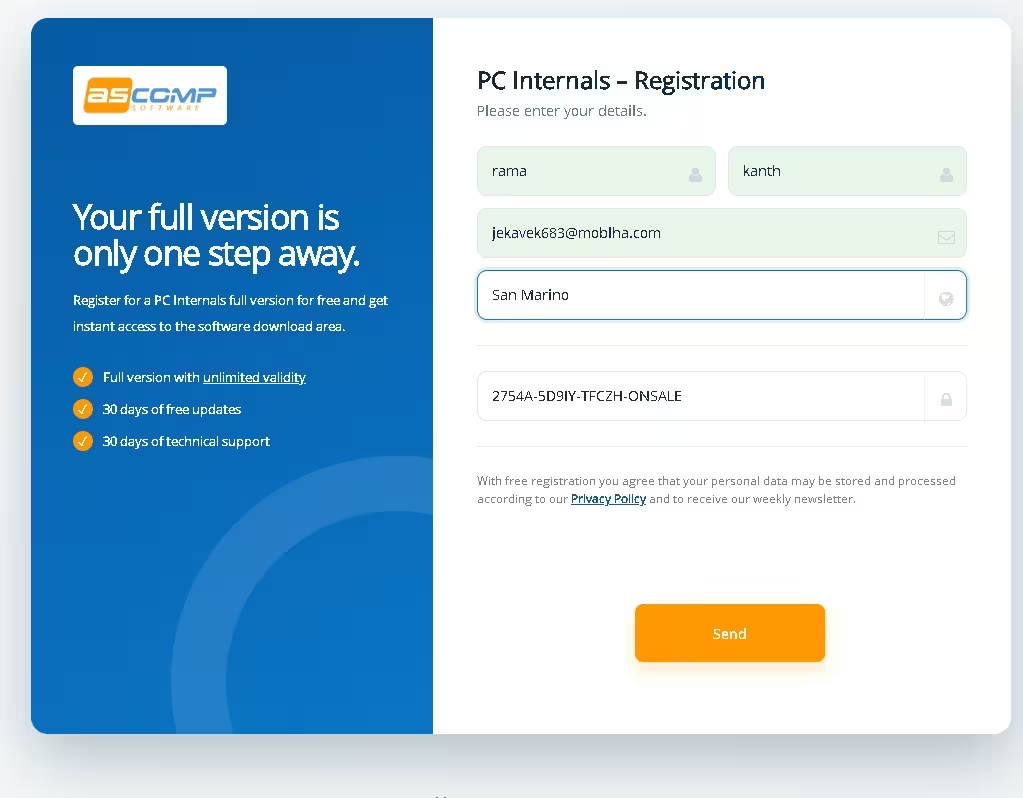
Open the PC Internals giveaway registration page. Enter your first and last name, email address and country. The licence key field at the bottom is filled in automatically by the link. Click Send.
Licence key field empty? Paste this giveaway key: 2754A-5D9IY-TFCZH-ONSALE
2. Confirm your email address
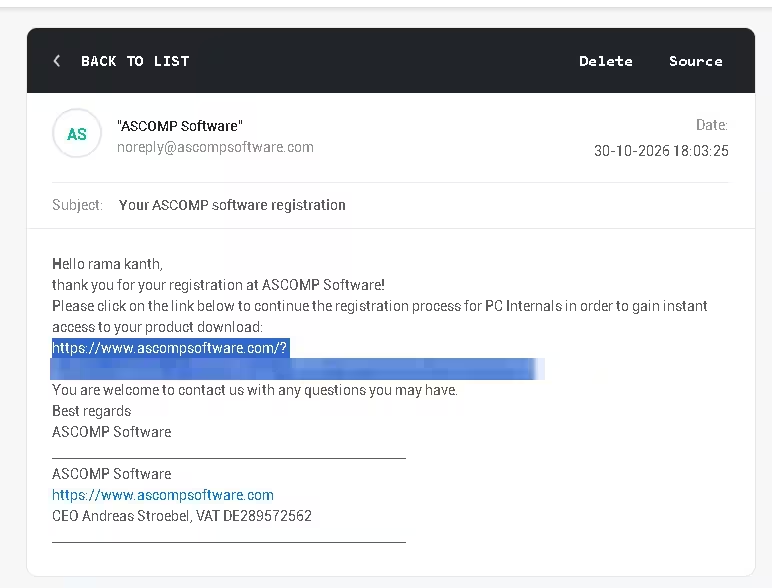
Within a few seconds you’ll get an email from noreply@ascompsoftware.com with the subject “Your ASCOMP software registration”. Click the link inside to finish the registration. If it doesn’t arrive, check your spam, junk or promotions folder.
3. Download the full version and copy your customer ID
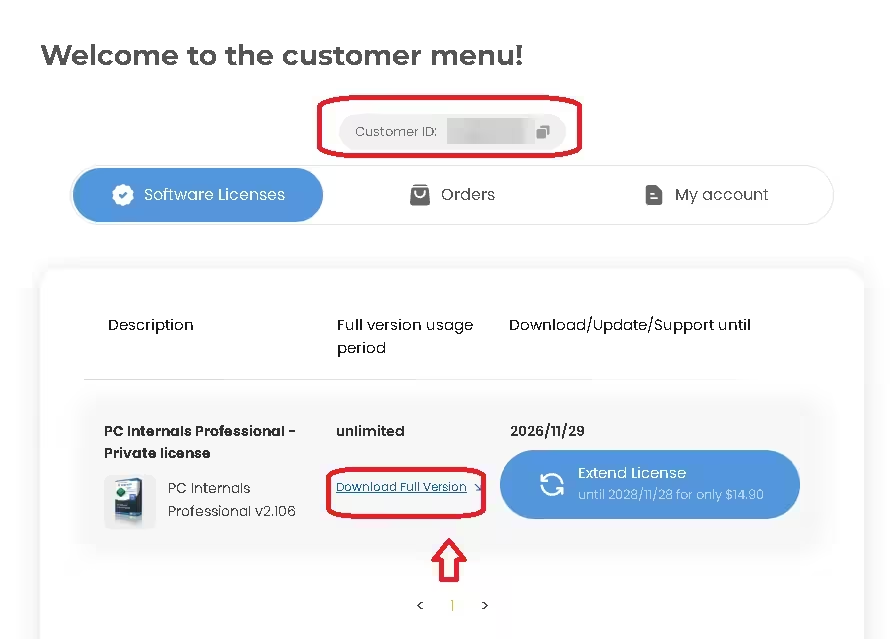
The link opens your ASCOMP customer menu. Under Software Licenses you’ll see PC Internals Professional – Private license with an unlimited usage period. Click Download Full Version, and copy the 10-digit Customer ID shown at the top (it is also emailed to you). The third column shows the date your free updates and support end, 30 days after you register.
4. Install PC Internals
Run the downloaded installer and follow the setup wizard.
5. Unlock the Professional Edition
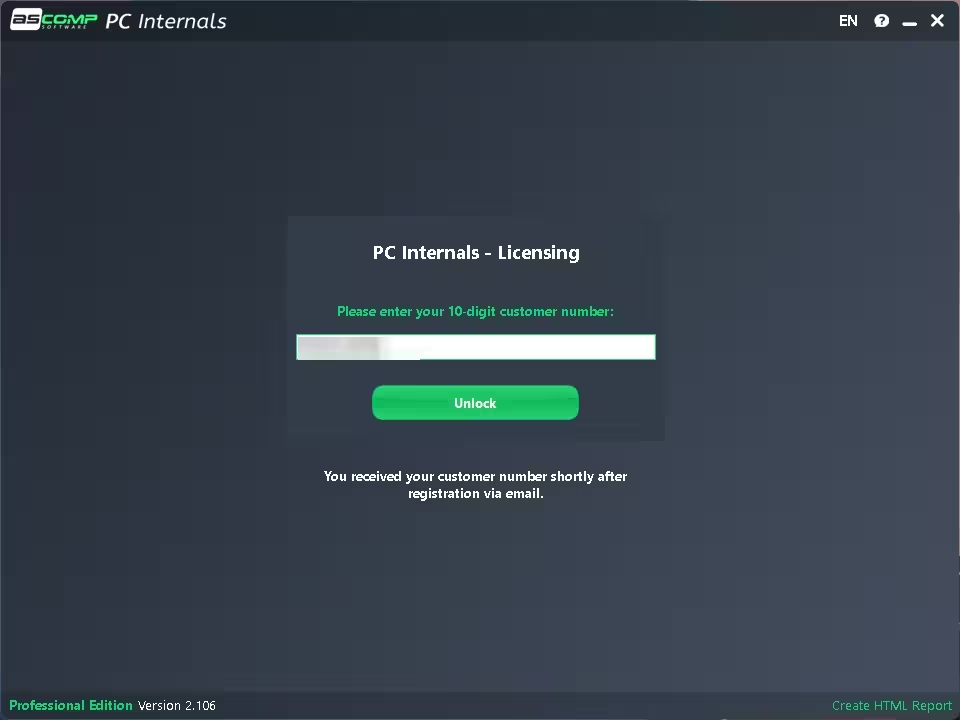
Launch PC Internals. The PC Internals – Licensing window asks for your 10-digit customer number. Paste your customer ID and click Unlock. The bottom-left corner then reads Professional Edition Version 2.106.
What PC Internals Pro shows (tested on our laptop)
The interface has five big tabs: System, Drives, Processor, RAM and GPU. Everything loads in a second or two, and a Create HTML Report link in the bottom-right corner saves the lot as a single page you can keep or send to whoever fixes your PC. We tested it on a Lenovo Legion 5 laptop (Ryzen 5 4600H, 24 GB RAM, GeForce GTX 1650) running Windows 11.
Drives: SSD health, S.M.A.R.T. and lifespan
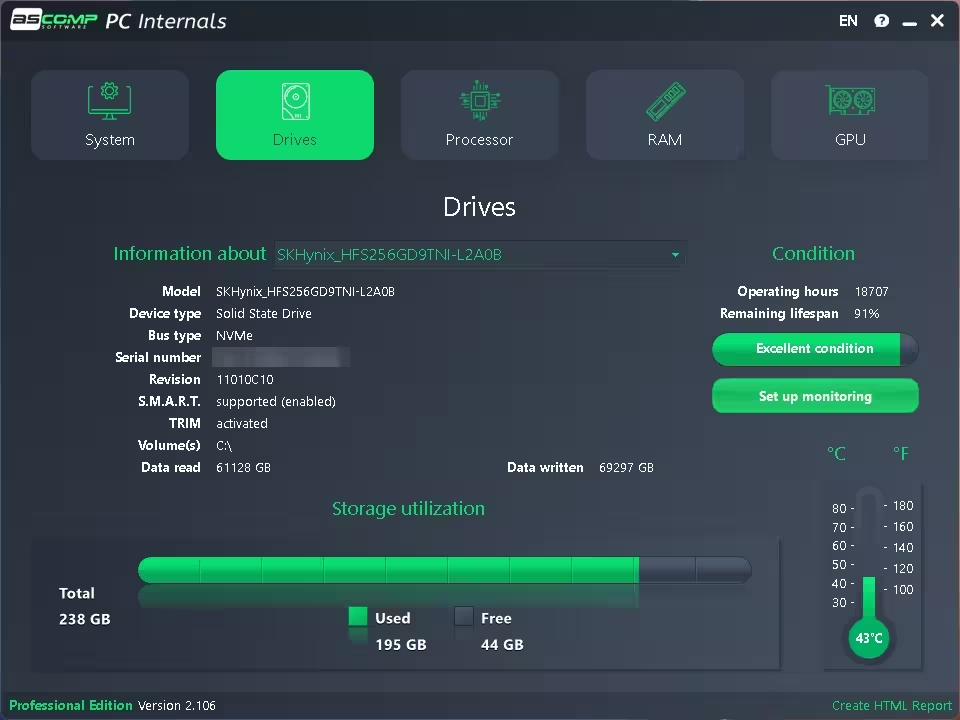
This is the tab worth installing it for. For each drive you get the model, bus type (NVMe, SATA), S.M.A.R.T. and TRIM status, total data read and written, plus a Condition panel with operating hours, remaining lifespan, a colour-coded health bar and a live temperature gauge in °C and °F. The Set up monitoring button is the Pro feature: it is where you set the warning limits for background alerts.
System: Windows, BIOS and Secure Boot at a glance
Shows your exact Windows edition, version (26H2 on our PC), install date, last update and last boot, along with the laptop model, mainboard, BIOS version and date, Secure Boot status, SMBIOS version and every graphics adapter.
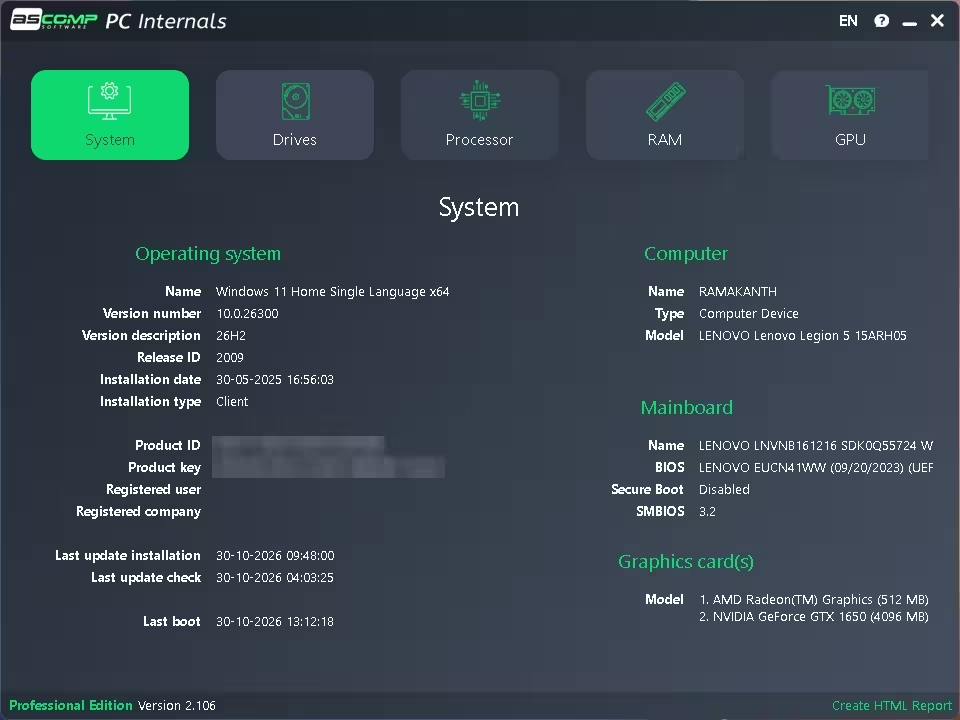
⚠️ Privacy tip: the System tab displays your full Windows product key in plain text. Blur it before you post a screenshot or share an HTML report in a forum.
Processor: cores, cache and live load
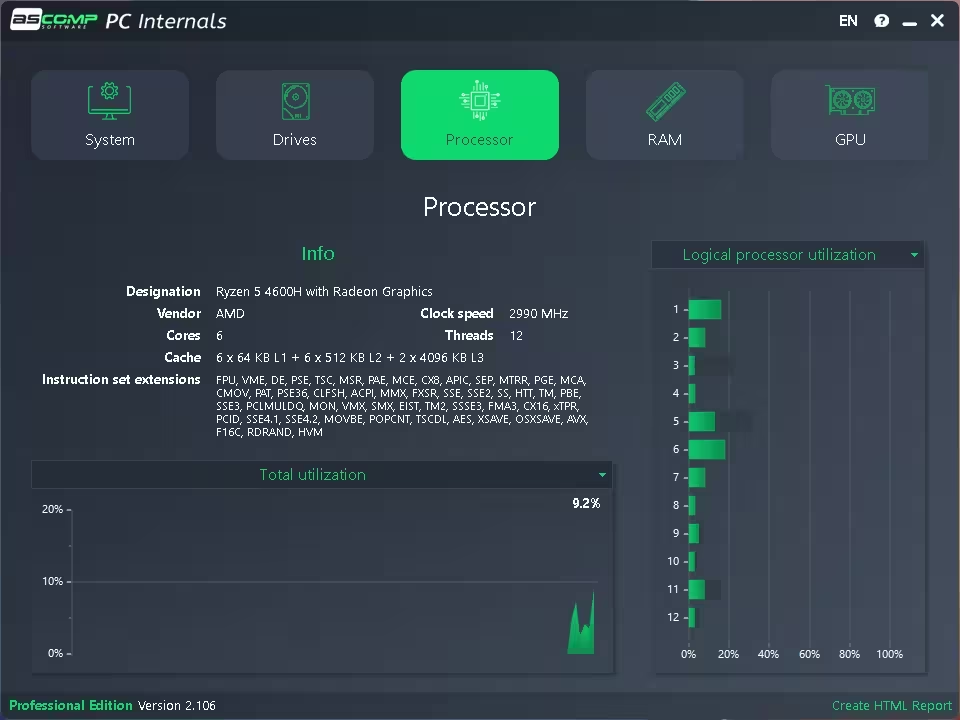
Lists the CPU name, cores and threads, clock speed, L1/L2/L3 cache and supported instruction sets (AVX, AES and so on), with a total-utilisation graph and a live bar for every logical processor.
RAM and GPU
- RAM: total capacity, memory type (DDR4, DDR5), each module by slot with its brand and speed, virtual memory size and a live usage graph.
- GPU: every graphics adapter with VRAM, driver version, WDDM version, VBIOS, PCI location and the GPU engines it exposes, plus utilisation and temperature graphs.
3 things PC Internals found on our laptop
Numbers are only useful if they tell you something. Here’s what one scan of our Legion 5 turned up.
91%
SSD life left after 18,707 powered-on hours and about 69 TB written. No sign of wear-related trouble yet, but SSDs can still fail suddenly, so keep monitoring and backing up.
8 + 16 GB
Mixed-capacity RAM: an 8 GB Kingston stick next to a 16 GB module. Not a fault, but worth knowing before you buy your next upgrade.
Off
Secure Boot disabled in the BIOS. Some newer games’ anti-cheat systems require it to be on.
Free Standard vs Professional Edition
| Standard | Professional | |
|---|---|---|
| Price | Free | $24.90 (free in this giveaway) |
| Intended use | Personal use and evaluation | Private licence: you, on up to two PCs, including for your own business |
| System, Drives, CPU, RAM, GPU tabs | Yes | Yes |
| Background drive monitoring | No | Yes, with your own limits for hours, S.M.A.R.T. and lifespan |
| Alerts | No | Windows notification or email |
Limitations to know before you install
- Updates end after 30 days. The licence never expires, but new versions after the first 30 days need a paid extension. In our account, ASCOMP offered two more years of updates for $14.90.
- Private licence, not a company licence. ASCOMP’s terms let the registered person use a private licence on up to two systems, even for their own business. It doesn’t cover rolling the software out across a company’s PCs; that needs ASCOMP’s Company License ($49.90, up to five systems at one site).
- Newsletter sign-up. Registering agrees to ASCOMP’s weekly newsletter.
- It reports, it doesn’t fix. PC Internals tells you a drive is wearing out; it won’t repair it. Back up first, then replace.
- Small display quirks. On our PC the RAM tab listed the page file as “?:\pagefile.sys” instead of “C:\”, and one RAM module’s maker showed as “Unknown”.
💡 Tip: right after you unlock the Pro edition, click Set up monitoring on the Drives tab and turn on alerts. A warning that arrives while the SSD still works is the whole point of this tool.
More ASCOMP and PC utility giveaways on Techno360
- ASCOMP Cleaning Suite Pro 4.021 free licence
- ASCOMP BackUp Maker Pro free licence (pair it with PC Internals: back up before a drive fails)
- ASCOMP Secure Eraser Pro free licence
- ASCOMP KEYCTRL Pro free hotkey manager
- ASCOMP PDF-Compress Pro free licence
- EaseUS Partition Master Pro 20 free licence key
- iCare Format Recovery Pro free licence code
- Ashampoo WinOptimizer 28 free licence key
FAQs
Is the PC Internals Pro giveaway really free?
Yes. You only register with your name, email and country. No payment details are asked for.
Is this the full Professional Edition or a trial?
It’s the full Professional Edition 2.106 with a private licence. After you unlock it with your customer ID, the bottom-left corner reads “Professional Edition”.
How long does the free licence last?
The licence has unlimited validity. Free updates and technical support last 30 days from registration; after that you can keep using the version you have.
Where do I find my customer ID?
At the top of your ASCOMP customer menu, and in the email ASCOMP sends after registration.
Can PC Internals check SSD health on Windows 11?
Yes. Our screenshots were taken on Windows 11 Home 26H2. It reads the drive’s S.M.A.R.T. data and shows remaining lifespan, operating hours, data written and temperature for your internal drives.
I claimed PC Internals in an earlier giveaway. Should I register again?
Your old licence keeps working at the version you installed. This new giveaway delivers version 2.106, with 30 days of updates counted from the day you register.
The licence key field is empty or says invalid. What now?
Open the giveaway page through our button so the key fills in automatically, or paste 2754A-5D9IY-TFCZH-ONSALE. If ASCOMP rejects it, the promotion has probably ended.
Can I use it on more than one PC or for work?
The giveaway gives you a private licence. ASCOMP’s terms allow the registered person to use it on up to two systems, including for their own business, such as a freelancer’s work laptop. It isn’t a company licence, so it doesn’t cover installing PC Internals across an employer’s or company’s PCs.
📊 Verdict
PC Internals Professional turns your SSD’s hidden health data into one clear screen and, more usefully, a background alert before the drive gives up. Add the tidy System, CPU, RAM and GPU tabs and a lifetime licence, and it’s an easy free grab for any Windows PC.
👍 Good: clear SSD lifespan and temperature readout, background drive alerts by notification or email, HTML reports, modern interface, lifetime licence.
👎 Watch out for: only 30 days of updates, a private licence limited to two PCs, newsletter sign-up and a few display quirks. Grab it while it’s live, because ASCOMP hasn’t announced an end date.
Discover more from Techno360
Subscribe to get the latest posts sent to your email.

You must be logged in to post a comment.