
Is your browser silently working against you? Millions of Chrome users install extensions every day — but few realize that some of those extensions could be stealing their data right now.

The Hidden Danger Lurking in Your Browser
Chrome extensions have become an essential part of everyday browsing. From ad blockers and productivity tools to AI assistants and VPNs, most users have anywhere from 5 to 20 extensions installed at any given time. But here’s what the security community has known for years — and what most regular users don’t:
Browser extensions are one of the most underestimated cybersecurity threats of the modern era.
Some extensions quietly monitor every website you visit. Others steal session cookies, hijack form data, inject invisible ads, or silently exfiltrate your credentials to remote servers. What’s especially alarming is that an extension can start completely legitimate — and then turn malicious overnight after a silent update or ownership change.
To make matters worse, when Google removes a dangerous extension from the Chrome Web Store, it is not automatically uninstalled from your browser. That means tens of thousands of users could still be running flagged malware without any warning.
This is the exact problem MalExt Sentry was built to solve.
What Is MalExt Sentry?
MalExt Sentry is a free, open-source Chrome extension that functions like an antivirus scanner — but designed exclusively for browser extensions. It continuously monitors your installed extensions and cross-references them against a regularly updated threat intelligence database of known malicious extensions.
The concept is elegantly simple: instead of hoping Google catches every bad actor, MalExt Sentry gives you your own independent layer of defense, running directly in your browser, entirely on your device.
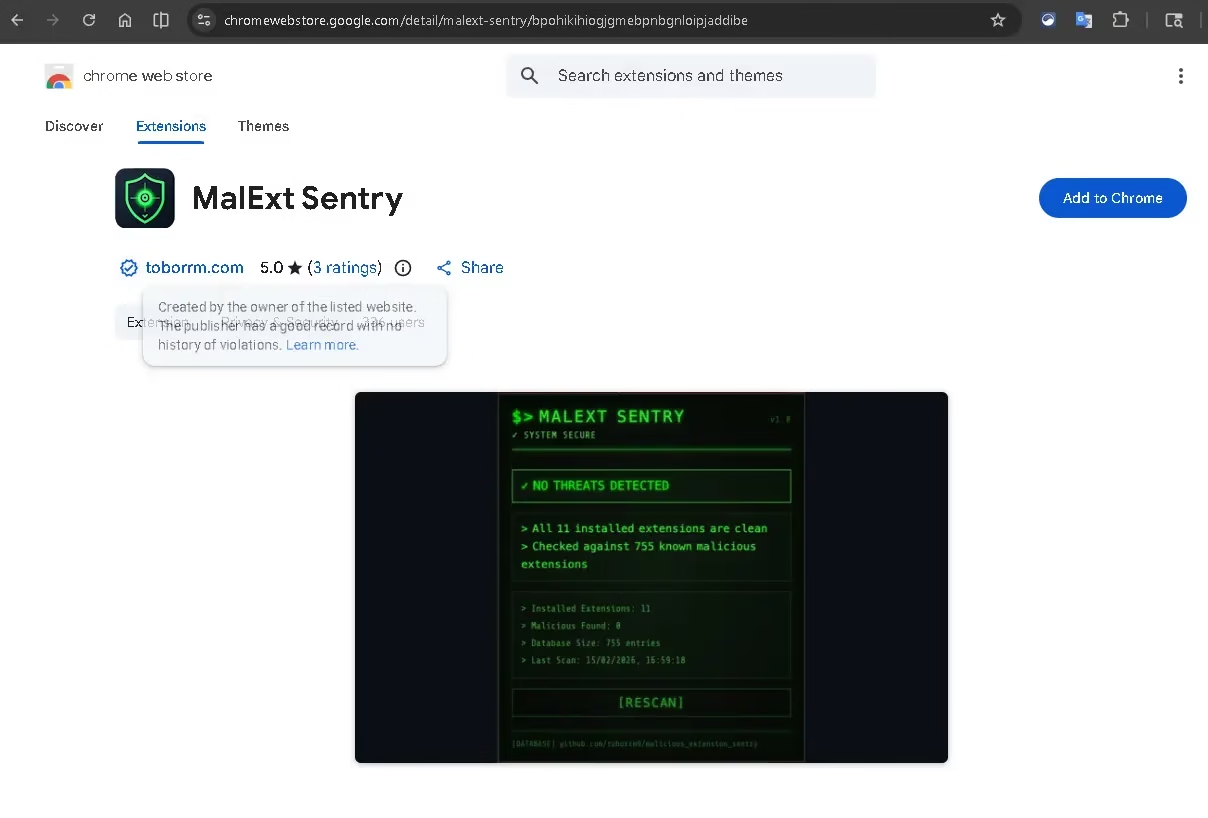
As you can see from the Chrome Web Store listing above, MalExt Sentry currently holds a perfect 5.0-star rating and is published by toborrm.com — a verified publisher with no history of violations. The store listing itself shows a live scan result: 11 installed extensions scanned, 0 malicious found, checked against a database of 755 known threats.
How MalExt Sentry Works: Step-by-Step
Once you install MalExt Sentry, it gets to work immediately. Here’s exactly what happens under the hood:
1. Automatic Background Scanning Every 6 Hours
MalExt Sentry silently runs in the background, checking your installed extensions against its threat database on a regular schedule. You don’t have to remember to run it — it just works.
2. Real-Time Threat Alerts
If a match is found between one of your extensions and a known malicious entry in the database, you receive an immediate, clear warning with actionable steps to remove the threat.
3. Manual On-Demand Scans
Want to run a check right now? Simply click the MalExt Sentry icon in your browser toolbar and hit the [RESCAN] button. Results appear in seconds.
4. Locally Cached Threat Database
The extension downloads a threat database from GitHub and stores it locally on your device. This means scans are fast, there are no latency issues, and crucially — your extension list is never uploaded anywhere.
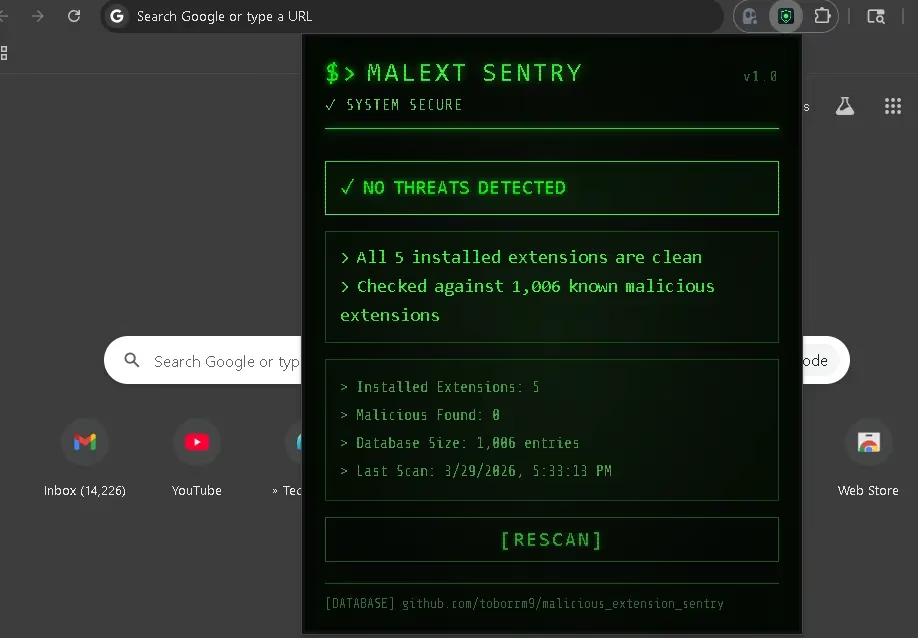
The screenshot above shows MalExt Sentry’s clean, terminal-style interface displaying “NO THREATS DETECTED” after scanning 5 installed extensions against a database of 1,006 known malicious extensions. The last scan timestamp, database size, and a one-click [RESCAN] button are all immediately visible — no complex menus, no confusing dashboards.
The Threat Intelligence Engine: 40+ Sources Powering Your Protection
What truly sets MalExt Sentry apart is the breadth of its threat intelligence database. Rather than relying on a single source, MalExt Sentry aggregates data from over 40 threat intelligence feeds, including independent security research blogs and disclosure reports, real-time threat intelligence feeds from the cybersecurity community, ongoing Chrome Web Store monitoring for newly flagged extensions, and published malware analyses and incident reports.
The database categorizes threats into distinct groups to help users understand what kind of risk they face: Fake AI tools (a rapidly growing attack vector in 2025–2026), malicious VPN extensions, crypto-related extensions targeting wallet credentials, productivity tool imposters, and scrapers and trackers harvesting browsing data.
The database is hosted on GitHub and updated continuously, meaning newly discovered threats are incorporated quickly — a critical advantage given how fast the malicious extension landscape evolves.
Privacy-First Architecture: Your Data Stays on Your Device
One of the strongest selling points of MalExt Sentry is its uncompromising approach to user privacy. In an era where many “security tools” are themselves privacy nightmares, MalExt Sentry’s architecture is built around a simple principle: scan locally, share nothing.
Here’s what that means in practice: your list of installed extensions is never transmitted to any server, no browsing history, URLs, or behavioral data is collected, the only external connection the tool makes is downloading the threat database from GitHub, and all analysis and comparison logic runs entirely on your local machine.
This makes MalExt Sentry an excellent fit for privacy-conscious users, corporate environments where data security is paramount, and anyone who is rightfully skeptical of cloud-connected security products.
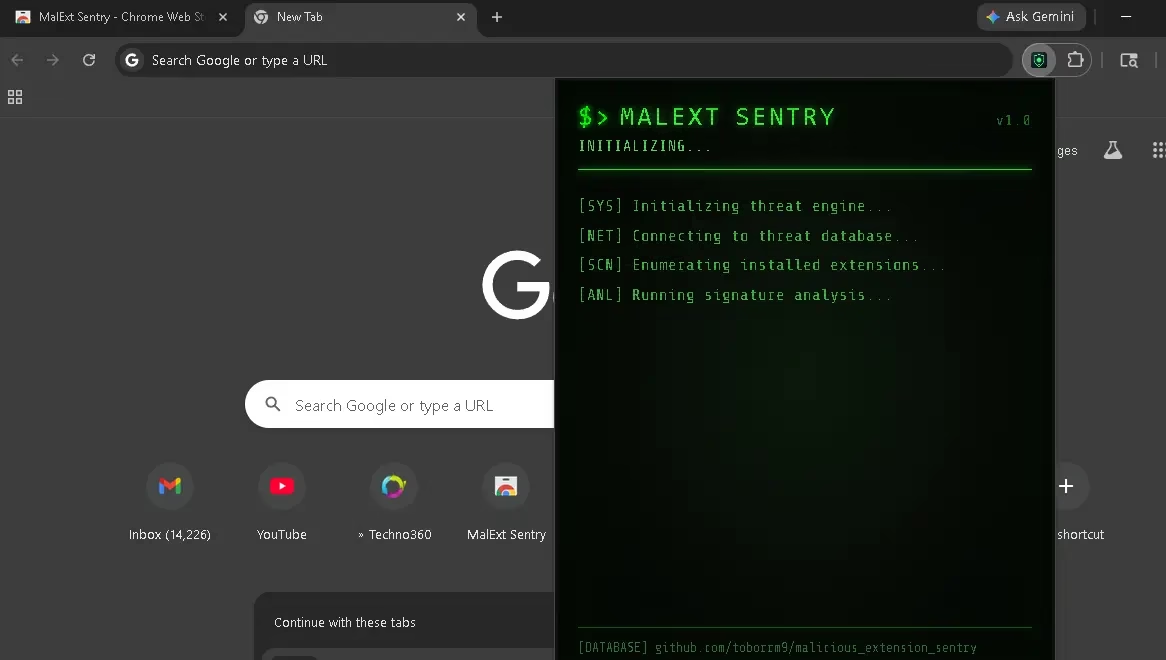
The initialization screen above gives a transparent view of exactly what MalExt Sentry does when it starts: it initializes the threat engine, connects to the threat database, enumerates your installed extensions, and runs signature analysis. No black boxes, no mystery — just clear, auditable open-source security.
Real-World Use Cases: Who Needs MalExt Sentry?
Everyday Chrome Users who have accumulated extensions over years without auditing them — a surprisingly dangerous situation given how frequently extension ownership changes hands.
Remote Workers and Freelancers who use multiple productivity and communication extensions and can’t afford a data breach or credential theft incident.
Privacy-Focused Individuals who want confirmation that their browser isn’t leaking data to unknown third parties through a compromised extension.
IT Administrators and Security Teams who want a lightweight, deployable tool for initial triage of browser extension risk across users.
Developers and Researchers building on Chrome who want to validate their browsing environment before working with sensitive codebases or credentials.
Limitations You Should Understand
Transparency is important, and MalExt Sentry is upfront about what it can and cannot do.
MalExt Sentry is a signature-based detection tool — meaning it identifies threats that are already known and catalogued in its database. A brand-new malicious extension that hasn’t yet been analyzed and flagged by the security community will not be caught on day one.
This is not a flaw unique to MalExt Sentry — it’s a fundamental characteristic of all signature-based security systems, including most commercial antivirus products. The mitigation is the same as always: use it as a first line of defense within a broader security posture, not as your sole protection.
For users who want to go deeper and analyze suspicious extensions that aren’t yet in any database, complementary tools like CRX Viewer (for inspecting extension source code) and KoiDex (for behavioral risk analysis) can provide additional layers of investigation.
How MalExt Sentry Compares to Alternatives
| Feature | MalExt Sentry | Manual Audit | Commercial AV |
|---|---|---|---|
| Cost | Free | Free | Paid |
| Extension-Specific Scanning | Yes | No | Rarely |
| Privacy (Local Scanning) | Yes | Yes | Often No |
| Automatic Updates | Yes | No | Yes |
| Open Source | Yes | N/A | No |
| Ease of Use | Very Easy | Complex | Easy |
| Real-Time Alerts | Yes | No | Varies |
Step-by-Step: How to Get Started with MalExt Sentry
Getting protected takes less than 60 seconds:
Step 1: Visit the MalExt Sentry Chrome Web Store page and click “Add to Chrome.”
Step 2: Accept the permissions prompt. MalExt Sentry requests only the permissions it needs to enumerate your installed extensions.
Step 3: Click the MalExt Sentry icon in your toolbar. It will immediately initialize, download the latest threat database, and run its first scan.
Step 4: Review your results. If you see “NO THREATS DETECTED,” you’re clear. If a threat is found, follow the on-screen removal instructions.
Step 5: Let it run in the background. Automatic scans every 6 hours mean you stay protected without any ongoing effort.
Final Verdict: Is MalExt Sentry Worth Installing?
Absolutely — and here’s the bottom line: the risk of not having a tool like this is far greater than the minimal effort of installing it.
Chrome extensions represent a massive, largely unmonitored attack surface. The average user has no practical way to audit them manually. Google’s enforcement, while improving, is reactive by nature. MalExt Sentry fills this gap with a free, open-source, privacy-respecting, and genuinely useful tool that takes under a minute to deploy.
It won’t catch zero-day threats, and it shouldn’t be your only security measure. But as a fast, lightweight, always-on first line of defense against known malicious extensions — it’s one of the best free security additions you can make to your browser today.
Frequently Asked Questions About MalExt Sentry
Is MalExt Sentry safe to use?
Yes. MalExt Sentry is open-source, meaning anyone can inspect its code. It only requests the permissions needed to enumerate your installed extensions and does not collect, transmit, or store any of your personal data or browsing history.
How do I detect malicious Chrome extensions?
The easiest way to detect malicious Chrome extensions is to install MalExt Sentry from the Chrome Web Store. It automatically scans all your installed extensions against a database of over 1,000 known malicious extensions and alerts you if any threats are found — no technical knowledge required.
Does MalExt Sentry work in real time?
MalExt Sentry runs an automatic background scan every 6 hours and sends you an alert if a threat is detected. You can also trigger a manual scan at any time by clicking the extension icon and pressing [RESCAN].
Is MalExt Sentry free?
Yes, MalExt Sentry is completely free. There are no paid tiers, no subscriptions, and no premium features locked behind a paywall. It is fully open-source.
Can MalExt Sentry catch all malicious Chrome extensions?
MalExt Sentry uses signature-based detection, which means it identifies known threats from its database. Newly emerging malicious extensions that have not yet been catalogued may not be detected immediately. It is best used as a first line of defense alongside other security practices.
Does MalExt Sentry send my data to any server?
No. MalExt Sentry performs all scanning locally on your device. Your list of installed extensions is never uploaded to any server. The only external connection it makes is downloading the threat database from GitHub.
Get MalExt Sentry Now
Chrome Extension: Install from the Chrome Web Store
GitHub (Open Source): github.com/toborrm9/malicious_extension_sentry
Threat Database: malext.toborrm.com
Have you run MalExt Sentry and found a threat lurking in your browser? Share your experience in the comments below — your story could help protect someone else.


Discover more from Techno360
Subscribe to get the latest posts sent to your email.