
🎁 Software Giveaway · Expired · Windows
Recover Lost WhatsApp Chats from an iPhone or iTunes Backup
A Windows tool that scans an iPhone, iPad or local iTunes backup for WhatsApp messages and attachments, lets you preview them, and exports only what you pick to your PC.
Windows 11/10/8/7iOS 5 – iOS 27Version 3.0.4Giveaway ended
⚡ Quick Read
- What it does: Scans an iPhone/iPad or an iTunes backup for WhatsApp chats and attachments, then exports selected items to your PC.
- Giveaway status: The one-year license promotion has ended. The archived key below may no longer activate.
- Price now: MobiKin’s product page lists $35.95 (regular $55.95).
- Trial: Scans and previews only. Saving recovered data needs the full version.
- Not supported: Direct iCloud recovery is not documented. Damaged or factory-reset iPhones need an existing iTunes backup.
MobiKin WhatsApp Recovery for iOS is a Windows utility that scans an iPhone or iPad for WhatsApp messages and attachments, shows you a preview of what it finds, and exports the items you select to your computer. It can also read the WhatsApp data stored inside a local iTunes backup, so you can pull out individual chats without restoring the whole backup to your phone.
MobiKin first released the tool in April 2024. The current Windows build is version 3.0.4, and a separate Mac version is also available. Below you’ll find the giveaway details, activation steps, features, a step-by-step recovery guide, compatibility information and the limits you should know about before you rely on it.
MobiKin WhatsApp Recovery for iOS: Giveaway and License Details
| Software | MobiKin WhatsApp Recovery for iOS (Windows version) |
|---|---|
| Developer | MobiKin |
| Latest version | 3.0.4 (released December 29, 2025) |
| Original offer | One-year license giveaway |
| Promotion status | Ended: activation of the archived key is not guaranteed |
| Current price | $35.95 (regular $55.95), as listed on MobiKin’s product page |
| Refund policy | 30-day money-back guarantee (publisher’s claim) |
| Official website | MobiKin WhatsApp Recovery for iOS |
The giveaway was advertised as a one-year license. Giveaway licenses can come with restrictions that a retail purchase does not have, such as limits on free upgrades or technical support. Check the license terms shown by the installer or the publisher before relying on the registration. For paid plans, see MobiKin’s purchase page.
Download and Activation Instructions
Get the installer only from MobiKin’s official download server:
⬇ Download for Windows (v3.0.4)Official Product Page
- Download the installer from the official MobiKin domain and confirm the file is digitally signed by the expected publisher before running it.
- Install and launch the application on your Windows PC.
- If you already claimed the original giveaway, open the registration window using the key icon and choose Register.
- Enter the registration details supplied when the promotion was active. The archived details originally published with this offer were:
Email ID: mobikin@giveawayoftheday.com
Legacy license code: E7008A79F971B680902182622028FA600D70DB7949757732B67A108B
This legacy key may be rejected for new activations. After registering, confirm the registration status inside the program before you start a recovery.
Main Features of MobiKin WhatsApp Recovery for iOS
According to the publisher’s product documentation, the software offers these recovery workflows:
- Scan an iOS device directly: Connect an iPhone or iPad to a Windows PC and scan for WhatsApp data the software can access, even if you have no backup. MobiKin says you can connect several devices at once and pick the one to scan.
- Recover from an iTunes backup: iTunes stores backups as database files you can’t open normally. The tool detects local iTunes backups, scans them and lets you extract WhatsApp content without restoring the entire backup to the iPhone.
- Preview before recovery: Review detected messages, photos, videos, web pages and compressed attachments before choosing what to export.
- Selective export: Pick individual chats or files instead of exporting everything.
- Export to a computer: Save recovered and existing WhatsApp chats to your PC. The publisher documents HTML and CSV export for WhatsApp data, so you can read or print chats later.
- No need to uninstall WhatsApp: MobiKin says you can recover deleted messages to the computer without removing WhatsApp from the iPhone.
- Free updates for paid users: The publisher states that purchased registration details remain valid for newer versions, which can be installed via Menu → Check for Updates.

How to Recover WhatsApp Messages from iPhone with MobiKin
Option 1: Scan an iPhone or iPad
- Install and open MobiKin WhatsApp Recovery for iOS on your Windows PC, then choose Recover from iOS Device.
- Connect the iPhone or iPad with a USB cable, unlock it and tap Trust if iOS asks whether to trust the computer.
- Select your device, choose the WhatsApp data types and click Start Scan. Respond quickly if your iPhone shows an unlock prompt during extraction.
- Preview the results and tick only the messages or attachments you want to keep.
- Click Recover to Computer to save the selected data to your PC.
Option 2: Scan an iTunes Backup
- Make sure an iTunes backup that contains the WhatsApp data you need is stored on the computer.
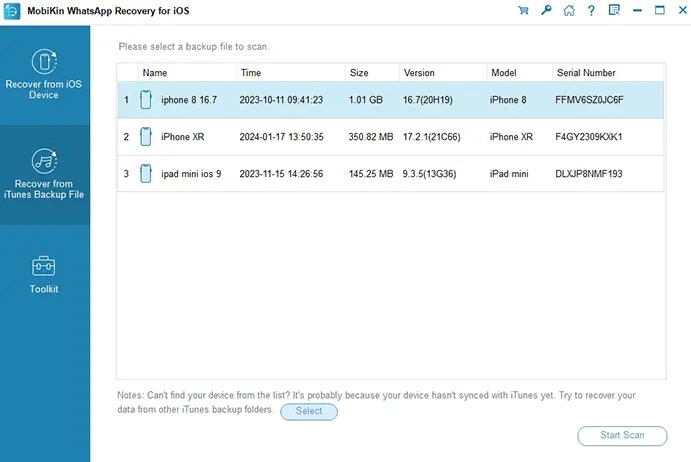
- Open the program and choose Recover from iTunes Backup File. It lists the backups it detects.
- Select the right backup, choose the data types and click Start Scan.
- Preview the WhatsApp messages and attachments found in the backup.
- Select the items you need and click Recover to Computer.

Marketing Claims vs. the Support FAQ
MobiKin’s product page and its support FAQ don’t always say the same thing. Where they differ, we suggest planning around the more cautious FAQ answer:
| Scenario | Product page | Support FAQ |
|---|---|---|
| Factory-reset iPhone | Listed as a supported loss scenario | Not directly recoverable; use an iTunes backup |
| Damaged, broken or disabled iPhone | Listed as a supported loss scenario | Not directly recoverable; use an iTunes backup |
| Free trial | Offered as a free download | Scan and preview only; no recovery |
| iCloud backup | Not listed as a recovery source | Not listed as a recovery source |
Important Limitations to Know Before You Start
- Recovery is not guaranteed: A scan does not mean deleted messages can be restored. Results depend on whether the data is still accessible and has not been overwritten.
- The trial is limited: MobiKin’s FAQ says the trial can scan and preview data, but recovery and export require the full version. Confirm activation before spending time on a full scan.
- iTunes only, not iCloud: The publisher documents recovery from a local iTunes backup. It does not describe direct recovery from an iCloud backup, so don’t assume signing in to iCloud is a supported route.
- Damaged or reset devices: The FAQ says direct recovery from a damaged/disabled iPhone or after a factory reset is not supported, and points users to an existing iTunes backup instead.
- Privacy matters: WhatsApp chats can hold sensitive personal information. Use the software only on devices and backups you own or are authorised to access, and read the publisher’s privacy policy before connecting a device.
- Protect what you have first: Don’t delete WhatsApp, reset the phone or overwrite existing backups while attempting recovery. Keep the original device and backup untouched until you’ve checked the exported files.
For more detail, see the publisher’s product FAQ, especially its answers about trial limits, supported recovery sources and damaged devices.
System Requirements and Compatibility
| Operating system | Windows 11, 10, 8 and 7 (a separate Mac version is available) |
|---|---|
| Processor | 1 GHz Intel/AMD CPU or faster |
| RAM | 1 GB or more |
| Free disk space | 1 GB or more |
| Supported iOS | iOS 5 through iOS 18, iOS 26 and iOS 27 |
| Supported devices | iPhone 4 up to the iPhone 18 series and iPhone Air; iPad, iPad Air, iPad mini and iPad Pro models (including 2025 models); iPod touch 3–7 |
| Supported data | WhatsApp messages and WhatsApp attachments |
These compatibility claims come from MobiKin’s technical-specification page. Check the current download and release notes for your exact device and iOS version before installing.
Recent Version History
- 3.0.4 (Dec 29, 2025): Cross-platform use with Mac sync, Live Photos export, and fixes for iOS driver installation and other issues.
- 2.0.19 (Sep 26, 2025): Added iOS 26 support for loading data, plus bug fixes.
- 2.0.16 (Nov 27, 2024): Added Korean, Russian, Indonesian, Hindi, Turkish and Dutch languages.
- 2.0.8 (Apr 22, 2024): First release of WhatsApp Recovery for iOS.
Pros and Cons
| 👍 Pros | 👎 Cons |
|---|---|
| Two recovery routes: direct device scan and iTunes backup | Trial cannot save recovered data |
| Preview and selective export save time | No documented iCloud backup recovery |
| Readable HTML export for chats | Damaged or reset phones need an existing iTunes backup |
| Broad device list, including iOS 26 and iOS 27 | Giveaway has ended; archived key may not work |
Related WhatsApp and iPhone Recovery Tools on Techno360
- Coolmuster iPhone WhatsApp Recovery Free License
- MobiKin Recovery for WhatsApp (Android) Free License
- EaseUS MobiSaver Pro for iOS Free License
- Coolmuster iPhone Data Recovery Giveaway
- FoneLab WhatsApp Transfer for iOS Giveaway
Looking for more free licenses? Browse our latest software giveaways.
Frequently Asked Questions
Is the MobiKin WhatsApp Recovery for iOS giveaway still active?
No. The one-year giveaway covered in this article has ended. The archived registration details are kept for reference, but we cannot guarantee they will activate a fresh installation.
How much does MobiKin WhatsApp Recovery for iOS cost?
At the time of our check, MobiKin’s product page listed the Windows version at $35.95, down from a regular price of $55.95, with a 30-day money-back guarantee. Prices and plans can change, so confirm on the official purchase page.
Can I recover WhatsApp messages from an iPhone without a backup?
The publisher says the program can scan an iOS device directly as well as a local iTunes backup. Whether a particular deleted message can be recovered depends on whether the data is still accessible to the software; recovery is not guaranteed.
Can the free trial recover and save WhatsApp messages?
According to MobiKin’s FAQ, the trial version can scan and preview recoverable data but cannot complete the recovery. You need the registered full version to save recovered items.
Can it recover WhatsApp data from iCloud?
The publisher documents direct iOS-device scanning and recovery from iTunes backup files. Its documentation does not clearly list iCloud-backup recovery, so treat that as unsupported unless MobiKin confirms otherwise.
Can it recover messages from a factory-reset or damaged iPhone?
MobiKin’s FAQ says it cannot directly recover data from a damaged or disabled iPhone or after a factory reset. You may be able to retrieve the data from an iTunes backup, if one exists and contains the WhatsApp data.
Is there a Mac version?
Yes. MobiKin offers a separate Mac version. The giveaway covered here was for the Windows version.
Where can I get the latest installer?
Use MobiKin’s official download centre rather than third-party download mirrors.
Final Verdict
📊 Our Take
MobiKin WhatsApp Recovery for iOS gives you two documented ways to get WhatsApp data back: scanning a connected iPhone or iPad, and scanning a local iTunes backup. The preview and selective-export workflow is useful when you want to check what’s there before saving anything, and the HTML export makes recovered chats easy to read or print.
That said, recovery is never guaranteed, the trial stops at scan-and-preview, iCloud isn’t a documented source, and the one-year giveaway featured here has ended. Run the free scan first to see whether your chats are actually found, then decide whether the license is worth buying.
Editorial note: Product capabilities, pricing, compatibility and version history in this article were checked against MobiKin’s official product page, purchase page and support FAQ on November 10, 2026. Giveaway availability and prices can change independently of the software.
Discover more from Techno360
Subscribe to get the latest posts sent to your email.

You must be logged in to post a comment.