

🔐 Privacy · DNS · 2026
Mullvad DNS Is Shutting Down: 8 Free Alternatives to Switch To Before November 2
Mullvad pulls the plug on its public encrypted DNS on November 2, 2026. If you set it by hand, you have a deadline — here’s who actually needs to act, and the best replacement for your reason.
⚠️ Mullvad DNS deadline: November 2, 2026
If you manually configured Mullvad’s public DNS on a device, browser or router, switch to another resolver before this date or name resolution will break. Mullvad VPN users don’t need to change anything — the DNS inside the VPN tunnel keeps working.

If your phone, laptop or router quietly points to Mullvad’s public DNS, mark the calendar. Mullvad confirmed on September 3, 2026 that it is winding down the free encrypted resolver it launched in 2022, and the servers go dark for good on November 2. This isn’t a scandal or a breach — it’s a deliberate handover. Rather than run its own resolver, Mullvad is putting money behind the Quad9 Foundation and pointing users there.
⚡ Quick Read — TL;DR
- Deadline: Mullvad’s public encrypted DNS stops resolving on Nov 2, 2026.
- VPN users: Nothing to do — the tunnel already handles DNS.
- Manual setups: Swap providers before the date or lose name resolution.
- Closest match: Quad9 — Mullvad’s own recommended replacement.
- Ad blocking? AdGuard DNS, dnsforge.de or Control D.
- Full control? NextDNS (free up to 300K queries/month).
- Raw speed? Cloudflare 1.1.1.1.
Who Actually Needs to Switch?
Not everyone with a Mullvad connection is affected. Find your row:
| Who are you? | What to do |
|---|---|
| Mullvad VPN user (normal VPN DNS) | ✅ Nothing — DNS runs inside the tunnel |
| Mullvad Browser with default DNS | ✅ Nothing — migrated to Quad9 automatically |
| Manually configured Mullvad DNS | ⚠️ Switch before Nov 2, 2026 |
| Custom Mullvad DNS profile (iOS/macOS/router) | ⚠️ Check and replace it before Nov 2, 2026 |
Quick Answer: Which One Should You Pick?
Short on time? Match your reason for using Mullvad to a winner and jump straight to it.
🏆 Best overall
Quad9
Threat blocking, encrypted DNS and no account — closest to what most Mullvad users want.
🚫 Best for ad blocking
AdGuard DNS
Ads, trackers and malware, free.
⚙️ Best for customization
NextDNS
Choose and customize your blocklists.
⚡ Best for speed
Cloudflare 1.1.1.1
Among the fastest, worldwide.
🇪🇺 Best European option
DNS4EU
EU-hosted with filter tiers.
Quad9DNS4EUAdGuard DNSNextDNSDNS.SBdnsforge.deControl DCloudflareComparisonDecision guideSetup steps
Why Is Mullvad Shutting Down Its Public DNS?
Mullvad’s reasoning is refreshingly honest: running a fast, reliable, privacy-first public resolver across the planet is a specialist job, and it would rather bankroll the people who already do it best than half-build a rival. It called Quad9 the leader in this space and said it will redirect the resources it spent on its own servers into supporting the non-profit.
There’s also a practical angle. For a Mullvad VPN subscriber, the public DNS was always a bit redundant — once the tunnel is up, queries ride inside it and never touch a standalone resolver. The public servers mainly helped people who wanted encrypted DNS without a VPN. Those are exactly the folks who now need a new home.
What happens if you do nothing?
After November 2, devices still configured to use Mullvad’s discontinued public DNS will no longer be able to resolve domains through those servers — affected apps and sites will act like the internet is down, even though your connection is fine. There’s no security risk in doing nothing, just broken lookups. The actual change is usually quick once you’ve chosen a replacement below.
Do You Even Need a Separate DNS if You Use Mullvad VPN?
Usually, no. When Mullvad VPN is connected, DNS requests are handled through the encrypted tunnel by Mullvad’s own resolver — Mullvad actually recommends against pointing at its public DNS while the VPN is active, because the tunnel’s resolver is faster. A public DNS alternative matters mainly when you’re not on the VPN, or when you want network-level filtering on a device or whole home without running a VPN at all. That’s the gap the eight resolvers below fill. If that’s not you, you’re done — no action needed.
How We Picked These Mullvad DNS Alternatives
We prioritised free public resolvers that offer encrypted DNS, publish clear privacy practices, and give a former Mullvad DNS user something concrete — malware protection, ad blocking, deep customisation, European hosting or raw speed. We then checked every resolver address in this article against each provider’s own documentation, and flagged privacy caveats openly rather than repeating marketing copy. Last verified: September 10, 2026.
The 8 Best Mullvad DNS Alternatives in 2026
All eight have a free public option, though a couple impose feature or query limits (we flag those). All provide an encrypted DNS option such as DoH or DoT — note that the plain IPv4 addresses below (9.9.9.9, 1.1.1.1, and so on) are conventional, unencrypted DNS; the encryption comes from using the DoH/DoT hostname. DNSSEC support and configuration methods also vary by provider and endpoint. Copy the addresses straight into your device.
1. Quad9
Best for: privacy + malware protection
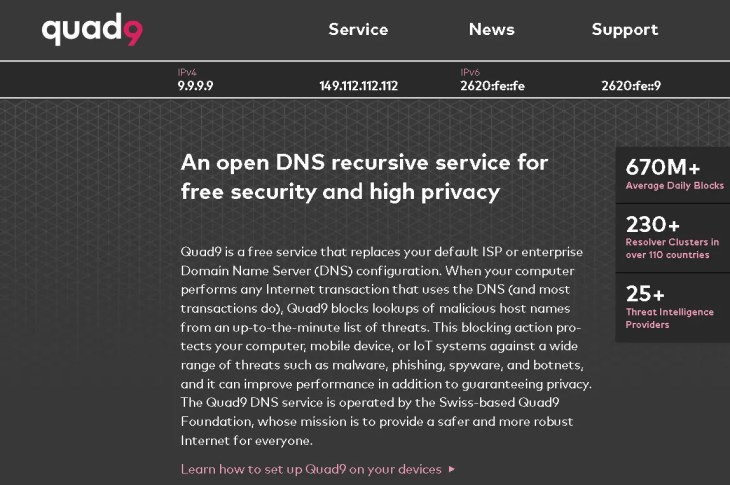
Start here, because Mullvad did. Quad9 is a Swiss non-profit that has offered a free resolver since 2017, and its headline server automatically drops lookups to domains tied to malware, phishing and other threats, pulling from rotating threat-intelligence feeds. Its privacy stance is exactly what you want as a Mullvad refugee: no user-identifiable query or IP logs, and no account. Prefer no filtering? Quad9 runs an unfiltered variant too, and supports DNSCrypt alongside DoH and DoT.
🟢 Privacy-focused · 🛡️ Threat blocking
9.9.9.9149.112.112.112dns.quad9.netUnfiltered variant: 9.9.9.10 · dns10.quad9.net
🇨🇭 SwitzerlandNo account
2. DNS4EU
Best for: European hosting with filter tiers

Born from an EU-backed project and now run by Czech cybersecurity firm Whalebone, DNS4EU is the pick for anyone who wants queries handled on European soil under European rules. It offers five profiles — here are all of them, with the primary IPv4 address and DoH/DoT hostname for each.
🟡 Anonymised, retention caveat · 🛡️ Blocks threats · 🚫 Ad blocking (some profiles)
86.54.11.1protective.joindns4.eu86.54.11.12child.joindns4.eu86.54.11.13noads.joindns4.eu86.54.11.11child-noads.joindns4.eu86.54.11.100unfiltered.joindns4.eu🇨🇿 Czech Republic5 profilesParental controlsPublic resolver: no account
3. AdGuard DNS
Best for: blocking ads and trackers

Were you using Mullvad DNS mainly to strip out ads? This is your natural landing spot. AdGuard’s free public resolver, run by a Cyprus-based company, comes in three flavours: block ads/trackers/malware, add adult-content filtering and Safe Search, or block nothing. It goes wider on protocols than most — DoH, DoT, DNS-over-QUIC and DNSCrypt. The public service collects no personal data; AdGuard keeps only anonymous aggregate stats and a rolling 24-hour list of requested domains to spot new trackers, none of it mapped to an individual.
🟢 Privacy-focused · 🚫 Ad blocking · 🛡️ Threat blocking
94.140.14.1494.140.15.15dns.adguard-dns.com🇨🇾 CyprusDoH·DoT·DoQ·DNSCryptNo account
4. NextDNS
Best for: maximum customization

NextDNS is less a fixed resolver and more a control panel. You pick which blocklists run, toggle protection against ads, trackers, freshly registered domains and adult content, and keep your own allow/deny lists. Once built, it hands you personalised DoH and DoT addresses with a unique ID. Logging is off unless you switch it on — and if you do, you choose what’s kept, for how long (an hour to two years) and in which region.
🔵 User-controlled logging · 🚫 Ad blocking · ⚙️ Customizable
https://dns.nextdns.io/YOUR-IDYOUR-ID.dns.nextdns.io🇺🇸 United StatesAccount required
5. DNS.SB
Best for: minimal, unfiltered privacy

If you liked Mullvad precisely because it left your traffic alone, DNS.SB is the spiritual match. Operated by Germany’s xTom, it filters nothing and logs nothing — no domains, no IPs, no timestamps. It adds two nice privacy touches, Query Name Minimisation and no EDNS Client Subnet, so less of your query detail leaks upstream.
🟢 No query logs claimed · ⚪ No filtering
185.222.222.22245.11.45.11https://doh.dns.sb/dns-querydot.sb🇩🇪 GermanyNo query logsNo account
6. dnsforge.de
Best for: German-hosted ad blocking with no logs
A donation-funded German resolver from adminForge, dnsforge.de threads a nice needle: it claims to keep no query logs, yet still filters. Four modes — Normal, Clean, Hard and Blank — scale from standard ad/tracker/malware blocking up to strict adult-content and gambling filters, or nothing at all. It supports DoH, DoT and DoQ.
🟡 No logs declared (unaudited) · 🚫 Ad blocking · 🛡️ Blocks threats
49.12.67.122https://dnsforge.de/dns-query🇩🇪 GermanyDonation-fundedNo account
7. Control D
Best for: ready-made filters, no account

Toronto-based Control D offers the widest menu of ready-made resolvers you can use free and without an account. Block only malware, or ads and trackers, or social media, or adult content — each has its own endpoint. There’s a family profile that also blocks drug sites, and even an “Uncensored” profile that unblocks domains restricted in some countries. For the free resolvers, Control D says it stores no IP addresses, timestamps or query history.
🟢 No logs claimed (free tier) · 🚫 Ad blocking · 🛡️ Threat blocking
76.76.2.276.76.2.1https://freedns.controld.com/p2🇨🇦 CanadaMany profilesNo account
8. Cloudflare 1.1.1.1
Best for: speed

The address everyone remembers. Cloudflare is consistently ranked among the fastest public resolvers by independent monitors, measured from hundreds of locations — though your real-world result depends on your ISP, location and routing, so it isn’t automatically fastest for everyone. By default it filters nothing, but “1.1.1.1 for Families” adds malware blocking (1.1.1.2) or malware plus adult-content blocking (1.1.1.3). Cloudflare says it never sells your data and doesn’t permanently store the full source IP of a query, though some technical logs are held up to 25 hours before deletion.
🟢 IP deleted ≤25h · ⚡ Fastest-class · 🛡️ Threats optional
1.1.1.11.0.0.1cloudflare-dns.comMalware blocking: 1.1.1.2 · Malware + adult: 1.1.1.3
🇺🇸 United StatesNo account
Side-by-Side: All 8 at a Glance
| DNS | Best for | Ads | Malware | Family | Encrypted DNS | No account | Logging | Free limit |
|---|---|---|---|---|---|---|---|---|
| Quad9 | Privacy/security | ❌ | ✅ | ❌ | DoH·DoT·DNSCrypt | ✅ | No user IP | Unlimited |
| DNS4EU | EU users | ✅ | ✅ | ✅ | DoH·DoT | ✅ | Limited retention | Unlimited |
| AdGuard DNS | Ads/trackers | ✅ | ✅ | ✅ | DoH·DoT·DoQ·DNSCrypt | ✅ | Anon. stats | Unlimited |
| NextDNS | Custom filtering | ✅ | ✅ | ✅ | DoH·DoT | ❌ | User-controlled | 300K/mo |
| DNS.SB | Minimalism | ❌ | ❌ | ❌ | DoH·DoT | ✅ | No query logs | Unlimited |
| dnsforge.de | Ad block + privacy | ✅ | ✅ | ✅ | DoH·DoT·DoQ | ✅ | No logs declared | Unlimited |
| Control D | Ready-made filters | ✅ | ✅ | ✅ | DoH·DoT·DoQ | ✅ | No logs (free) | Unlimited |
| Cloudflare | Speed | ❌ | Optional | Optional | DoH·DoT | ✅ | IP deleted ≤25h | Unlimited |
Privacy vs Security vs Filtering vs Speed — Four Different Things
“Best DNS” lists tend to blur four separate questions. Keeping them apart makes the choice much clearer:
🔒 Privacy
- What the resolver records about you
- Strong choices: Quad9, DNS.SB, AdGuard
🛡️ Security
- Whether malicious domains are blocked
- Strong choices: Quad9, DNS4EU, Control D
🚫 Filtering
- Ads, trackers, adult, gambling
- Strong choices: AdGuard, NextDNS, Control D
⚡ Speed
- DNS response latency
- Strong choice: Cloudflare, depending on location and ISP
How to find the fastest DNS for your connection
Global rankings are a starting point, not the final word — latency depends on your ISP and where you are. Shortlist two or three candidates and test them from your own connection with a DNS benchmarking tool (DNSPerf’s site, GRC’s DNS Benchmark on Windows, or dnsperftest-style scripts) rather than trusting a chart. For a quick manual check, run repeated lookups against each resolver and compare response times. Indian users especially should test nearby endpoints — like DNS.SB’s Bengaluru address — against the global default before settling.
Which DNS Should You Choose?
Choose Quad9 if…
- You want the closest privacy/security replacement for Mullvad.
Choose AdGuard DNS if…
- You mainly used Mullvad to block ads and trackers.
Choose NextDNS if…
- You want detailed customization and per-device control.
Choose Cloudflare if…
- Speed is your top priority.
Choose DNS.SB if…
- You want a simple, unfiltered resolver with no query logging.
Choose DNS4EU if…
- You specifically want an EU-based option.
Choose Control D if…
- You want ready-made filter categories without an account.
Choose dnsforge.de if…
- You want German-hosted filtering with no declared query logs.
How to Replace Mullvad DNS (Quick Setup)
Once you’ve picked a resolver, switching takes a couple of minutes. Examples below use Quad9’s dns.quad9.net / 9.9.9.9 — swap in whichever hostname or IP you chose.
🤖 Android (9+)
- Settings → Network & Internet → Private DNS
- Pick “Private DNS provider hostname”
- Enter dns.quad9.net → Save
🪟 Windows 11
- Settings → Network & internet → Wi-Fi/Ethernet → Hardware properties
- Next to DNS server assignment → Edit → Manual
- Turn on IPv4, enter 9.9.9.9 and 149.112.112.112
- Set DNS encryption (DoH) to On where offered → Save
- DoH options vary by Windows version and provider
🍎 iPhone / iPad
- Download the provider’s official encrypted-DNS profile (e.g. from Quad9’s site)
- Settings → Profile Downloaded → Install
- Confirm under General → VPN & Device Management
- The exact flow varies by provider
💻 macOS
- System Settings → Network → Details → DNS
- Add 9.9.9.9 / 149.112.112.112 (this is conventional DNS)
- For encrypted DNS, install the provider’s configuration profile instead — adding IPs alone doesn’t enable encryption
📶 Router (whole home)
- Log in to the router admin page
- Find DNS settings (often under WAN/Internet)
- Enter the primary/secondary IPs → save → reboot
🌐 Browser (DoH)
- Chrome/Edge/Firefox → Security/Privacy settings
- Enable “Use secure DNS” and paste the DoH hostname
Want the full walkthrough with screenshots? Our step-by-step guide to enabling Private DNS on Android covers the exact fields in detail.
What DNS Filtering Can — and Can’t — Do
Words like “safe,” “secure” and “block ads” can make DNS sound like a full security suite. It isn’t. Set expectations correctly:
✅ DNS can help with
- Malicious and phishing domains
- Some ads and trackers
- Adult-content domains
- Query privacy via DoH/DoT
❌ DNS can’t replace
- Antivirus / endpoint security
- A firewall
- A VPN (it doesn’t hide your traffic)
- In-browser content blocking
Mullvad itself notes that DNS-level content blocking can’t catch every ad or tracker. Treat a filtering resolver as one useful layer — for PC-level protection, pair it with something like the firewall in our Portmaster review, and for a broader tune-up, the best privacy apps for Android. Prefer another fully European resolver? See our take on DNS0.
✅ The Verdict
Mullvad’s DNS shutdown isn’t a security crisis, but it does require action for manually configured users. The good news: there are several strong free alternatives, and the right one depends on whether you value privacy, malware blocking, ad blocking, customization or speed.
🏆 Best overall: Quad9 · 🛡️ Privacy + malware: Quad9 · 🚫 Ad blocking: AdGuard DNS · ⚙️ Customization: NextDNS · ⚡ Speed: Cloudflare 1.1.1.1 · 🇪🇺 European: DNS4EU
Whatever you choose, do it before November 2, 2026 so nothing breaks on the day the old servers go quiet.
Frequently Asked Questions
When exactly does Mullvad DNS stop working?
Mullvad’s public encrypted DNS servers stop resolving on November 2, 2026. The company announced the closure on September 3, 2026. Anything you manually pointed at those servers will simply fail after the cutoff, so switch before then.
Do Mullvad VPN users need to do anything?
No. Mullvad VPN’s internal DNS keeps working through the tunnel. The shutdown mainly affects manual configurations using Mullvad’s public DNS.
Which Mullvad DNS alternative is the closest match?
Quad9 is the replacement Mullvad itself recommends and is now financially supporting. It is a Swiss non-profit that blocks malicious domains, keeps no user-identifiable query logs and needs no account.
How do I switch DNS on Android?
On Android 9 or later: Settings → Network & Internet → Private DNS → “Private DNS provider hostname” → enter a hostname such as dns.quad9.net. It applies system-wide across every app.
Is a free DNS resolver actually safe to use?
Yes, provided you pick a reputable operator with a clear privacy policy. Every service here offers encrypted DNS (DoH or DoT) and documents what it does with your data, though DNSSEC support and available protocols vary by provider and endpoint.
Which DNS is fastest for Indian users?
Cloudflare 1.1.1.1 is consistently among the fastest resolvers worldwide, but real-world speed depends on your ISP, location and routing. DNS.SB runs a Bengaluru endpoint, and NextDNS and Control D have nearby points of presence, all of which can help in India.


Discover more from Techno360
Subscribe to get the latest posts sent to your email.