
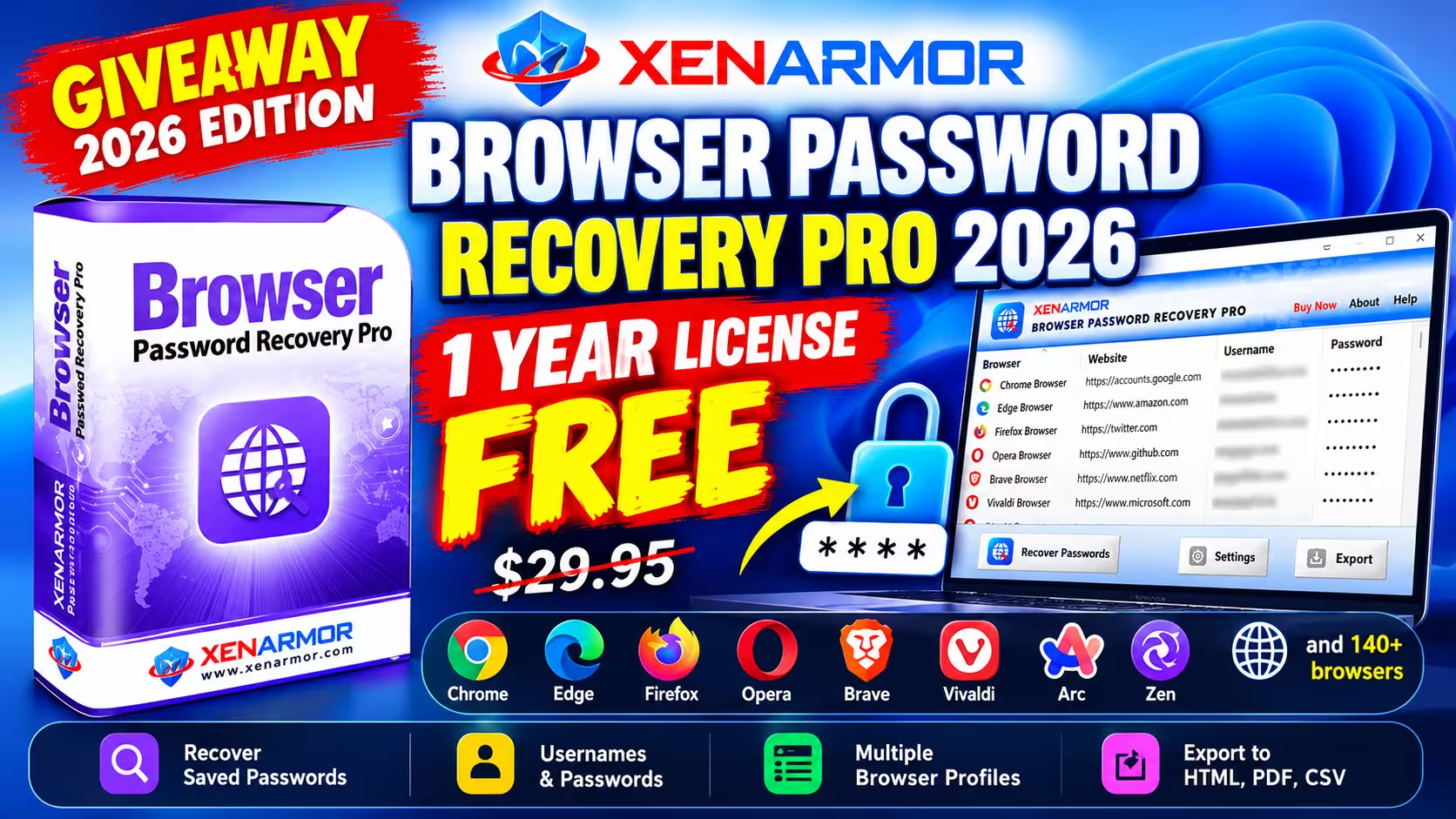
🎁 GIVEAWAY · 2026 EDITION · WORTH $29.95
Recover forgotten website passwords from 140+ browsers, free for a year
XenArmor is giving away a 1-year license of Browser Password Recovery Pro 2026 Basic Edition (normally $29.95). Register with your email, confirm it within 48 hours, and activate the key in the installer.
⚡ Quick Read
- Software: XenArmor Browser Password Recovery Pro 2026, Basic Edition
- License: 1 year, free (regular price $29.95)
- Platform: Windows Vista, 7, 8, 10 and 11
- Must do: Click the confirmation link in XenArmor’s first email. Licenses tied to unverified emails are deactivated after 48 hours
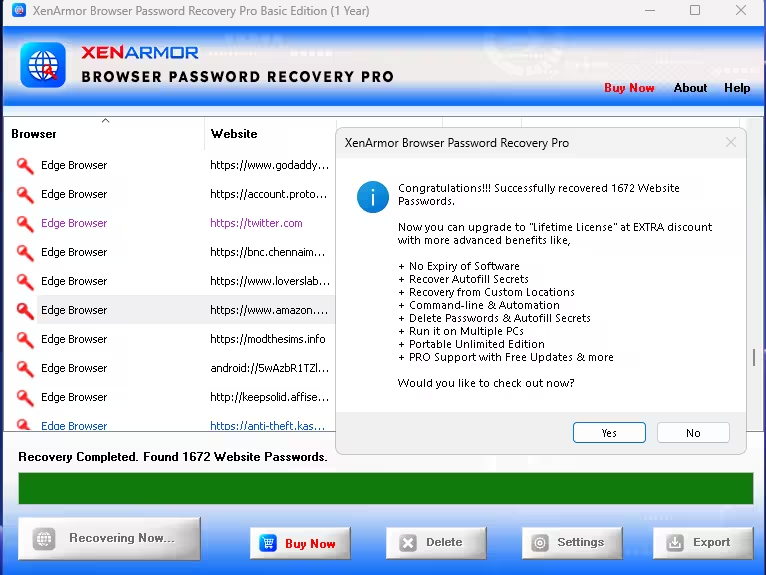
- Our test: On Windows 11, one scan reported 1,672 saved login entries from Edge and Chrome
Most of us let web browsers remember our logins, and that works fine until you need a password on a different device, a new browser, or a phone app that won’t accept “Sign in with Chrome”. Resetting every account is slow, and some old sites don’t even send reset emails anymore.
XenArmor Browser Password Recovery Pro scans the browser profiles on your Windows PC and lists every saved website, username and password in one window. The 2026 edition supports more than 140 browsers, including Chrome, Microsoft Edge, Firefox, Opera, Brave, Vivaldi and newer names such as Arc, Zen and Comet. Right now XenArmor is offering a free 1-year license, and here is how to claim it.
What It Does and Doesn’t Do
Browser Password Recovery Pro reads saved logins from browser data on your PC that it can access and decrypt. It does not reset account passwords, recover a password you never saved in a browser, or break into online accounts. It is also not a password manager. Once you’ve recovered your own credentials, import them into a trusted password manager and delete any unprotected export files.
Recovery also depends on how each browser encrypts its data. XenArmor’s guide notes that passwords protected by encryption tied to a specific Windows user or computer may not be recoverable from another user account, another PC or an external drive.
Key Features
- One-click recovery: Press F5 or click “Recover Passwords” and the program lists the browser, website, username, password and the profile file it was read from.
- 140+ browsers: Chromium-based browsers (Chrome, Edge, Brave, Opera, Vivaldi, Yandex), Firefox-based browsers (Firefox, Waterfox, LibreWolf, Zen) and many smaller ones.
- Multiple profiles: It scans supported browser profiles it can access and decrypt, including inactive ones, not only the profile you use today. That doesn’t guarantee every stored login will be recovered.
- Backup and export: XenArmor documents export to HTML, PDF, CSV, XML, JSON and SQLite. The giveaway build has an Export button; we didn’t test every format.
- No technical knowledge needed: There is nothing to configure for a standard scan.
- EV-signed installer: XenArmor says the software is signed with a Sectigo Extended Validation code-signing certificate. A valid signature confirms who published the file and that it hasn’t been altered, but it isn’t a guarantee that the software carries no risk.
Giveaway Basic Edition vs Paid Editions
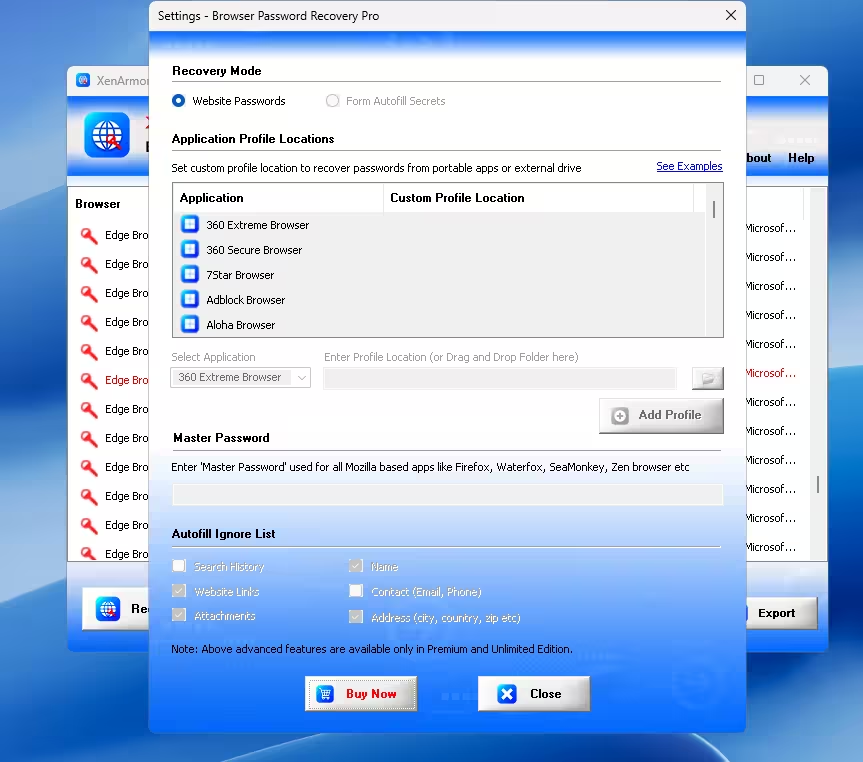
The giveaway key activates the Basic Edition. It does the main job, recovering saved website passwords, without limits. A few advanced options in Settings are greyed out with a note that they need the Premium or Unlimited Edition.
| Feature | Giveaway (Basic) | Premium / Unlimited |
|---|---|---|
| Recover website passwords | ✅ | ✅ |
| Form autofill secrets (cards, email, phone, search history) | ❌ | ✅ |
| Custom profile locations (portable browsers, external drives)* | ❌ | ✅ |
| Master password option for Firefox-based browsers | ❌ | ✅ |
| Command-line and automation | ❌ | ✅ |
| Portable edition, multiple PCs | ❌ | Unlimited only |
| License length | 1 year | 1 year or lifetime |
* External drives and custom profiles: The giveaway Basic Edition does not include the custom-profile-location option. Premium editions offer additional recovery options, but recovery from another Windows installation or external drive is not guaranteed. Some browsers use encryption tied to the original Windows user or computer, which can prevent passwords from being decrypted elsewhere.
How to Get Browser Password Recovery Pro 2026 Free License
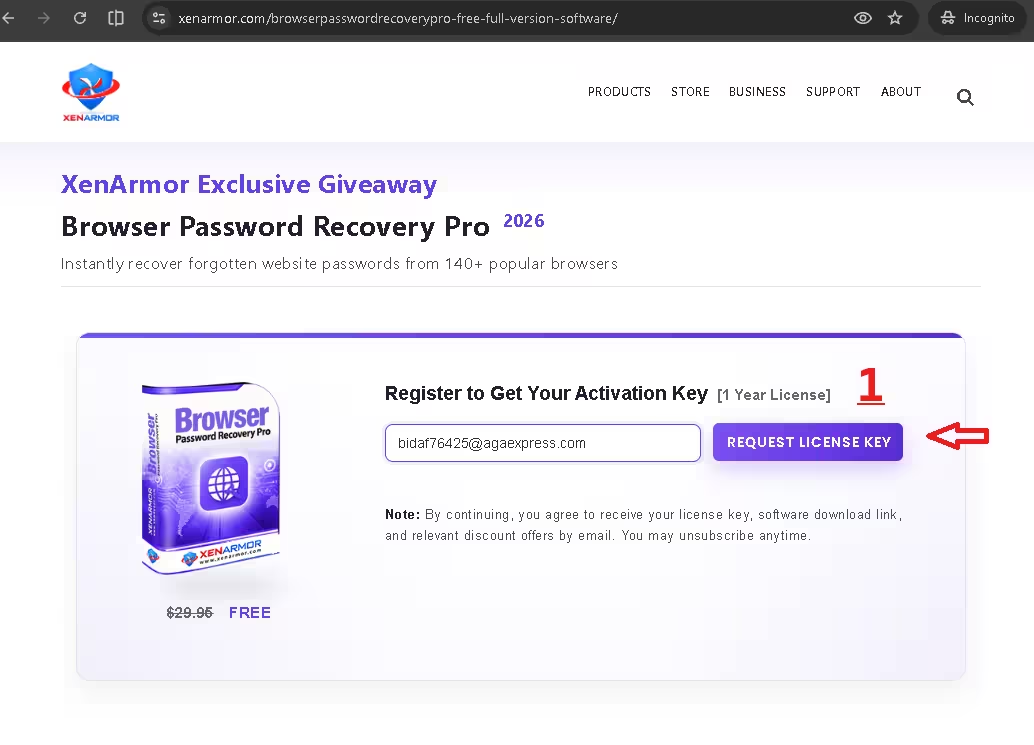
Step 1: Register on the giveaway page
Open the XenArmor giveaway page, type your email address in the “Register to Get Your Activation Key” box and click Request License Key. Signing up also subscribes you to XenArmor’s discount emails, which you can unsubscribe from later.
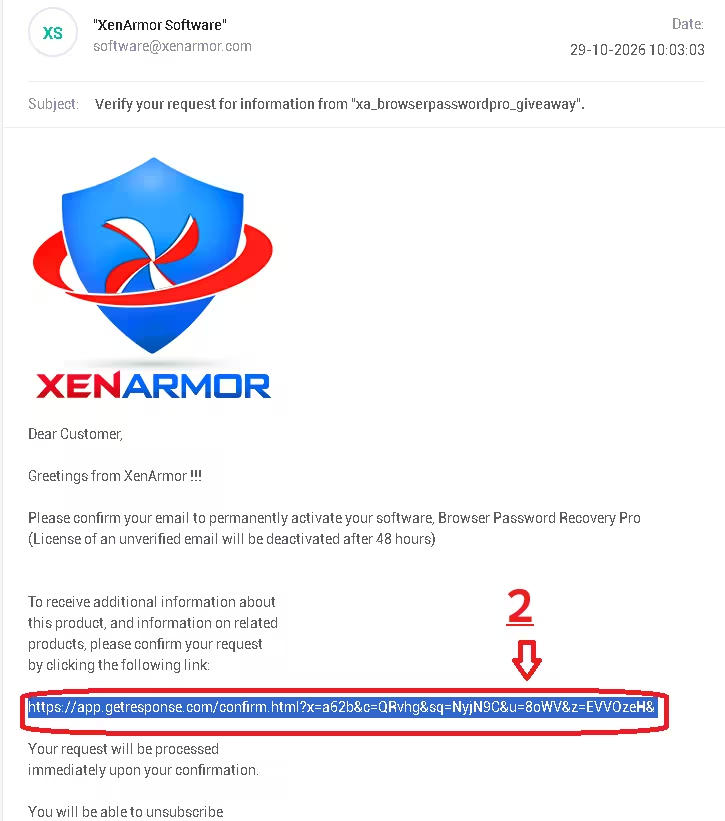
Step 2: Confirm your email within 48 hours
Within a minute or two you will get an email from XenArmor titled “Verify your request for information”. Click the confirmation link inside it. Don’t skip this step: XenArmor says licenses registered with an unverified email are deactivated after 48 hours. Check your Spam or Promotions folder if it doesn’t arrive.
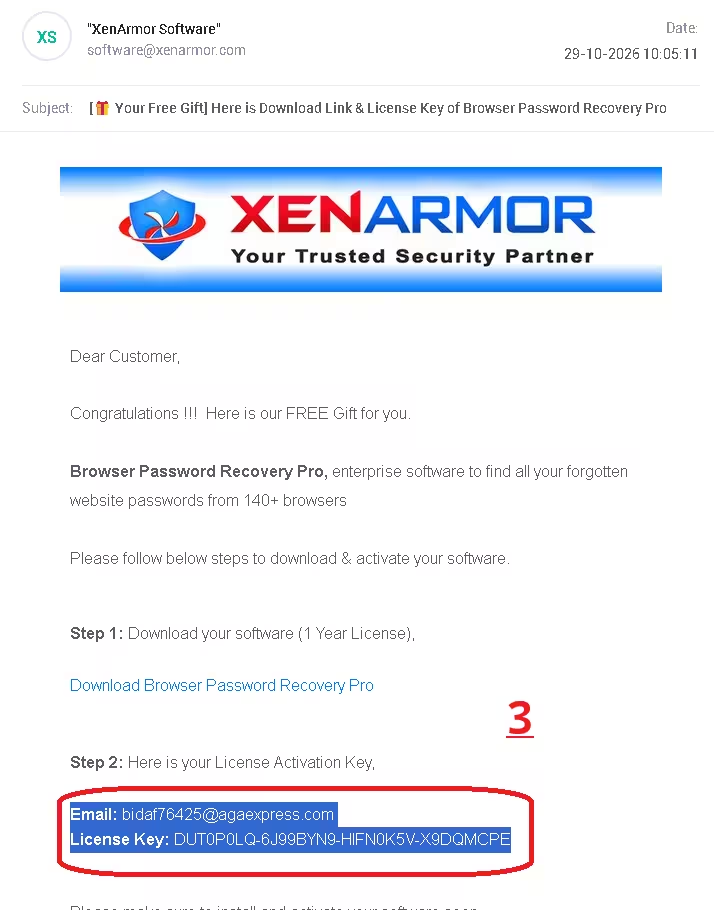
Step 3: Copy your license key
After confirming, a second email titled “Your Free Gift” arrives with the download link, your registered email and your License Key. Keep this email open for the activation step.
Step 4: Download and install
Download the giveaway installer (ZIP) and extract it. Inside you’ll find the setup file for the Basic Edition along with a readme, user guide link and license PDF. Run the setup file and click Next through the wizard.
🎁 Get Free License Key ⬇️ Download Installer (ZIP)
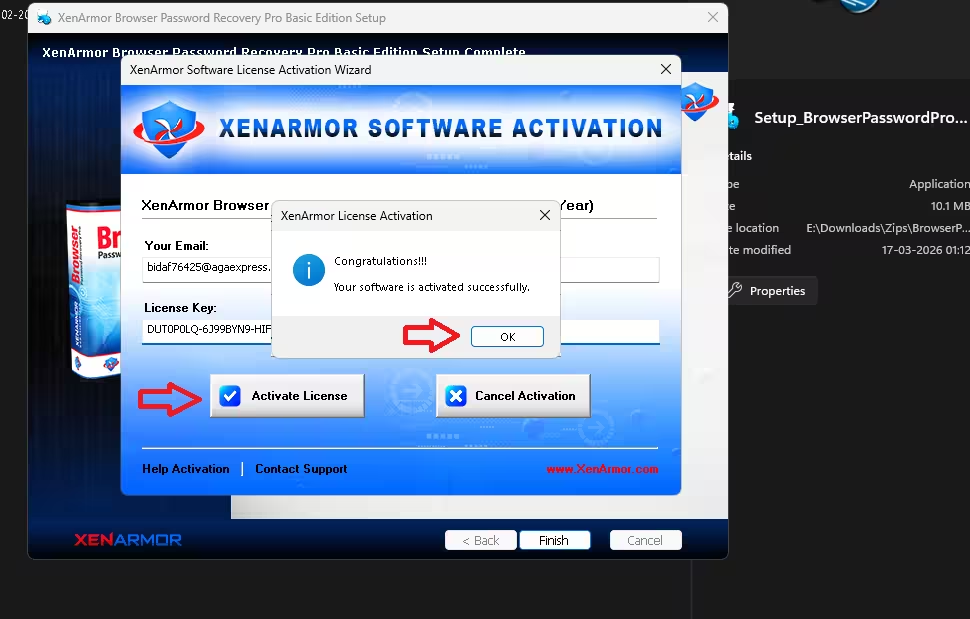
Step 5: Activate the license
When setup finishes, the XenArmor Software Activation wizard opens. Paste the email address and license key from Step 3, click Activate License, and you’ll see a “Your software is activated successfully” message. Click OK, then Finish.
Step 6: Recover your passwords
Open the program and click Recover Passwords (or press F5). In our test on Windows 11 it finished in seconds and reported 1,672 saved login entries across Edge and Chrome. That’s the count the software showed, which can include old or duplicate entries, not 1,672 unique current passwords. Use the column headers to sort by browser or website, or click Export to save a backup. When the scan ends, a pop-up offers a lifetime-license upgrade; click No if you don’t need it.
Things to Know Before You Use It
⚠️ Important
- Antivirus warnings: Password recovery tools are often flagged as PUA (potentially unwanted applications). XenArmor calls these false positives, but the publisher’s word alone doesn’t prove every detection is harmless. Before running the setup file, right-click it, open Properties → Digital Signatures and confirm the signer is XenArmor, scan it with your antivirus or an online scanner, and look into any detection before you continue. Don’t disable your antivirus or add exclusions just to get it running.
- Treat the export file like a key: An exported CSV or HTML file holds your passwords in plain text. Delete it once you’ve imported it into a password manager.
- Your own accounts only: XenArmor states the software is for recovering your own passwords and legitimate IT, audit or forensic work.
- A wake-up call: If a free tool can read every saved login on your PC in seconds, so can anyone who sits at it. Lock your Windows account with a strong password or PIN.
📊 Verdict
The giveaway Basic Edition covers what most people need: find a forgotten website password from any browser on your PC and export the list before switching computers or moving to a password manager. Autofill data, portable browsers and external drives are locked to paid editions, and the key lasts one year, but for a free license it is well worth grabbing.
👍 Fast, one-click recovery from 140+ supported browsers, with documented export to six formats
👎 1-year license, no autofill or custom-location recovery, upgrade pop-ups after scans
Frequently Asked Questions
Is XenArmor Browser Password Recovery Pro really free?
Yes. The giveaway gives you a 1-year license of the Basic Edition at no cost. The regular price is $29.95.
Why did my license stop working after two days?
You probably didn’t click the confirmation link in the first email. XenArmor deactivates giveaway licenses linked to unverified emails after 48 hours.
Which browsers does it support?
More than 140, including Chrome, Edge, Firefox, Opera, Brave, Vivaldi, Arc, Zen, Yandex, Waterfox and LibreWolf.
Can the giveaway version recover autofill data or passwords from an external drive?
No. Form autofill recovery and custom profile locations are Premium and Unlimited Edition features. The Basic Edition recovers saved website passwords from browsers on the PC. Even with a paid edition, recovery from another Windows installation or an external drive isn’t guaranteed, because some browsers use encryption tied to the original Windows user or computer.
Can it hack or reset an online account password?
No. It only reads passwords already saved in browsers on your PC. It can’t reset account passwords or get into online accounts.
Does it work on Windows 11?
Yes. XenArmor lists Windows Vista, 7, 8, 10 and 11, and we tested the giveaway on Windows 11.
Looking for more free licenses? Browse the latest Techno360 freebies or check out other XenArmor giveaways.
Discover more from Techno360
Subscribe to get the latest posts sent to your email.

You must be logged in to post a comment.