
🎁 Vovsoft Giveaway · November 2026
Vov Screen Recorder 5.2 – Free Lifetime License
A one-click Windows screen recorder with GPU encoding, multi-monitor support and system + mic audio. Normally $19, free until November 8, 2026.
⚡ Quick Read
- Software: Vov Screen Recorder v5.2 (Full Edition)
- Value: $19 – free during the campaign
- License: Lifetime (no free updates)
- Campaign: November 1 – November 8, 2026
- Works on: Windows 11, 10, 8/8.1 and 7 (64-bit)
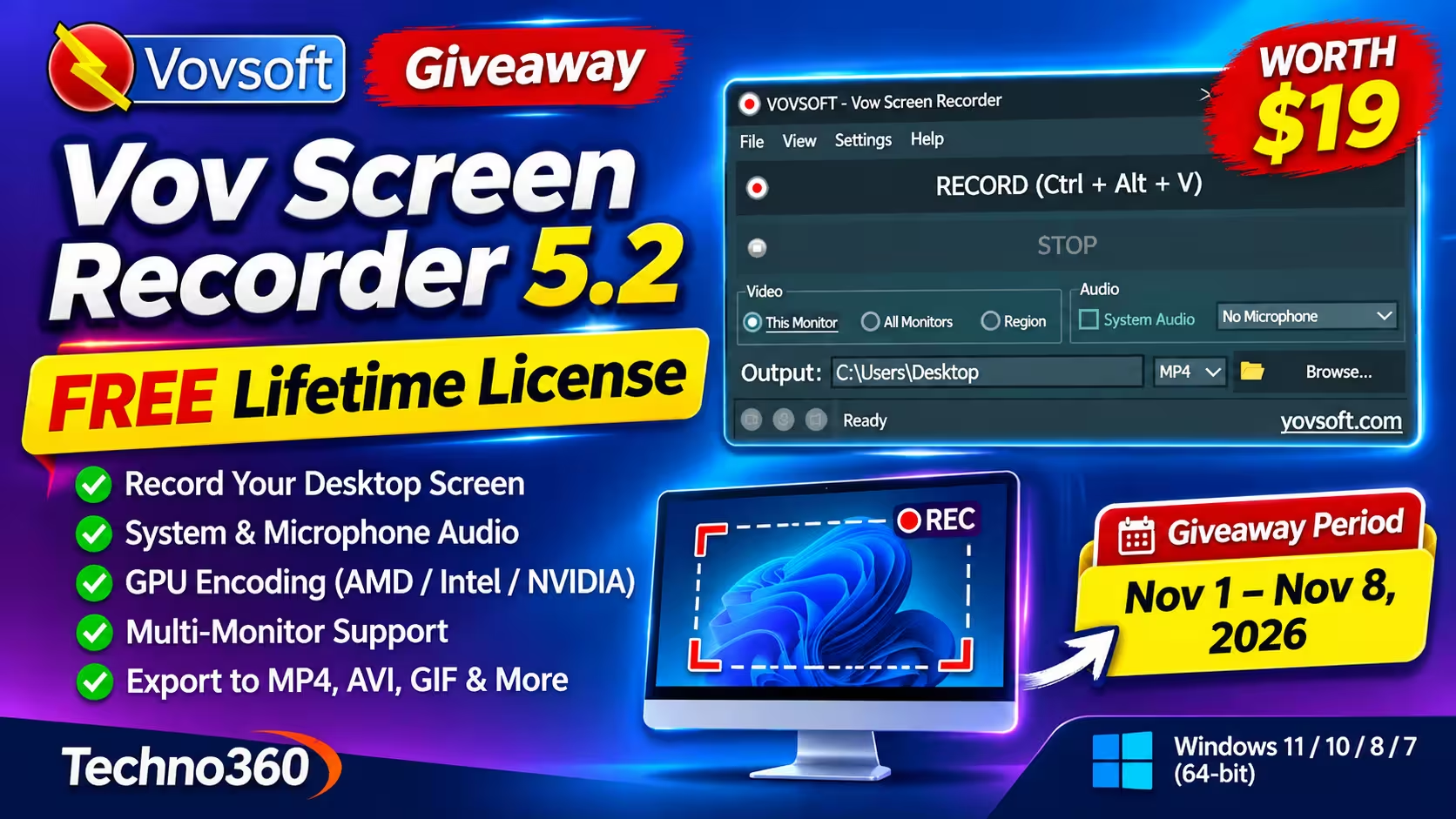
Vovsoft is giving away Vov Screen Recorder again, and this time the deal is better than before. Our previous post covered a one-year license back in June 2025. That license has since expired. The November 2026 campaign hands out a lifetime license for version 5.2, so once it’s activated, you can keep using it.
It’s a no-frills recorder. Pick what to capture, hit Record, and you get a video file. If you make quick tutorials, bug reports or gameplay clips and don’t want to learn OBS, this is worth grabbing.
What Is Vov Screen Recorder?
Vov Screen Recorder is a lightweight Windows app that records your desktop. Everything lives in one small window: a big RECORD button (hotkey Ctrl + Alt + V), a STOP button, video source options, audio options and an output folder with a format picker.

Under the hood it uses FFmpeg libraries, so Vovsoft says you don’t need to install any extra video codecs.
Key Features
- Three capture modes: This Monitor, All Monitors, or a custom Region.
- Audio capture: record system sound, your microphone, or both.
- Popular output formats: MP4, MKV, AVI, MOV, MPEG, FLV, WMV and animated GIF.
- Hardware encoding: H.264 and HEVC on AMD, Intel and NVIDIA GPUs, plus a software encoding fallback.
- Mouse pointer options: hide it, draw it, or highlight it so viewers can follow your clicks.
- Custom hotkey and options to minimize to the system tray or when recording starts.
- Installer and portable editions, with a multilingual interface.

What’s New in Version 5.2
Version 5.2 was released on September 10, 2026. It builds on version 5.1 (September 8, 2026), which added recording of the microphone and system audio at the same time and improved the UI. Version 5.2 then fixed an encoding problem in the microphone list. Earlier this year, version 5.0 added the “This Monitor” and “All Monitors” options. You can read the full version history on Vovsoft’s site.
So the giveaway build is a good one to keep: it’s the first that can capture your voice and computer audio together, which is what you need for most tutorials.
Giveaway Details
| Product | Vov Screen Recorder v5.2 (Full Edition) |
|---|---|
| Developer | Vovsoft |
| Regular price | $19 (free during the giveaway) |
| License type | Lifetime, no free updates |
| Campaign period | November 1 – November 8, 2026 |
| Supported OS | Windows 11, 10, 8/8.1, 7 (64-bit) |
| Download size | Installer 22.54 MB · Portable 27.89 MB |
How to Get Vov Screen Recorder Free
Step 1: Open the Vovsoft giveaway page. The license key is shown right there – no sign-up or email needed.
Giveaway License Key
PZXDF-R1KH7-VDBKF

Step 2: Click Download on the giveaway page (or use the button at the top of this post) and install Vov Screen Recorder. Download and install it before the campaign ends on November 8.
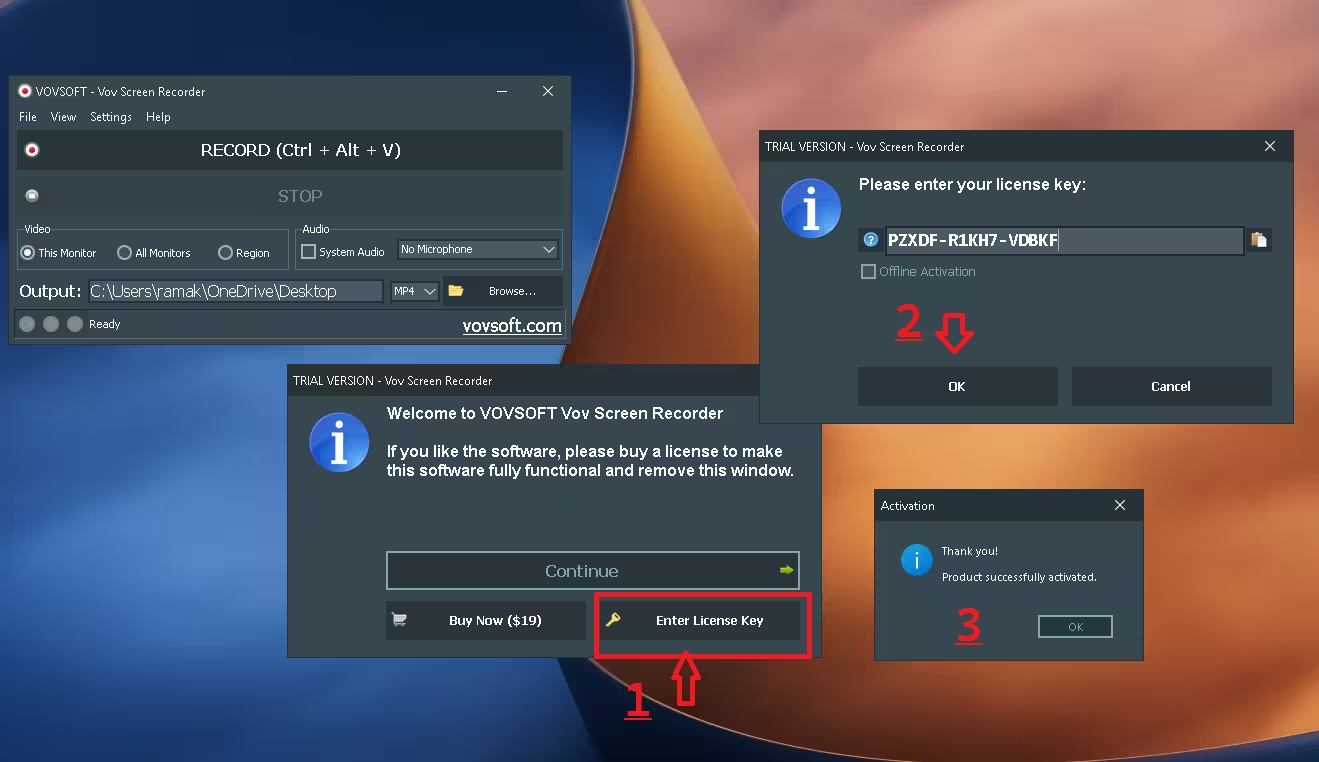
Step 3: Launch the app. On the “Welcome to VOVSOFT Vov Screen Recorder” screen, click Enter License Key.
Step 4: Paste the key PZXDF-R1KH7-VDBKF and click OK. You should see “Thank you! Product successfully activated.”
Giveaway Terms You Should Know
- Lifetime license for the giveaway version (v5.2).
- No free updates. Vovsoft warns that updating the giveaway copy may unregister it, so stay on v5.2 and keep the installer and key somewhere safe.
- Install before November 8, 2026. You must download and install during the campaign.
- Not for resale. The license may not be resold.
The giveaway terms don’t say whether commercial use is allowed or whether the key can be moved to another PC. If either matters to you, check with Vovsoft before relying on it.
📊 Our Verdict
Vov Screen Recorder does one job and keeps it simple. The GPU encoding options and the choice of output formats are a nice bonus for such a small app, and a lifetime license is a clear upgrade over last year’s one-year deal. If you need editing, webcam overlays or live streaming, look elsewhere – but for quick, clean screen captures, it’s an easy free add.
👍 Pros
- One-window interface with a global record hotkey
- Hardware encoding on AMD, Intel and NVIDIA GPUs
- System audio and microphone capture
- Lifetime giveaway license, portable edition available
👎 Cons
- No built-in editor or webcam overlay
- No free updates for the giveaway copy
- Windows 7 support is 64-bit only
Frequently Asked Questions
Is the Vov Screen Recorder giveaway license really lifetime?
Yes. Vovsoft’s giveaway terms list it as a lifetime license. The catch is that it doesn’t include free updates, so you stay on version 5.2.
When does the giveaway end?
The campaign runs from November 1 to November 8, 2026. Download, install and activate before it ends.
What happens if I update the app?
Vovsoft says updating the giveaway copy may make it unregistered. Skip update prompts if you want to keep the free license working.
Which video formats can it record to?
MP4, MKV, AVI, MOV, MPEG, FLV, WMV and animated GIF. You pick the format from the drop-down next to the output folder.
Can it record system audio and my microphone together?
Yes. Tick System Audio and pick your microphone from the drop-down in the Audio section.
More Free Screen Recorders and Vovsoft Giveaways
Discover more from Techno360
Subscribe to get the latest posts sent to your email.

You must be logged in to post a comment.