
🎁 Free Giveaway • Live as of November 4, 2026
Wipe Your Android Phone Beyond Recovery – Free for 1 Year
Coolmuster Android Eraser (normally $25.95) is free again in Coolmuster’s 2026 giveaway. Claim a 1-year license for Windows and permanently erase contacts, messages, photos, passwords and app data before you sell, trade in or donate your phone.
Last updated: November 4, 2026 • Version 4.1.32 (Windows) • By Ramakanth
⚡ Quick Read
- What: Coolmuster Android Eraser – 1-year license, 1 PC (Windows 11/10/8/7)
- Value: $25.95 – yours for $0
- Deadline: the giveaway page countdown showed about 6 days left on November 4, 2026 (ends around November 11, 2026)
- How: enter name + email on the giveaway page → copy the license code → register in the app
- Best for: anyone selling, donating or recycling an Android phone or tablet
🎁 Claim Free License ⬇ Download Installer
What Is Coolmuster Android Eraser?
Coolmuster Android Eraser is a Windows (and Mac) data-wiping tool that permanently erases everything on an Android phone or tablet – including files you already deleted. Instead of just marking data as removed, it overwrites the storage so that no Android data recovery tool can bring it back.
That makes it the right tool to run before you sell, trade in, donate or recycle a phone. It is also handy for clearing out a sluggish device and freeing up space taken by leftover junk and cached files.

Why a Factory Reset Isn’t Enough
A standard factory reset removes the pointers to your files, but the data itself can stay on the flash storage until something overwrites it. Recovery software can sometimes pull photos, chats and contacts back from a “reset” phone. Coolmuster Android Eraser closes that gap by writing over existing and previously deleted data, so personal information such as bank records, saved passwords and account details is gone for good.
Key Features of Coolmuster Android Eraser (2026)
- Permanent erasure: wipes internal storage and SD cards with no chance of recovery.
- Deep scan for deleted files: finds and overwrites previously deleted items, caches and hidden privacy traces.
- Three security levels: Low (quick overwrite), Medium (1-pass overwrite – recommended) and High (3-pass overwrite based on the U.S. DoD 5220.22-M standard).
- Wide data coverage: contacts, text messages, call logs, photos, videos, music, app data, browsing history, accounts, passwords and system settings.
- Erasure report: exports a time-stamped report with device details and wipe status – useful proof when handing a phone to a buyer or employer.
- USB or Wi-Fi connection to your PC.
- Broad compatibility: Android 6.0 and later (Coolmuster lists Android 17 support) on Samsung, Google Pixel, Xiaomi, OPPO, OnePlus, vivo, Motorola, TECNO, Honor and more.
📊 What’s new: Coolmuster released Android Eraser 4.1.32 for Windows on September 18, 2026, with an optimized erasure process and smoother installation.
Giveaway Details at a Glance
| Software | Coolmuster Android Eraser |
|---|---|
| Latest version | 4.1.32 (Windows, Sep 18, 2026) |
| Regular price | $25.95 |
| Giveaway price | Free |
| License | 1 year, 1 PC, home/non-commercial use |
| PC requirements | Windows 11/10/8/7, 1 GHz CPU, 256 MB RAM (1 GB recommended), 200 MB free disk space |
| Phone requirements | Android 6.0 or later |
| Giveaway ends | Around November 11, 2026 (per the page countdown on Nov 4) |
How to Get Coolmuster Android Eraser Free License (Step-by-Step)
- Open the giveaway page: visit the Coolmuster Android Eraser giveaway.
- Fill in the form: enter your name, email address and the captcha code, then click Submit.
- Copy your code: the license code appears on the next page (sharing on social media is optional – close that window to see the code). Save both the code and the email address you used.
- Download and install: get the installer from Coolmuster’s official download link and install it.
- Register: open the program, click the Key icon on the main screen, enter your email and license code, and hit Register.

How to Wipe Your Android Phone with Coolmuster Android Eraser
- Connect your Android phone to the PC with a USB cable (or over Wi-Fi).
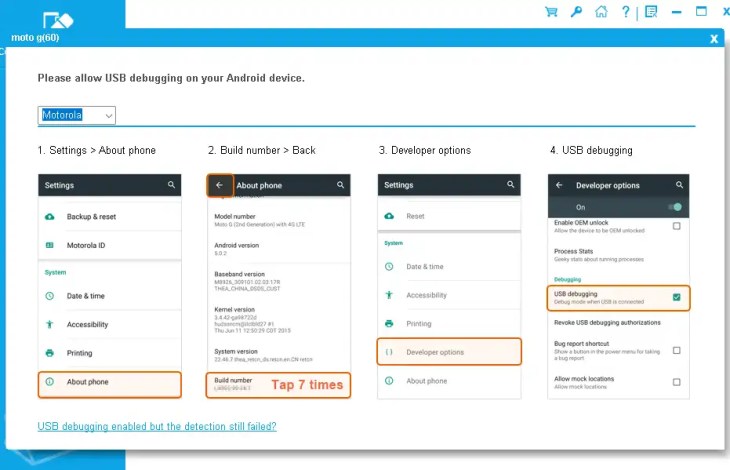
- Turn on USB debugging on the phone when prompted, and allow the small Coolmuster helper app to install – the PC needs it to talk to the device.
- Click Erase, pick a security level (Medium is recommended; choose High for phones with banking or work data) and confirm.
- Wait for the wipe to finish, then export the erasure report if you need proof of deletion.
⚠️ Before You Erase: Quick Checklist
- Back up first – erased data cannot be recovered by anyone, including you. A free tool like MobiKin Backup Manager for Android helps.
- Charge the phone – a High-level, 3-pass wipe can take a long time.
- Sign out of your Google account and turn off Find My Device before selling, so the buyer isn’t blocked by Factory Reset Protection.
- Remove your SIM card and any SD card you want to keep.
Giveaway Terms & Limitations
- The license is valid for 1 year on 1 PC, for home and non-commercial use.
- Free updates are included during the license period, but free technical support is not.
- Keep your license code and email – you can reinstall the program as long as you have them.
- The free license covers the Windows version only.
✅ Our Verdict
If you are about to sell or give away an Android phone, a factory reset alone is a gamble. Coolmuster Android Eraser gives you a simple three-level overwrite, DoD-style 3-pass wiping and an erasure report – and this giveaway makes it free for a year. Grab the code while the countdown is still running.
👍 Pros: permanent wipe, 3 security levels, erasure report, wide brand support. 👎 Cons: Windows-only license, no free tech support, irreversible by design.
Frequently Asked Questions
Is Coolmuster Android Eraser free?
It normally costs $25.95, but Coolmuster’s 2026 giveaway offers a free 1-year license for Windows. You only need to enter your name and email on the giveaway page to get the code.
Can data erased by Coolmuster Android Eraser be recovered?
No. The software overwrites existing and deleted data, so it can’t be restored – not even with professional Android data recovery tools. Always back up anything you want to keep.
Which security level should I choose?
Medium (1-pass overwrite) is recommended for most people. Choose High (3-pass, based on DoD 5220.22-M) if the phone held banking, password or work data.
Does it work with Samsung, Pixel and Xiaomi phones?
Yes. It supports Android 6.0 and later on Samsung, Google Pixel, Xiaomi, OPPO, OnePlus, vivo, Motorola, TECNO, Honor and other brands.
What happens when the 1-year license expires?
The giveaway license is time-limited, so after a year you’ll need a paid license to keep using the full version – or keep an eye on Techno360 for the next Coolmuster giveaway.
More Free Android Tools on Techno360
Discover more from Techno360
Subscribe to get the latest posts sent to your email.

You must be logged in to post a comment.