
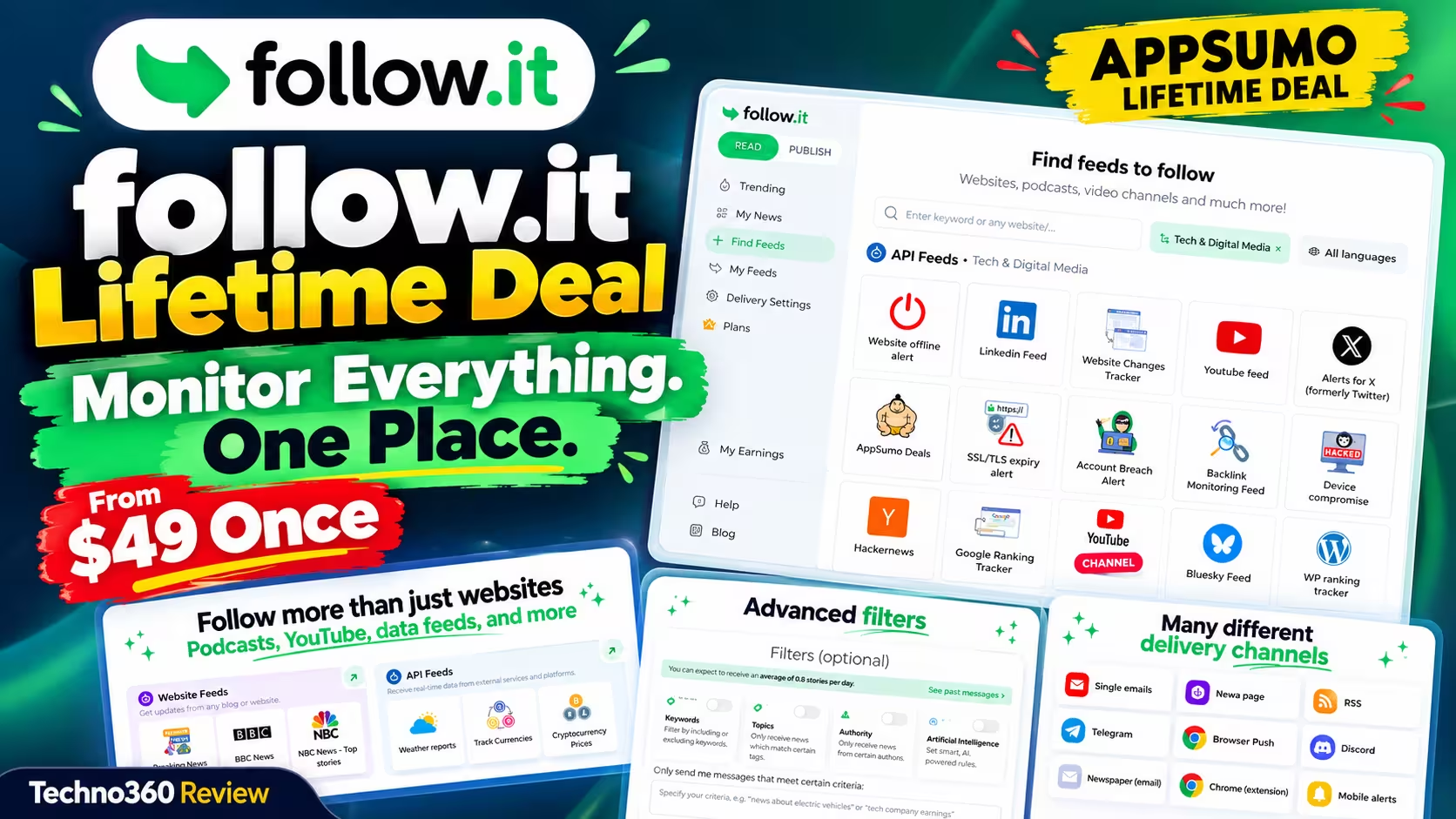
🎁 AppSumo Lifetime Deal
Every website, feed and alert you track — in one place, paid for once
follow.it pulls blogs, YouTube channels, uptime checks, price alerts and more into one hub, filters out the noise, and delivers updates by email, RSS, Telegram or Slack. The premium reader plan is now a one-time purchase on AppSumo.
From $49 once
4.7/5 · 51 reviews
60-day refund
⚡ Quick Read
- What it is: a feed reader and monitoring hub — websites, blogs, YouTube, podcasts, plus dozens of “API feeds” for things like uptime, SSL expiry, exchange rates and mentions on X, LinkedIn and Bluesky.
- The deal: four lifetime tiers from $49 to $299, matching follow.it’s $5–$40/month reader plans.
- Break-even: roughly 10 months versus paying monthly (7.5 months on Tier 4).
- Best for: bloggers, marketers and site owners who track lots of sources and want alerts in one place.
- Safety net: AppSumo’s 60-day refund window.
What Is follow.it?
follow.it began as a “follow by email” service for blogs and has grown into a general-purpose tool for keeping track of anything that changes online. The company is based in Balzan, Malta, and sits in the same Inisev product family as BackupBliss and TasteWP, both of which have run earlier AppSumo deals. follow.it for Publishers also ran on AppSumo before; this new deal is for follow.it for Readers — the side you use to follow other people’s content.
The idea is simple: instead of checking a dozen tabs, apps and inboxes, you tell follow.it what you care about, filter it down to what matters, and pick how and when the updates reach you. On AppSumo it is positioned as an alternative to Feedly, Inoreader and NewsBlur.
What You Get With follow.it
One hub for every source
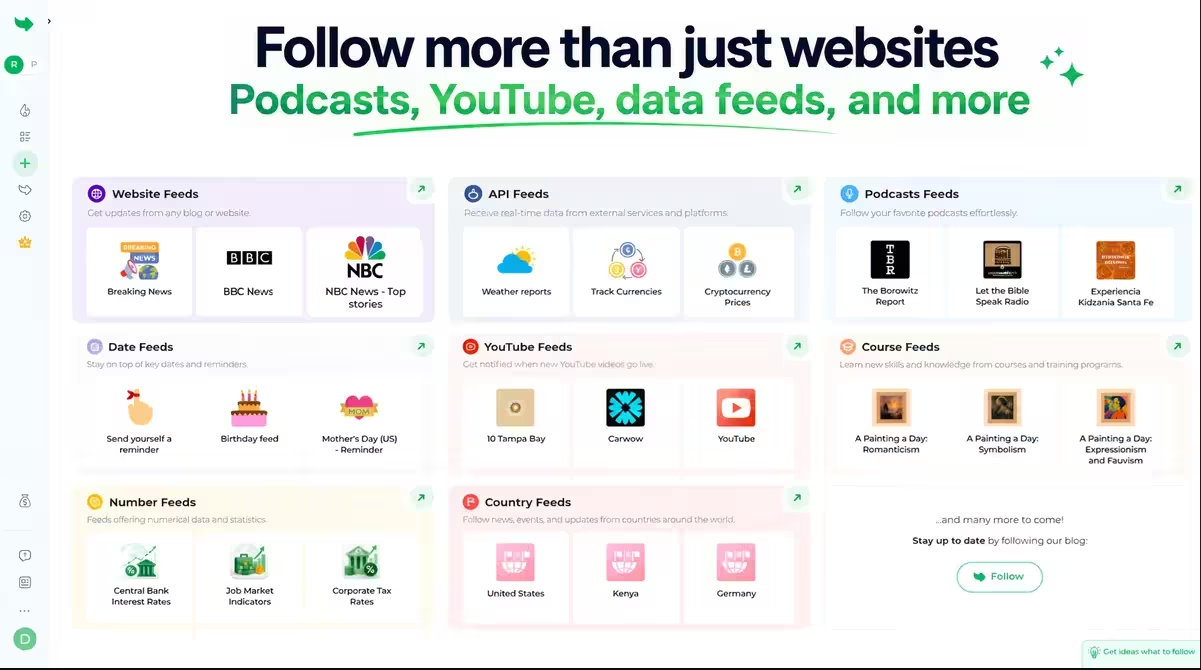
You can follow ordinary websites and blogs (anything with an RSS feed), YouTube channels and podcasts from a single dashboard. You can save stories for later, build a personal news page, and forward stories straight to Buffer if you share content on social media. There is also a Chrome extension and mobile alerts.
Filters that cut the noise
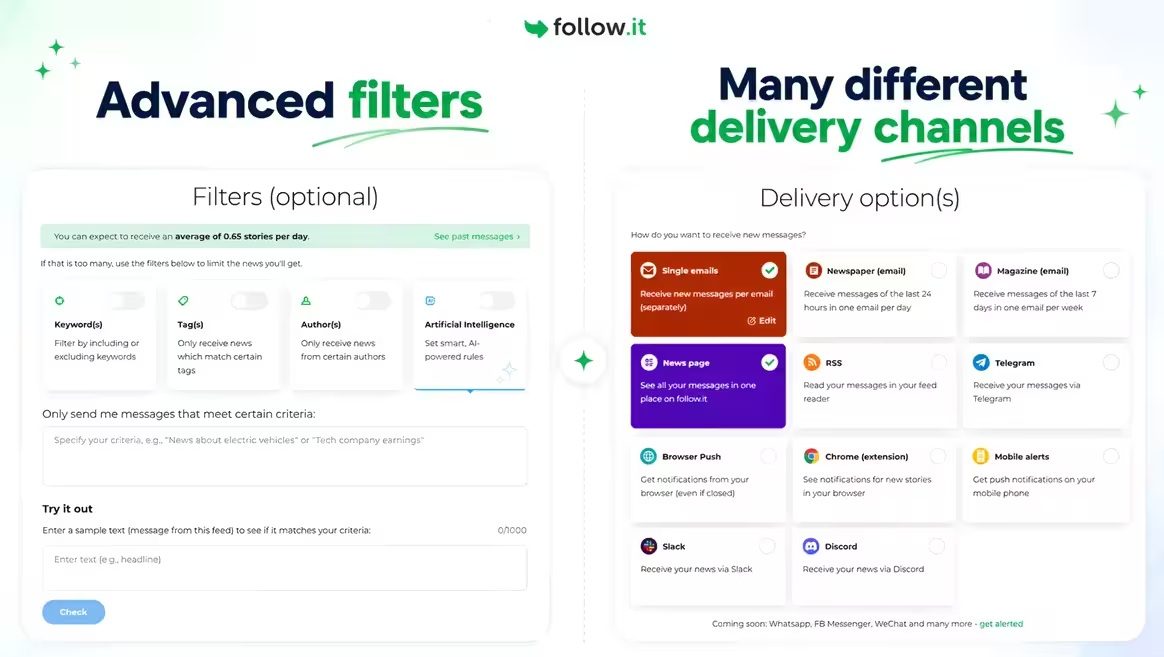
This is the feature most AppSumo reviewers single out. Any feed can be filtered by keyword, tag or author, so a busy tech site only sends you the posts about, say, Windows 11. Paid tiers add AI filters, where you describe what you want in plain language and follow.it checks incoming items against that prompt, plus AI summaries of individual stories. Both are capped per tier (details in the pricing table below).
API feeds: monitoring beyond websites
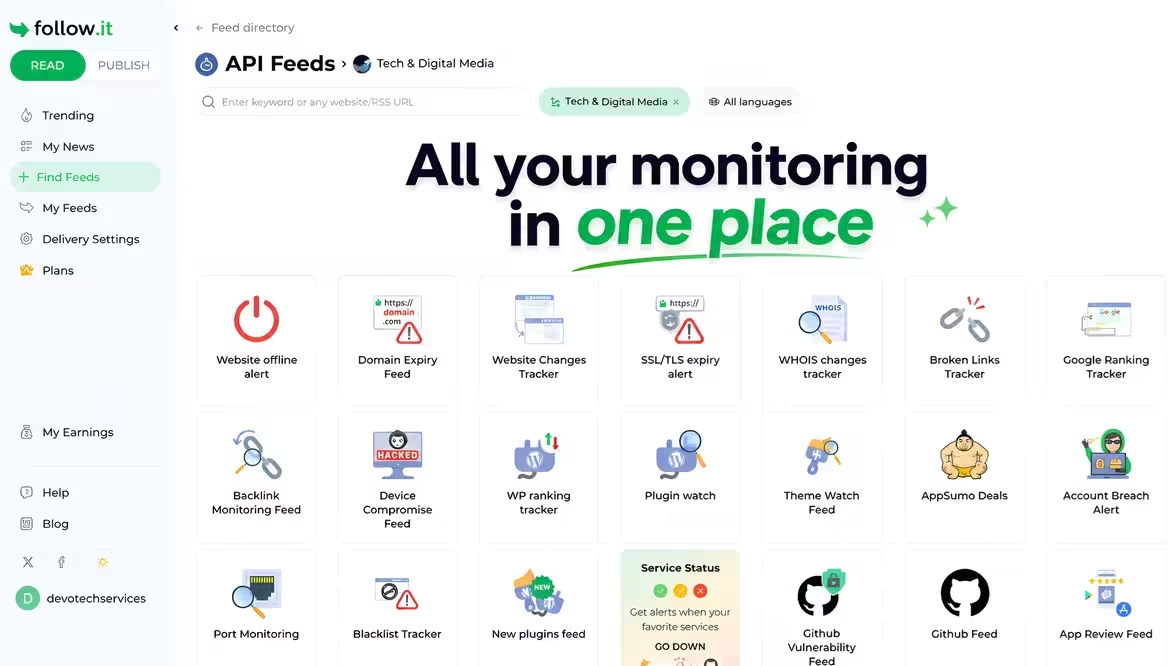
The “API feeds” are what set follow.it apart from a plain RSS reader. These are ready-made monitors you configure once. The current directory includes:
- Website and tech: website offline alerts, SSL/TLS expiry, domain expiry, WHOIS changes, website change tracking, broken links, blacklist checks, DMARC and Postmaster alerts.
- SEO and WordPress: Google ranking tracker, backlink monitoring, WP plugin ranking tracker, plugin watch.
- Social and community: alerts for X, LinkedIn and Bluesky, Hacker News, GitHub, app review alerts.
- Finance: exchange rates, stock prices and cryptocurrency prices.
- Security: account breach and device compromise alerts.
- Everything else: weather alerts, football and basketball, movie releases, game discounts, conferences — even a feed of new AppSumo deals.
On top of these are number feeds (track a specific figure), date feeds (reminders for dates you can’t miss) and course feeds (a short lesson delivered daily).
Delivery your way
Each feed can have its own delivery channel and frequency: instant single emails, a daily “Newspaper” digest, a weekly “Magazine”, RSS output, Telegram, Slack, Discord, the Chrome extension, browser push or mobile alerts. follow.it lists WhatsApp, Facebook Messenger and WeChat as coming soon. That per-feed control is useful — server-down alerts can go to Telegram instantly while blog posts land in a once-a-day email.
See All follow.it Deal Tiers on AppSumo →
follow.it Lifetime Deal Pricing: Which Tier to Pick
Each AppSumo tier maps to one of follow.it’s regular reader plans — Tier 1 is Hello, Tier 2 is Basic, Tier 3 is Standard and Tier 4 is Pro — and includes all future updates to that plan.
| Feature | Tier 1 | Tier 2 | Tier 3 | Tier 4 |
|---|---|---|---|---|
| Lifetime price | $49 | $99 | $199 | $299 |
| Matches plan | Hello ($5/mo) | Basic ($10/mo) | Standard ($20/mo) | Pro ($40/mo) |
| RSS feeds | 500 | 1,000 | 3,000 | 8,000 |
| Number feeds | 10 | 25 | 50 | Unlimited |
| Course feeds | 10 | 25 | 50 | 100 |
| AI summaries | 5/day | 20/day | 50/day | 100/day |
| AI filters (items checked/month) | 500 | 2,000 | 5,000 | 10,000 |
| Email delivery speed | Standard | Up to 5x faster | Up to 10x faster | Up to 10x faster |
| Support | Standard | Premium | Premium | Premium |
Each tier also unlocks the API-feed features of its matching plan, so higher tiers get more out of the monitoring feeds. follow.it’s own pricing page lists ad-free emails from the Basic plan upward, so Tier 1 may still show ads in your email digests — worth knowing if you plan to live in your inbox.
Our pick: Tier 1 is fine for trying it out or following a few hundred blogs. Tier 2 is the sweet spot for most bloggers and marketers — ad-free emails, faster delivery and four times the AI allowance for $50 more. AppSumo marks Tier 3 as “recommended”, which makes sense if you’ll lean on AI filters heavily.
Is the Lifetime Deal Cheaper Than Paying Monthly?
Using follow.it’s listed monthly prices, here is how long it takes for each tier to pay for itself:
| Tier | Lifetime price | Monthly equivalent | Yearly cost if subscribed | Pays for itself in |
|---|---|---|---|---|
| Tier 1 (Hello) | $49 | $5 | $60 | ~10 months |
| Tier 2 (Basic) | $99 | $10 | $120 | ~10 months |
| Tier 3 (Standard) | $199 | $20 | $240 | ~10 months |
| Tier 4 (Pro) | $299 | $40 | $480 | ~7.5 months |
So if you’d realistically use follow.it for a year or more, the lifetime deal comes out ahead. As with every lifetime deal, “lifetime” means the lifetime of the product. follow.it says it has been running for over a decade, is properly funded and has no plans to sell — and AppSumo’s 60-day refund gives you time to make sure it fits your workflow.
Free Plan vs Lifetime Deal
follow.it has a genuinely usable free plan, so it’s fair to ask whether you need to pay at all. The free plan lets you follow up to 100 RSS feeds, one number feed and one course feed, filter by tag, author or keyword, save and share stories, and use every delivery channel.
What you’re paying for is scale (500 to 8,000 feeds), the AI summaries and AI filters, more capable API feeds, reading full content inside your inbox, faster delivery and customer support. If you follow fewer than 100 sources and keyword filters are enough, start on the free plan. If you’re running websites, tracking competitors or want monitoring alerts alongside your reading, the paid tiers are where follow.it earns its keep.
Who Should Buy It (and Who Shouldn’t)
Good fit:
- Bloggers and content creators who track many news sources and need a steady stream of story ideas.
- Website owners who’d like uptime, SSL, domain and backlink alerts without paying for separate tools.
- Marketers watching competitors, brand mentions or industry news across sites and social platforms.
- Anyone who prefers news by email or Telegram rather than opening another app.
Probably skip it if:
- You follow a handful of sites — the free plan or your browser’s reader will do.
- You need a polished, Feedly-style reading app above all else. Reviewers mention a learning curve in the interface.
- You want a full team collaboration platform; this deal is for individual reader plans.
Pros and Cons
| 👍 Pros | 👎 Cons |
|---|---|
| Combines a feed reader with dozens of monitoring tools | Interface takes some getting used to, according to reviewers |
| Per-feed control over delivery channel and frequency | Some users want better ways to organise many feeds |
| Keyword, tag, author and AI filtering | AI summaries and AI filters are capped per tier |
| Established product (since 2016) with a strong 4.7/5 AppSumo rating | Tier 1 matches the Hello plan, which doesn’t include ad-free emails |
| Future updates to your plan are included | Some announced features (AI feeds, bundle feeds, WhatsApp and Messenger delivery) are still “coming soon” |
How to Get the follow.it Lifetime Deal
- Open the follow.it deal page on AppSumo and choose a license tier.
- If you’ve never bought from AppSumo before, follow.it says the code followit10 takes an extra 10% off.
- Complete checkout. Your license code appears in your AppSumo account under products.
- Redeem it on follow.it within 60 days of purchase.
- Start adding feeds: try your favourite blogs first, then one or two API feeds such as a website offline alert or exchange-rate alert.
You can upgrade to a higher tier while the deal is live, but downgrades are only allowed within 60 days of purchase — so test on a lower tier first if you’re unsure.
📊 Techno360 Verdict
follow.it is more than an RSS reader. Its real strength is putting news, website monitoring, social mentions and price alerts behind one set of filters, with each feed sent wherever you want it. At $49–$99 for the plan that would otherwise cost $5–$10 a month, the deal pays for itself in under a year.
Our recommendation: start on the free plan to see if the workflow suits you, then pick Tier 2 for ad-free emails and a comfortable AI allowance. If you only follow a few blogs, the free plan is all you need.
Looking for more free tools? Our live free apps tracker updates every few hours with paid Android apps that are temporarily free, and our guide to the best alternative app stores for Android covers private, open-source options.
Frequently Asked Questions
What is follow.it?
follow.it is a feed reader and monitoring platform. It lets you follow websites, blogs, YouTube channels and podcasts, plus specialised “API feeds” for uptime, SSL expiry, exchange rates, social mentions and more, and delivers filtered updates by email, RSS, Telegram, Slack, Discord, browser push or mobile alerts.
How much is the follow.it lifetime deal?
The AppSumo deal has four one-time tiers: $49 (Tier 1), $99 (Tier 2), $199 (Tier 3) and $299 (Tier 4). They match follow.it’s Hello, Basic, Standard and Pro reader plans, which normally cost $5, $10, $20 and $40 per month.
Is follow.it free?
Yes. The free plan lets you follow up to 100 RSS feeds, filter by keyword, tag or author, save stories and use every delivery channel. Paid plans add more feeds, AI summaries and filters, stronger API feeds and faster delivery.
Is follow.it a good Feedly alternative?
For people who want updates delivered to their inbox or Telegram with strong filtering, yes. follow.it also adds monitoring feeds that Feedly doesn’t offer. If you mainly want a polished in-app reading experience, Feedly or Inoreader may suit you better.
Can I get a refund?
Yes. AppSumo offers a 60-day refund window on this deal. You also need to activate your license within 60 days of purchase.
Do I get future updates?
Yes. Each tier includes all future updates to its matching plan (Hello, Basic, Standard or Pro), and if a plan is renamed your license moves to the new plan automatically.
Is there a coupon code?
follow.it says new AppSumo customers can use the code followit10 for an extra 10% off.
Pricing, limits and ratings were checked against the AppSumo listing and follow.it’s pricing page on 8 October 2026 and may change. This article contains affiliate links.


Discover more from Techno360
Subscribe to get the latest posts sent to your email.