

Fix Dull, Dark & Crooked Photos in One Click – Free
Ashampoo Photo Optimizer 10 analyses each picture and corrects colour, brightness and contrast automatically, then lets you batch-fix up to 1,000 photos at once. Ashampoo and COMPUTER BILD are giving away the full version, so you pay nothing for the license.
Giveaway promotions can end without notice. Claim the key first, then install at your own pace.

⚡ Quick Read
- What it is: A beginner-friendly Windows photo enhancer that auto-corrects colour, exposure and contrast, with manual sliders, effects and batch editing.
- The deal: A free full-version key from Ashampoo’s official registration page, with the installer hosted by German magazine COMPUTER BILD.
- Normal price: Ashampoo’s US store lists Photo Optimizer 10 from $12 (checked 30 September 2026).
- Works on: Windows 11 and Windows 10, 64-bit only. Activation needs an internet connection.
- Time needed: About 5 minutes – email address, a ~130 MB download and one key to paste.
- Heads-up: This is version 10. The newest release, Photo Optimizer Pro 26, is a paid upgrade.
Why Your Photos Need a “Fix It” Button
Most of us don’t have a bad-camera problem. We have a bad-light problem. Birthday cake shots come out orange under indoor bulbs, holiday photos look washed out against a bright sky, and the phone was tilted just enough to make every building lean. Opening Photoshop to fix fifty of those is nobody’s idea of a fun evening.
That’s the gap Ashampoo Photo Optimizer fills. Point it at a folder, pick the photos, click once, and it balances colour, brightness and contrast for you. If the auto result isn’t quite right, simple sliders let you nudge it without learning layers, masks or curves jargon.
What Is Ashampoo Photo Optimizer 10?
Ashampoo Photo Optimizer 10 is a 64-bit photo enhancement program for Windows from Ashampoo, the German developer behind Burning Studio, WinOptimizer and Photo Commander. It sits between a basic photo viewer and a full editor: fast automatic corrections for everyday shots, plus enough manual control to rescue a tricky one.
On Ashampoo’s store, Photo Optimizer 10 holds a 4.6-star rating from 832 verified customer reviews (as listed on 30 September 2026). It reads all the common formats, including JPG, BMP, DNG, HEIC, RAW and TIF, according to COMPUTER BILD’s giveaway listing – HEIC support matters if your photos come from an iPhone.
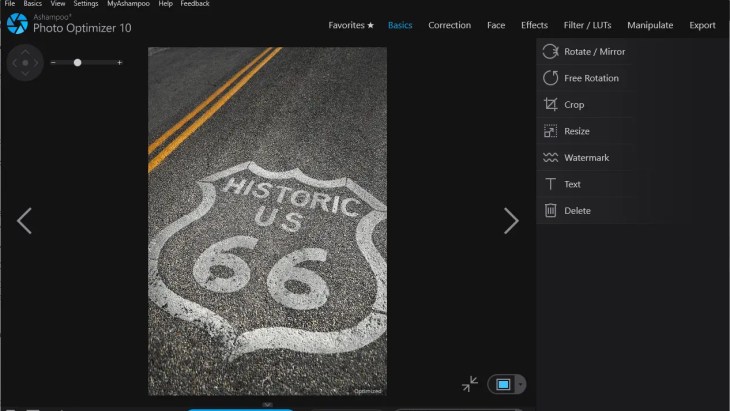
Key Features of Photo Optimizer 10
1. One-click auto optimization
The headline feature. Photo Optimizer analyses a photo and corrects the usual suspects – dull colours, poor lighting and weak contrast – including white balance for more natural colours. Ashampoo says the auto-optimization engine was significantly enhanced in version 10. Separate one-click tools also handle brightness, contrast, sharpening, stain removal and noise reduction on their own.
2. Batch processing for up to 1,000 photos
Select a whole memory-card dump in the thumbnail view and apply an automatic fix to every image in one pass. COMPUTER BILD puts the limit at up to 1,000 photos per run. Batch mode can also rotate, mirror, invert colours, or apply sepia and greyscale across the lot.
3. LUTs for instant “looks”
Lookup tables (LUTs) change hue, saturation and brightness together in a single click, like a pro colour grade. Ashampoo lists more than 30 built-in LUTs in version 10, and you can load LUTs downloaded from the internet to keep a whole photo series visually consistent.
4. Perspective correction and horizon straightening
Tilted horizons and “falling” buildings are fixed with dedicated perspective and straightening tools – handy for travel and architecture shots taken at an angle.
5. Portrait touch-ups
Remove red eye, whiten teeth and retouch skin blemishes or spots without leaving the app.
6. Manual sliders, tonal curves and colour temperature
When the auto result isn’t perfect, drag sliders for lighting and colour and watch the change live. Version 10 adds manual colour temperature control and tonal curve adjustments. A split-view before/after line lets you compare the original and the edit side by side, and every step can be undone.
7. Effects, frames and watermarks
Turn photos into sketches, charcoal drawings or oil paintings, age them with sepia, add motion or adaptive blur, drop in decorative frames, or stamp a text or image watermark before sharing online.
8. Favourites, printing and sharing
Pin your most-used tools to Favourites for faster access, print contact sheets with up to 16 photos per page, set any image as your desktop wallpaper, or send it by email straight from the program.
Want to see it in action? Here’s Ashampoo’s official video for version 10:
System Requirements
| Operating system | Windows 11, Windows 10 (64-bit only) |
| Hardware | Any device that runs the systems above |
| Other | Microsoft Visual C++ 2015 x64 Redistributable |
| Internet | Required for activation; Ashampoo says the license is re-verified at regular intervals |
| Languages | English and German in the COMPUTER BILD edition |
Source: Ashampoo’s official Photo Optimizer 10 requirements page and COMPUTER BILD’s download listing.
How to Get Ashampoo Photo Optimizer 10 Full Version for Free
The license key comes from Ashampoo’s own registration page, while the installer is hosted by COMPUTER BILD, which refreshed its giveaway listing on 30 September 2026. The download page is in German – in Chrome or Edge, right-click and choose Translate to English if you need it.
Step 1: Request your free license key
Open the official Ashampoo Photo Optimizer 10 giveaway page and enter your email address. Ashampoo sends the full-version license key to that address. If you’ve never used Ashampoo software before, you’ll be asked to create a free Ashampoo account – no payment details needed. Check Spam or Promotions if the email doesn’t arrive within a few minutes.
Step 2: Download the giveaway installer
Go to the COMPUTER BILD download page and click the Download button, or grab the installer with this direct download link (ashampoo_photo_optimizer_10_45880.exe, about 130 MB).
💡 Tip: Use this giveaway installer, not the regular trial from Ashampoo’s site. The trial may point you to the newest paid version, which this key won’t unlock.
Step 3: Install and activate
- Run the installer and follow the setup wizard.
- When the activation screen appears (like the one below), paste the license key from your email.
- Click Activate Now! to unlock the full version.

⚠️ Before you install: Keep the license email safe. The key is also stored in your Ashampoo account, so you can reinstall later, but download links for giveaway installers don’t always stay online once a promotion ends.
Giveaway vs. Paid Version
| This giveaway | Photo Optimizer Pro 26 (latest) | |
|---|---|---|
| Version | Photo Optimizer 10 | Photo Optimizer Pro 26 |
| Price | Free | From $12; upgrade from an older version $15 |
| One-click optimization & batch mode | ✔ | ✔ |
| LUT looks | 30+ built-in | 27 extra LUTs in nine themes (Vintage, HighKey, LowKey, seasonal and more) |
| Image compression | – | JPG, WebP & PNG compression with live file-size preview |
| Other additions | – | New frames, modernised interface, better RAW support and metadata handling |
Prices from Ashampoo’s US store, checked on 30 September 2026, and may change. Giveaway licenses are normally for personal use and don’t include free upgrades to later versions.
Who Should Grab This?
- Casual photographers who want better-looking phone and camera shots without learning a pro editor.
- Families sorting holiday and event photos – batch mode fixes a whole trip’s worth of images in one go.
- Bloggers and small sellers who need clean, bright product or post images with a watermark.
- iPhone users on Windows who want to edit HEIC photos directly.
Need more than quick fixes? Ashampoo’s all-in-one editor and viewer is also on offer – see our Ashampoo Photo Commander 18 free license guide. For AI upscaling of small or blurry pictures, check the Leawo Photo Enlarger giveaway, and if your photo folder is full of copies, clean it up first with Toolstone Photo Finder Pro. You can also add creative styles with Ashampoo AI Filter #1 or make greeting cards with Ashampoo Photo Card 3.
Techno360 Verdict
Worth grabbing
Ashampoo Photo Optimizer 10 does one job well: making ordinary photos look better with almost no effort. The one-click fix and batch mode save real time, while LUTs, perspective correction and portrait tools give you room to go further. It isn’t the newest release, so you miss Pro 26’s compression tool and extra LUTs, but for a free full version with no time limit mentioned on the offer pages, it’s an easy recommendation for anyone who edits family, travel or blog photos on Windows.
- Genuinely one-click auto optimization
- Batch-edit up to 1,000 photos
- 30+ LUTs plus perspective correction
- Opens HEIC and RAW files
- Older version – no free upgrade to Pro 26
- 64-bit Windows 10/11 only
- Download page is in German
Frequently Asked Questions
Is Ashampoo Photo Optimizer 10 really free?
Yes. The license key comes from Ashampoo’s own registration page and the installer from COMPUTER BILD’s official giveaway listing, which was live when we checked on 30 September 2026. You only need an email address and a free Ashampoo account.
Is this giveaway safe and legal?
Yes. This is an official promotion run by Ashampoo with COMPUTER BILD, not a cracked copy. You get a genuine license key by email and the program activates through Ashampoo’s servers.
Which Windows versions does it support?
Ashampoo lists Windows 11 and Windows 10, 64-bit only. You also need the Microsoft Visual C++ 2015 x64 Redistributable and an internet connection for activation.
Which image formats can it open?
All the standard formats, including JPG, BMP, DNG, HEIC, RAW and TIF.
How many photos can I edit at once?
Batch processing handles up to 1,000 photos in a single run, applying the same automatic fix or effect to all of them.
Can I upgrade to Photo Optimizer Pro 26 for free?
No. The giveaway unlocks version 10 only. Ashampoo offers an upgrade from older versions to Photo Optimizer Pro 26 for $15 on its US store (checked 30 September 2026).
I didn’t receive the license email. What should I do?
Wait a few minutes, then check your Spam, Junk or Promotions folders. If it still hasn’t arrived, log in to your Ashampoo account – registered keys are listed there – or request the key again with the same email address.
About the author: Ramakanth is the lead writer and co-founder of Techno360. After years in IT support, he’s been testing and writing about Windows software since 2008. The giveaway links and download in this article were re-checked on 30 September 2026.
Looking for more freebies? Browse our full collection of free software giveaways and deals.
Discover more from Techno360
Subscribe to get the latest posts sent to your email.

You must be logged in to post a comment.